
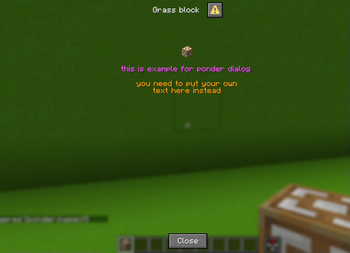
Ponder lib allow datapack makers to add direct connection between items and dialogs.
this way players can access matching dialog wiki pages without navigating in endless menues every single time
How to use :
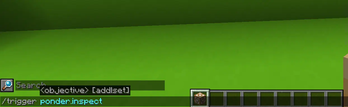
opening matching ponder :
while holding supported item in main hand run the command
/trigger ponder.inspect
Creating dialog :
just create new dialog inside your namespace
Creating supported item :
to create supported item you need to add the folowing custom data to the item
{ponder_id:"NAMESPACE:DIALOG"}
you can summon example item with /loot give @s loot ponder:example_item
Advanced features :
you can add custom triggers to your pack to do so you need to add the following commands to your custom trigger function
data merge storage ponder:id {ponder_id:"NAMESPACE:DIALOG"}

function ponder:open_ponder with storage ponder:id
possible uses for custom triggers :
- adding help menu inside custom block with custom menu
- opening dialog via interaction entity
- adding tool to inspect certain blocks and then opening dialog
additional info :
- uses the smithed datapack conventions
Feedback and bugs:
join to my discord server

- Edition: Minecraft Java
- File type: .jar
- Minecraft versions listed: 1.21.6, 1.21.7, 1.21.8
- How to install: Install the matching mod loader (Forge, Fabric or NeoForge) for your Minecraft version. → Download the .jar. → Put it in the .minecraft/mods folder and launch that loader profile.
- Where to get it: Opens on Modrinth — not every file is mirrored on our own servers.
Install steps are the general flow for this file type — see the MC Java Mods guides for the full walkthrough.
- Downloads as ponder.lib.zip
- Download size: 7 KB
- Download link checked 21 Aug 2026 — working
These come from our own check of the pack file, not from the source page.