
PowerRanks
Java mod listed for Minecraft 1.21. Downloads from the MC Java Mods app on Android.
I don't know my version or loader
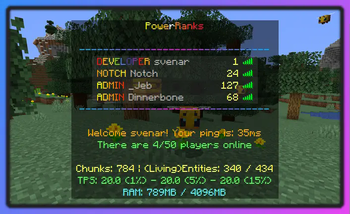
Introducing PowerRanks, a plugin that brings customizable ranks to your server.
With PowerRanks, you can assign a special prefix to each rank, allowing other players to easily see your status. Not only that, but you have the ability to define the ChatColor and NameColor for each rank, adding a personalized touch to your server.
Why choose PowerRanks?
Speedy Performance: Changes you make are reflected instantly, thanks to PowerRanks' optimization for speed.
User-Friendly Setup: Permissions can be configured either through commands or in the configuration files, making it easy for server administrators.
Tailored to Your Needs: PowerRanks offers a range of customization options to adapt to your server's unique requirements.
No Cost Attached: PowerRanks is available for download and usage absolutely free.
The standard ranks provided include Member, Moderator, Admin, and Owner, but feel free to modify or remove them as you see fit. Plus, PowerRanks doesn't limit you - you can create as many ranks as you need.
In addition, PowerRanks comes equipped with an auto-updater. By default, it checks for updates, but you have the option to enable automatic downloads. You can also update configuration files directly. For more details, refer to the 'config.yml'.
Ready to elevate your server experience? Try PowerRanks today!
More information
Documentation and usage examples are available on https://docs.powerranks.nl
Placeholders
PowerRanks uses PlaceholderAPI to manage placeholders.
A list of placeholders is available at: https://github.com/PlaceholderAPI/PlaceholderAPI/wiki/Placeholders#powerranks
- Edition: Minecraft Java
- File type: .jar
- Minecraft versions listed: 1.21, 1.21.1
- How to install: Install the matching mod loader (Forge, Fabric or NeoForge) for your Minecraft version. → Download the .jar. → Put it in the .minecraft/mods folder and launch that loader profile.
- Where to get it: Opens on Modrinth — not every file is mirrored on our own servers.
Install steps are the general flow for this file type — How to install Minecraft Java mods & modpacks walks through it step by step.
- Ships as PowerRanks.jar — drop this file into the mods folder
- Download size: 4.7 MB
- Download link checked 7 Oct 2026 — working
These come from our own check of the pack file, not from the source page.