
FoxAddition Anti-Cheat
FoxAddition is an anti-cheat plugin designed to block certain types of hacks, possible to use it with another anti-cheat plugin making it an additional…
⬇ Download on Modrinth
THIS IS AN ADDITIONAL ANTICHEAT, READ MORE UNDER.
If you find any errors or bugs, kindly report them on the Discord server (my discord is imfoxer).

 FoxAddition is an anti-cheat plugin designed to prevent specific types of hacks. It can be used in conjunction with other anti-cheat plugins, enhancing hack detection on your server with additional checks.
FEATURES
- Support for most versions: FoxAddition aims to be designed to support Spigot servers (and forks) from older versions like 1.7.2 to the latest versions of Minecraft. Compatibility with FOLIA is currently available, if you find any error or problem, you can join to the discord server support of the plugin and provide more details.
- Extensive and customizable configuration: We strive to give users the ability to create their configuration freely, allowing them to edit possible values. Users can even disable checks in specific worlds.
- Support for Bedrock players: The plugin is designed to be compatible with and detect Bedrock players (if your server uses GeyserMC). This functions properly when Floodgate is detected on your server, allowing you to enable or disable checks for specific editions. If Floodgate is not in use, the player in Bedrock will be treated if it were Java, and the plugin will continue to function and detect accordingly. In versions 1.1.5+ of FoxAddition you can configure a prefix option to determine a bedrock player, this can be perfect in case you configured Floodgate in a Bungeecord. In versions 1.2.0+ of the plugin, I added support for UUID in case you don't use the others method.
- Logging system: Log all alerts received when a player fails any checks; this is stored in the 'logs' folder within the plugin folder with a txt file. This is a feature that can be activated or deactivated in the configuration. You can check 'Some information.' below for more details.
- Compatibility with various plugins: The plugin is compatible with other plugins to provide fixes for false positives or enhance your experience with FoxAddition. This is automatically detected upon plugin initiation, and it can be deactivated in the configuration in case of any issues. Below, you will find a list of plugins currently compatible with FoxAddition and their respective uses.
- ExecutableItems - Used to fix some false flags in some checks in certain types of attributes/enchant/items.
- DiscordSRV - Used to send alerts in a specify discord channel with your bot in this plugin, you can change the messages in the configuration file. Check this plugin here
- mcMMO - Used to fix some false flags in some checks when an ability is used in the moment.
- PlaceholderAPI - Used to allow to the plugin in use placeholders in any part, like in the list of commands to execute in certain vls or in the messages.
- ProtocolLib - Used to allow the usage of packets to use in checks that only works with this plugin and add some additional checks. (Probably in a future, this can be a requeriment to improve the stability and performance of the anti-cheat in using packets.)
- VeinMiner - Used to fix some false flags in some checks when the mode of this plugin is enabled.
- WeaponMechanics - Used to fix some false flags in some checks when a player shoot with the armor.
### COMMANDS - **/foxaddition notify** - Send a notify to all users with the permission 'foxac.notifications'. - **/foxaddition verbose** - Enable/Disable the verbose output. - **/foxaddition reload** - Reload configuration files, if you use FileWatcher, this reload automatically. - **/foxaddition discordtest** - Test DiscordSRV hook to see if this works correctly.
PERMISSIONS
- foxac.notifications - See the notify message.
- foxac.command - Permission used to use any commands of FoxAddition.
- foxac.bypass. - Bypass a category of checks, you can use '*' to bypass all checks. Example: foxac.bypass.* (bypass all checks) or foxac.bypass.badpackets (bypass all badpackets check)
Welcome! Here you can find some information about the project.
FoxAddition is an anti-cheat that seamlessly integrates with your server's main anti-cheat to effectively block certain hacks and exploits that may sometimes go unnoticed or undetected by your main anti-cheat. It offers extensive configuration options, allowing you the freedom to tailor settings to your liking, also can be linked with some plugins, providing you with a customizable experience. This can be used in servers from 1.7.x (recommended 1.7.10) to the latest versions of Minecraft.
You can get support in the official discord server (this is an international server) to report problems, bugs or errors.
About the logs system.In this feature, when detecting any form of violation, the anticheat logs detailed information into a folder within the plugin named logs. If this feature is enabled, it will create a .txt file (named with the day) with comprehensive data related to the specific violation from all users.
The time zone and format can be freely customized in the 'config.yml' configuration file. If the default value is chosen, it will automatically utilize the system's time zone and format to show.
Example how this show in logs:
[2023-07-16 00:24:59] [ALERT] Player detected FastBow (Type: Lenience) [lenience:200/200] [interval:220/950] [vls:1(+1)]
[2023-07-16 00:25:00] [ALERT] Player detected FastBow (Type: Lenience) [lenience:200/200] [interval:281/950] [vls:2(+1)]
[2023-07-16 00:25:00] [ALERT] Player detected FastBow (Type: Lenience) [lenience:200/200] [interval:693/950] [vls:3(+1)]
[2023-07-16 00:29:33] [ALERT] Player detected Reach [in:horizontal] [distance:5.152102690501036/3.75] [vls:1(+1)]
[2023-07-16 00:29:33] [ALERT] Player detected Reach [in:horizontal] [distance:5.152102690501036/3.8676000013947487] [vls:2(+1)]
[2023-07-16 00:32:15] [ALERT] Player detected Phase [Block:GRASS] [loc:-101,7, 69,2, 230,6] [vls:1(+1)]
[2023-07-16 00:32:15] [ALERT] Player detected Phase [Block:GRASS] [loc:-101,7, 69,2, 230,6] [vls:2(+1)]
[2023-07-16 00:32:15] [ALERT] Player detected Phase [Block:GRASS] [loc:-101,7, 69,2, 230,6] [vls:3(+1)]
[2023-07-16 00:32:15] [ALERT] Player detected Phase [Block:GRASS] [loc:-101,7, 69,2, 230,6] [vls:4(+1)]
In any of the configuration files, this have a value of the version of the file, this is EXTREMELY RECOMMENDED NOT EDIT THAT VALUE, this is used to indicate the plugin the version of the file to replace with a new file updated of this in case this is outdated.
NOTE: The anti-cheat does NOT automatically update configuration files with your previous values. To ensure a smooth transition to new versions and avoid potential issues, the anti-cheat follows a specific procedure. It renames the existing configuration file to 'old_{file}' and generates a new version of the file. This allows you to manually transfer your previous settings to the updated configuration file, ensuring a seamless experience with the latest changes of the anticheat.
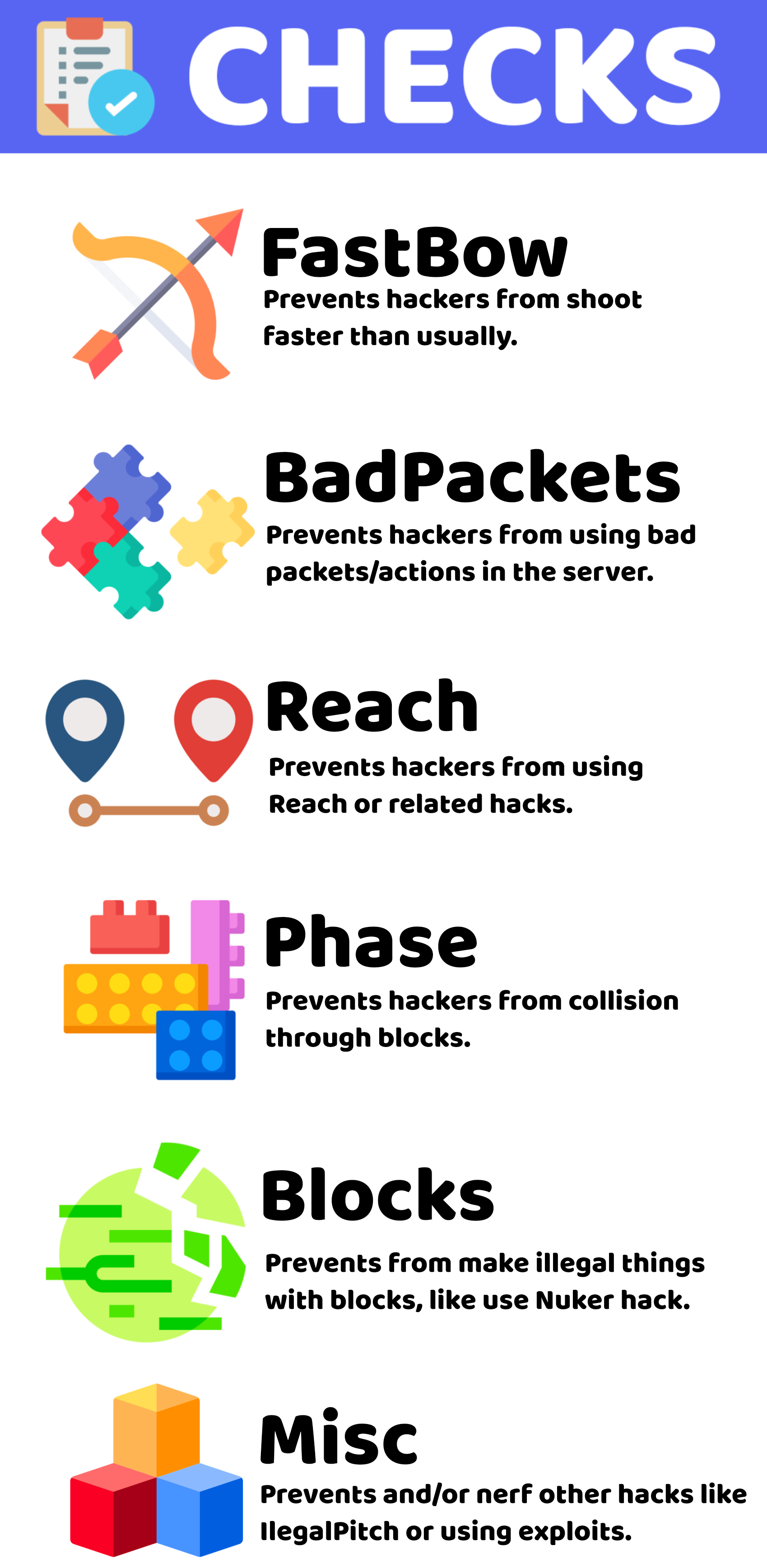
- Edition: Minecraft Java
- File type: .jar
- Minecraft versions listed: 1.8, 1.8.1, 1.8.2
- How to install: Install the matching mod loader (Forge, Fabric or NeoForge) for your Minecraft version. → Download the .jar. → Put it in the .minecraft/mods folder and launch that loader profile.
- Where to get it: Opens on Modrinth — not every file is mirrored on our own servers.
Install steps are the general flow for this file type — How to install Minecraft Java mods & modpacks walks through it step by step.
- Ships as FoxAddition.jar — drop this file into the mods folder
- Download size: 114 KB
- Download link checked 27 Aug 2026 — working
These come from our own check of the pack file, not from the source page.