
LPC Minimessage - Chat Formatter
Java mod listed for Minecraft 1.20–26.x. Downloads from the MC Java Mods app on Android.
⬇ Download on Modrinth





LPC – LuckPerms Chat Formatter ✨
A flexible chat formatting plugin with MiniMessage support for LuckPerms
Modern chat formatting powered by MiniMessage, full LuckPerms metadata support, group/track formats, and PlaceholderAPI.
🧩 Compatibility
| Minecraft | 26.1.2 |
| Server | Paper (recommended) or Spigot |
| Java | 25+ |
🔧 Requirements
- LuckPerms (Required) – Permissions plugin
- PlaceholderAPI (Optional) – Additional placeholders
✅ Features
Formatting
- Full MiniMessage support, with group- and track-specific formats
- Optional PlaceholderAPI integration and
[item]placeholder (hover tooltip on Paper) - Per-rank message styling and per-rank gradient names (
{gradient-name}) - Per-world toggle via
disabled-worlds
Social (on by default)
- @Mention pings – highlight online names + sound/action-bar ping (Paper)
- Emoji shortcuts – e.g.
:heart:→ ❤ (fully configurable) - Clickable links – URLs become
openUrllinks on Paper, coloured on Spigot
Moderation (off by default)
- Anti-spam cooldown, repeated-message blocker, caps filter, profanity mask, anti-advertising
- Per-player mute (
/lpc mute) + LuckPerms mute node for punishment plugins
Server messages (off by default)
- MiniMessage join / quit / first-join / death messages
Quality of life
/lpc reload · version · help · mute · unmutewith tab completion- Built-in Modrinth update checker
- Safe by design – player messages can never inject
click/hover/command components - Works on both Paper (Adventure rendering) and Spigot (legacy fallback)
⌨️ Commands
| Command | Permission | Description |
|---|---|---|
/lpc reload |
lpc.reload |
Reload the configuration |
/lpc version |
– | Show the installed version |
/lpc help |
– | List available commands |
/lpc mute <player> [duration] |
lpc.mute |
Mute a player (e.g. 10m, 2h; omit for permanent) |
/lpc unmute <player> |
lpc.mute |
Unmute a player |
🧑💼 Permissions
| Permission | Default | Description |
|---|---|---|
lpc.reload |
op | Reload the configuration |
lpc.chatcolor |
false | Use colour codes & cosmetic MiniMessage tags in chat |
lpc.itemplaceholder |
false | Use the [item] placeholder in chat |
lpc.update |
op | Receive an update notification on join |
lpc.emoji |
true | Use emoji shortcuts (only enforced if emoji.require-permission) |
lpc.chatlinks |
true | Have URLs turned into clickable links |
lpc.mention.exempt |
false | Opt out of receiving mention pings |
lpc.mute |
op | Use /lpc mute and /lpc unmute |
lpc.muted |
false | Marks a player as muted (usually set by a punishment plugin) |
lpc.bypass.spam / .repeat / .caps / .profanity / .advert |
op | Bypass the matching moderation filter |
ℹ️ Even with
lpc.chatcolor, only cosmetic tags (colours, decorations, and optionally gradients/rainbow) are honoured in player messages. Interactive tags (click,hover,insertion, …) are always stripped.
⚙️ Configuration (config.yml)
# Main chat format (MiniMessage!)
chat-format: "{prefix}{name}<dark_gray> »<reset> {message}"

# Per-group formats (optional)
group-formats:
#  default: "<gray>[User]</gray> {name}<dark_gray> »<reset> {message}"
#  admin: "<red>[Admin]</red> {name}<dark_gray> »<reset> {message}"

# Per-track formats (optional) – groups take priority over tracks
track-formats:
#  staff_track: "<gold>[Staff]</gold> {name}<dark_gray> »<reset> {message}"

# Enable the [item] placeholder
use-item-placeholder: true

# Allow <gradient> / <rainbow> for players with lpc.chatcolor
allow-gradient-tags: true

# Worlds where LPC does NOT format chat
disabled-worlds: []

# Check Modrinth for updates on startup
update-checker: true

# Reload message
reload-message: "<green>Reloaded LPC configuration!"
🪄 Available Placeholders
| Placeholder | Description |
|---|---|
{message} |
The chat message (inserted safely, never re-parsed) |
{name} |
Player's name |
{displayname} |
Display name / nickname |
{world} |
Player's current world |
{prefix} / {suffix} |
Highest priority prefix / suffix |
{prefixes} / {suffixes} |
All prefixes / suffixes, highest priority first |
{username-color} / {message-color} |
Colour values from LuckPerms meta |
ℹ️ All colour values (prefix, suffix, etc.) must be in MiniMessage format – no legacy codes (
&a,§b).
🚀 Installation
- Stop your server
- Drop
LPC-<version>.jarinto your/pluginsfolder - Start the server to generate
config.yml - Edit the config to your liking
- Run
/lpc reloadto apply changes ✅
🛠️ Building
./gradlew shadowJar
# output: build/libs/LPC-<version>.jar
Requires JDK 25.
📌 Notes
- Not affiliated with LuckPerms – please do not contact the LuckPerms author for support.
- Legacy version available at: GitHub Legacy LPC
📸 Previews
Chat Format Example
[ITEM] Placeholder Example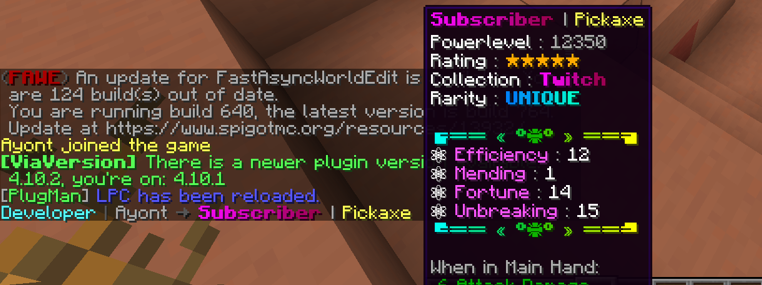
🚀 Installation
- Stop your server
- Place the
LPC.jarinto your/pluginsfolder - Start the server to generate configuration files
- Edit the
config.ymlto your liking - Use
/lpc reloadto apply your changes ✅
- Edition: Minecraft Java
- File type: .jar
- Minecraft versions listed: 1.20, 1.20.1, 1.20.2
- How to install: Install the matching mod loader (Forge, Fabric or NeoForge) for your Minecraft version. → Download the .jar. → Put it in the .minecraft/mods folder and launch that loader profile.
- Where to get it: Opens on Modrinth — not every file is mirrored on our own servers.
Install steps are the general flow for this file type — How to install Minecraft Java mods & modpacks walks through it step by step.
- Ships as LPC-4.4.0.jar — drop this file into the mods folder
- Download size: 758 KB
- Download link checked 7 Oct 2026 — working
These come from our own check of the pack file, not from the source page.