
ModsJava
Tool Trims Alternative
I don't know my version or loader
Open the Minecraft launcher and look at the profile you play on — it names both, like fabric-loader-1.21.4. The version also shows in the bottom-right corner of the game's main menu.
No loader in the profile name? Then it's plain Minecraft, and these mods won't run — you need Fabric or NeoForge installed first.
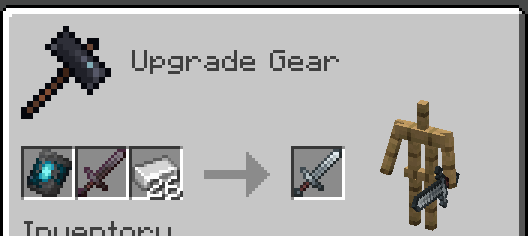
⚠️ Resource Pack Required
Grab the Resource Pack from the original
You can already trim armor, but what about weapons and tools? Well, with this Plugin, you can trim them!
Features
- All features from the original with a few changes:
Removed Toolsmithing Table (Use vanilla smithing table to trim tools)
Simplified commands into one creative command
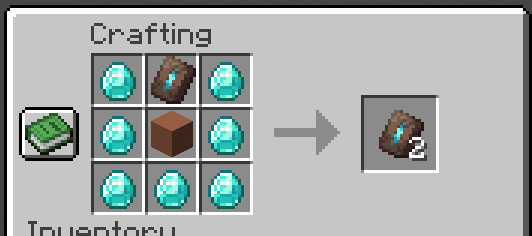
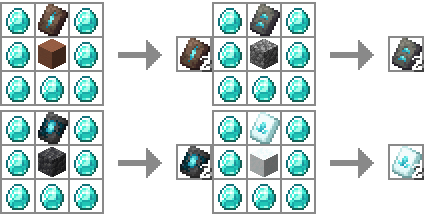
/function tooltrims:give_templatesTool Trims can be duplicated using a crafting table (instead of the Toolsmithing Table)
- Auto-install datapack (modified from original)
- Can hook into Geyser
- Stop the server
- Delete the original data pack if you have it
- Download and put in the plugins folder
- Configure the server to serve the resource pack from the original creation
- Re(start) server
- Depending on the version you may need to wait for the server to be up and restart again to load the datapack.
- Do normal install (listed above)
- If you want bedrock players to be able to craft with these trims, install this fix
- Click the featured version.
- Download, and unzip "Geyser Hook" (Secondary download, under the versions tab)
- Put "Tool Trims (plugin) Geyser RP.mcpack" in the packs folder of Geyser
- Put "Tool Trims (plugin) Geyser mappings.json" in the custom_mappings folder of Geyser
- Put "en_us.json" in the locales/overrides folder of Geyser
- Re(start) server
Thanks to:
- JoeFly: Amazing idea, resource pack, and data pack
Quick facts
- Edition: Minecraft Java
- File type: .jar
- Minecraft versions listed: 1.21.5, 1.21.6
- How to install: Install the matching mod loader (Forge, Fabric or NeoForge) for your Minecraft version. → Download the .jar. → Put it in the .minecraft/mods folder and launch that loader profile.
- Where to get it: Opens on Modrinth — not every file is mirrored on our own servers.
Install steps are the general flow for this file type — How to install Minecraft Java mods & modpacks walks through it step by step.
Verified by MCModsHub
- Ships as Tool-Trims-1.2.1.jar — drop this file into the mods folder
- Download size: 24 KB
- Download link checked 28 Aug 2026 — working
These come from our own check of the pack file, not from the source page.