
ClientStorage
Highly inspired by AE2 & Refined Storage ... but clientside! Features crafting search interface and inventory layout saving! A clientside mod (yes you can…
I don't know my version or loader
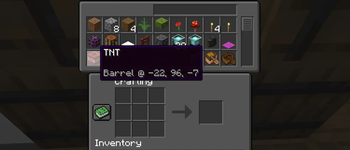
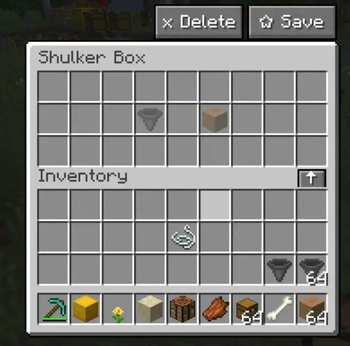





Highly inspired by AE2 & Refined Storage ... but clientside!
Features crafting search interface and inventory layout saving!
A clientside mod (yes you can use it on any server, though anticheats might interfer) to never search for an item again!
Having a chestmonster? You'll be able to deal with it easily! Command way (/csearch) or GUI way 😎.
Features
- toggle with a keybind
- see all items in chests that are in your reach proximity
- mark containers that have wanted item to be glowing
- any resourcepack support (gui is made out of creative textures)
- pick up items seamlessly
- search for items via built-in searchbox
#for tags (e. g.#protection- will search for any items havingprotectiontag)@for modded items (e. g.@simplevillagers- will search for items fromsimplevillagersmod)
- autodetect server type and modify needed packet delays (to some extent)
- packet limits are set automatically for different server types
- save inventory layout to a preset
- this allows you to have your shulkers / chests configured what items you can shift-click in and where they'll go!
Screenshots
| Zoomed | Whole inventory |
|---|---|
  |
 |

Showcase
Current problems
- detecting server is done via
brandfield fromCustomPayload- this could be improved - can easily trigger anticheats
Contributions
There's so much more that can be done! If you want to help, feel free to fork the repo and submit a pull request! Thanks ;).
- Edition: Minecraft Java
- File type: .jar
- Minecraft versions listed: 1.19, 1.19.1, 1.19.2
- How to install: Install the matching mod loader (Forge, Fabric or NeoForge) for your Minecraft version. → Download the .jar. → Put it in the .minecraft/mods folder and launch that loader profile.
- Where to get it: Opens on Modrinth — not every file is mirrored on our own servers.
Install steps are the general flow for this file type — How to install Minecraft Java mods & modpacks walks through it step by step.
- Ships as clientstorage-bukkit-1.19.2-1.1.0.jar — drop this file into the mods folder
- Download size: 25 KB
- Download link checked 19 Sept 2026 — working
These come from our own check of the pack file, not from the source page.