
ModsJava
Shop Plugin
Java mod listed for Minecraft 1.18–1.21. Downloads from the MC Java Mods app on Android.
⬇ Download on Modrinth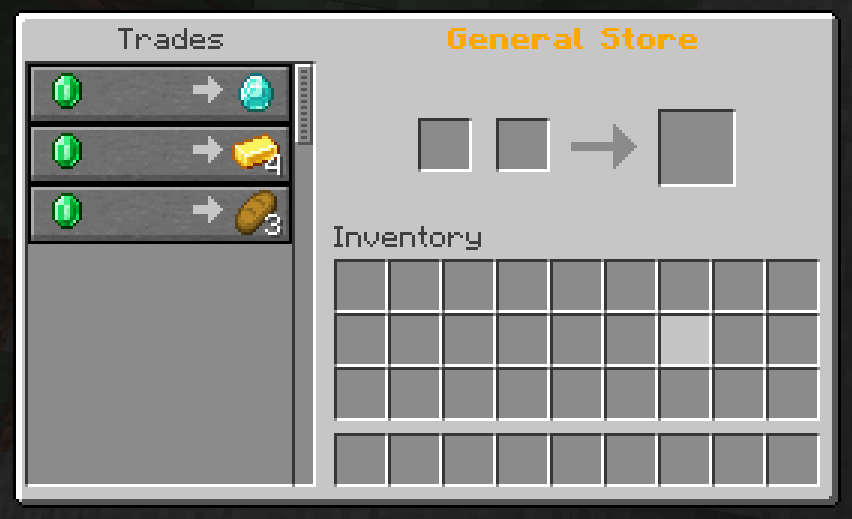
ShopPlugin
A flexible shop system for Minecraft servers with advanced features like NBT support, potions, and automatic restock system.





Save 20% on your next order with my code: moritxius-a-6421
Features
- 🏪 Flexible Shop Creation - Create unlimited shops with individual names
- 🎨 Customizable Display Names - Shops can have beautiful, colored display names
- ⚡ NBT Support - Items with custom names and enchantments
- 🧪 Potion System - Easy creation of potion trades with all effects
- 🔄 Automatic Restock - Trades become available again after configurable time
- 🔐 Permission System - Control over shop access and management
- 💾 Persistent Storage - All shops are automatically saved
- 📋 Tab Completion - Full auto-completion for all commands
Installation
- Download the
shopplugin-*.jarfile - Place it in your
plugins/folder - Restart the server
- The plugin automatically creates the
plugins/ShopPlugin/shops/folder
Commands
Basic Commands (for all players)
/shop <shopname>           - Opens a shop
/shop list                 - Shows all available shops
/shop info                 - Plugin information
Admin Commands (requires shopplugin.admin permission)
/shop create <shopname> [display_name]                    - Creates a new shop
/shop addtrade <shop> <input> <amount> <output> <amount> [max_uses]  - Adds a trade
/shop addpotion <shop> <input> <amount> <potion_type> [max_uses]     - Adds a potion trade
/shop addtradeadvanced <shop> <input> <amount> <output> <amount> [max_uses] [input_name] [output_name] [input_enchants] [output_enchants] [input_potion] [output_potion]  - Advanced trade creation
/shop removetrade <shopname> <trade_index>                - Removes a trade
/shop rename <shopname> <new_display_name>                - Changes the display name
/shop trades <shopname>                                   - Shows all trades in a shop
/shop remove <shopname>                                   - Deletes a shop
/shop potions                                             - Shows all available potion types
/shop restock <shopname> [hours]                          - Sets restock interval
Permissions
shopplugin.admin: true     # Full access to all shop management functions
shopplugin.use.*: true     # Access to all shops
shopplugin.use.<shopname>: true  # Access to specific shop
Examples
Create a simple shop
/shop create general "§6General Shop"
Add basic trade
/shop addtrade general DIAMOND 1 DIAMOND_SWORD 1 10
Add potion trade
/shop addpotion general EMERALD 2 HEALING 5
/shop addpotion general GOLD_INGOT 1 HEALING:UPGRADED 3
/shop addpotion general DIAMOND 1 REGENERATION:EXTENDED 1
Add advanced trade with NBT
/shop addtradeadvanced general DIAMOND 1 DIAMOND_SWORD 1 10 "&bMagical Diamond" "&cFire Sword" "" "FIRE_ASPECT:2,SHARPNESS:5"
Set restock interval
/shop restock general 12    # Every 12 hours
/shop restock vip 6         # Every 6 hours
Potion Types
Available Base Potions:
HEALING- Instant HealthHARMING- Instant DamageREGENERATION- RegenerationPOISON- PoisonSTRENGTH- StrengthWEAKNESS- WeaknessSPEED- SpeedSLOWNESS- SlownessJUMP- Jump BoostFIRE_RESISTANCE- Fire ResistanceWATER_BREATHING- Water BreathingINVISIBILITY- InvisibilityNIGHT_VISION- Night Vision
Modifiers:
:EXTENDED- Longer duration:UPGRADED- Stronger effect (Level II)
Examples:
HEALING:UPGRADED- Healing IISPEED:EXTENDED- Speed with longer durationREGENERATION:UPGRADED- Regeneration II
Enchantments
Enchantments are specified in the format ENCHANTMENT:LEVEL, multiple separated by comma:
"SHARPNESS:5,FIRE_ASPECT:2,UNBREAKING:3"
Common Enchantments:
SHARPNESS- SharpnessFIRE_ASPECT- Fire AspectUNBREAKING- UnbreakingEFFICIENCY- EfficiencyFORTUNE- FortuneSILK_TOUCH- Silk TouchPROTECTION- ProtectionTHORNS- Thorns
Restock System
The plugin features an automatic restock system:
- Default Interval: 24 hours
- Customizable: Individually adjustable per shop
- Automatic: Trades are checked and restocked when opening the shop
- Persistent: Restock times are saved and survive server restarts
How it works:
- When a trade reaches its maximum uses, it's marked as "sold out"
- After the configured restock time expires, the trade becomes available again
- The check occurs every time a player opens the shop
Configuration
Shops are automatically saved in plugins/ShopPlugin/shops/ as YAML files. Each shop has its own file with the following format:
display-name: "§6My Shop"
restock-hours: 24
trades:
  - input-material: DIAMOND
    input-amount: 1
    output-material: DIAMOND_SWORD
    output-amount: 1
    max-uses: 10
    output-display-name: "&cFire Sword"
    output-enchantments: "FIRE_ASPECT:2,SHARPNESS:5"
restock-times:
  0: 1640995200000
Troubleshooting
Shop won't open
- Check the permission
shopplugin.use.<shopname>orshopplugin.use.* - Make sure the shop exists with
/shop list
Trades don't work
- Check material names (must be exact)
- Use
/shop trades <shopname>to see all trades
Potions have no effects
- Make sure you use
POTION,SPLASH_POTIONorLINGERING_POTIONas material - Check the potion type with
/shop potions
Support
For problems or questions:
- Check server logs for error messages
- Make sure all permissions are set correctly
- Use
/shop infoto get plugin information
Quick facts
- Edition: Minecraft Java
- File type: .jar
- Minecraft versions listed: 1.18, 1.18.1, 1.18.2
- How to install: Install the matching mod loader (Forge, Fabric or NeoForge) for your Minecraft version. → Download the .jar. → Put it in the .minecraft/mods folder and launch that loader profile.
- Where to get it: Opens on Modrinth — not every file is mirrored on our own servers.
Install steps are the general flow for this file type — How to install Minecraft Java mods & modpacks walks through it step by step.
File checked by MCModsHub
- Ships as shopplugin-1.4.5.jar — drop this file into the mods folder
- Download size: 49 KB
- Download link checked 9 Oct 2026 — working
These come from our own check of the pack file, not from the source page.