
ServerUtils
Reload plugins - Unload unused commands - PluginWatcher - Command/PluginInfo - Automatic Updater. Free Minecraft Java mod for 1.8.8, 1.8.9, 1.9.
⬇ Download on ModrinthServerUtils
ServerUtils allows you to manage your plugins in-game. Featuring reloading, unloading and loading of plugins from your plugins folder at runtime. ServerUtils also has handy methods to lookup commands and plugins, and provides you with handy information about them.








Features
- Spigot/Paper, BungeeCord/Waterfall and Velocity compatible!
- Replaces (you can disable this) the /pl and /plugins (bukkit) commands with a customisable message plugins version. Adding the -v tag will add all versions to the output! Please note: the commands [plain]/bukkit:pl[/plain] and [plain]/bukkit:plugins[/plain] are not replaced, so you can still use those!
- A neat configurable /bpl plugins command for bungeecord! Use the -v flag to output the versions of the plugin and -m flag to also include modules in the plugin list (e.g. cmd_send.jar, cmd_server.jar etc.)
- Reload plugins on the fly with /su (load/reload/unload)plugin ! (BungeeCord: the main command is /bsu) Supports tabcomplete to quickly load new plugins from a jar in your plugins folder :)
- Watch plugin files for changes and automatically reload them! /su watchplugin!
- Unloading unused commands (spigot/paper): You can define in the config commands which will be unloaded by ServerUtils at boot. These commands will not be accessible anymore to any in-game player, nor the console.
- Reloading plugins and cleaning things up, like their PluginClassLoader and their recipes, recipe cleanup only works 1.12+, as below those versions a plugin is not associated with a recipe, so there's no way ServerUtils can know a recipe belongs to a plugin.
- ServerUtils can also restart / update itself, as a gimmick (:
- Reload commands.yml on the fly without performing a whole reload or restart on the server! Useful to quickly make aliases :) Please note: currently, this only works on 1.8 - 1.16.
- Reload the bukkit configuration on the fly without performing a whole reload or restart on the server! Please note: some configuration options may not be reloaded, please contact me if you think this is an error. Spigot/Paper configs are not reloaded, you can reload those with /paper reload or /spigot reload. Please note: currently, this only works on 1.8 - 1.16.
- Automatic updater. The plugin can be configured to automatically download & install new updates of the plugin on server boot or when updates are checked. This feature is disabled by default, but can be precisely configured per config. Plugins can listen for changes! ServerUtils offers an event API which can notify plugins precisely what component has been loaded, enabled, disabled or unloaded -- all with a Pre and Post stage. Please take a look at the Bukkit and Bungee events!
Load stages of a plugin (Spigot/Paper):
To understand the difference between loading / enabling / disabling / unloading of plugins, I will describe the load stages below:
Fully loading a plugin (like at startup):
- First, the plugin is loaded from a .jar file from the plugins directory. This is called loading of a plugin. The plugin is now "red" in the /plugin list, because it is not yet enabled.
- At the second step, a plugin is enabled. This causes the plugin to spit all sorts of things in the console (which the developer found important to notify you about at startup), like database connections being setup etc.
Fully disabling a plugin (like closing the server)
- First the plugin is disabled. This causes the plugin to lose all of it's features, like commands, event listeners, etc. After disabling, the plugin is still loaded in memory, but it is seen "red" in the /plugin list.
- Then the plugin will be unloaded from the memory, so the plugin won't appear at all anymore in the /plugin list.
Disclaimer ‼️
Please note that reloading may not be compatible with each and every plugin! Plugins which depend on a reloaded plugin, are likely to be error-prone for reloading. Improper cleanup, or improper startup practises may break plugin (re/un)loading as well. Please be careful!
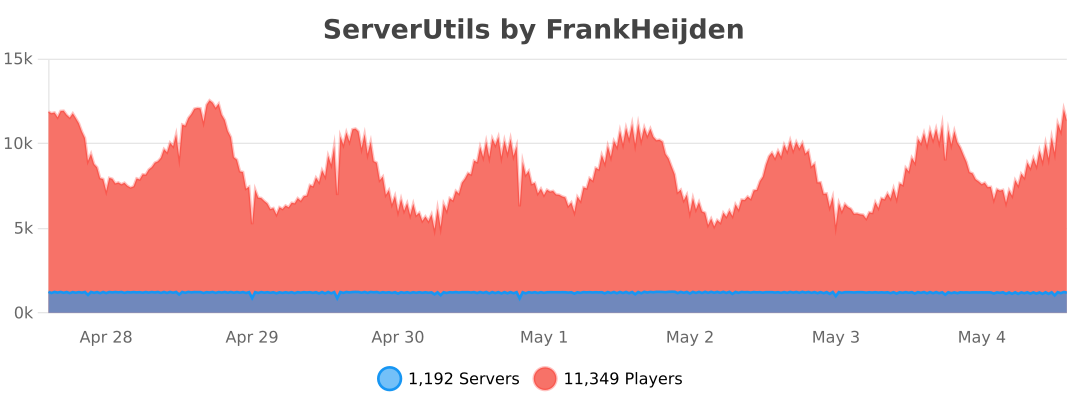
Statistics
Compiling ServerUtils
There are two ways to compile ServerUtils:
1. Installing gradle (recommended)
- Make sure you have gradle installed.
- Run the project with
gradle buildto compile it with dependencies.
2. Using the wrapper
Windows: gradlew.bat build
Linux/macOS: ./gradlew build
Developer API
Repository / Dependency
If you wish to use snapshot versions of ServerUtils, you can use the following repo:
https://repo.fvdh.dev/snapshots
Gradle:
repositories {
  compileOnly("net.frankheijden.serverutils:ServerUtils:VERSION")
}

dependencies {
  maven("https://repo.fvdh.dev/releases")
}
Maven:
<project>
  <repositories>
    <!-- ServerUtils repo -->
    <repository>
      <id>fvdh</id>
      <url>https://repo.fvdh.dev/releases</url>
    </repository>
  </repositories>

  <dependencies>
    <!-- ServerUtils dependency -->
    <dependency>
      <groupId>net.frankheijden.serverutils</groupId>
      <artifactId>ServerUtils</artifactId>
      <version>VERSION</version>
      <scope>provided</scope>
    </dependency>
  </dependencies>
</project>
Commands and Permissions
Please refer to the Wiki page for an updated overview of the commands and permissions.
- Ships as ServerUtils-Bukkit-3.5.4.jar — drop this file into the mods folder
- Download size: 2.1 MB
- Download link checked 28 Aug 2026 — working
These come from our own check of the pack file, not from the source page.