
🌌 EnderVault - Supercharged Ender Chest Plugin
EnderVault upgrades the basic Minecraft ender chest into a powerful, fully customizable storage system. Give your players more space based on their rank or permission, while keeping everything safe and easily accessible—even when they’re offline!
✨ What Makes EnderVault Awesome?
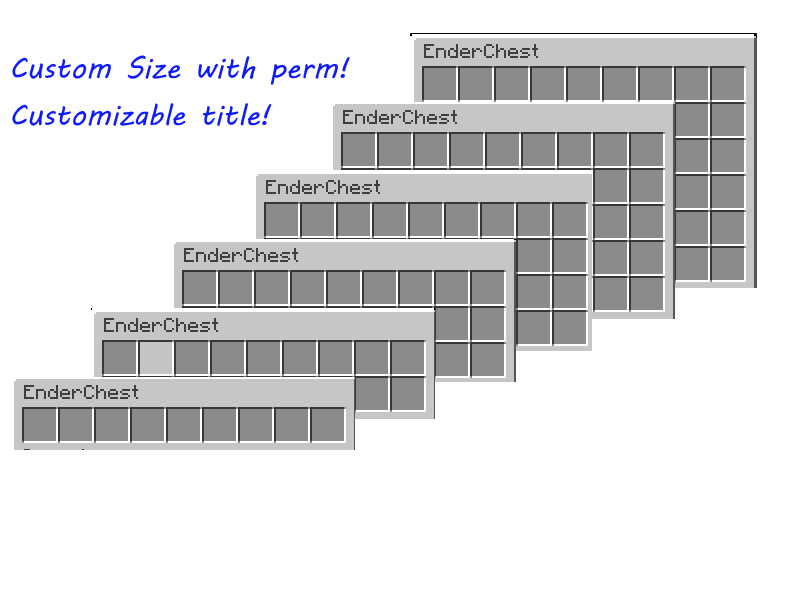
🧱 Custom Slot Sizes
Let players unlock bigger ender chests with permissions.
From 3 rows (27 slots) up to 6 rows (54 slots).
Example:endervault.rows.5gives 5 rows!💾 Choose How Data Is Saved
- PDC – Lightweight per-player storage (best for small servers).
- SQLite – Local database with great performance.
- MySQL – Sync storage across servers or large networks.
🌐 Supports Online & Offline Mode
- Online: Uses UUIDs for player tracking.
- Offline: Uses player names for compatibility.
🛠️ Edit Offline Player Vaults
Admins can open and edit offline players’ chests using SQLite or MySQL storage.💬 Easy Commands
/ev- Open your custom ender chest./ev <player>- Open someone else’s ender chest (requires permission).
📦 Right-Click Integration
Simply right-click a vanilla ender chest block to open your personalized EnderVault.
💡 Why Choose EnderVault?
EnderVault gives your server flexibility and reliability that vanilla chests just can’t match.
✅ Scales with your server size.
✅ Easy setup and config.
✅ Perfect for survival, factions, SMPs, or donor perks!
🔧 How to Install
- Download the latest
EnderVault.jar. - Place it in your server’s
pluginsfolder. - Restart your server.
- Edit the config file to choose your storage type.
⚙️ Configuration Example
storage:
  type: "sqlite" # Options: pdc, sqlite, mysql
  sqlite:
    file: "endervault.db"
  mysql:
    url: "jdbc:mysql://localhost:3306/database"
    username: "user"
    password: "password"

config:
  OnlineMode: true
🔐 Permissions
endervault.use– Open your own ender chest (default: true)endervault.viewothers– Open others’ chests (default: OP only)endervault.rows.<1-6>– Set how many rows a player gets
Example:endervault.rows.4= 4 rows
- Edition: Minecraft Java
- File type: .jar
- Minecraft versions listed: 1.13, 1.13.1, 1.13.2
- How to install: Install the matching mod loader (Forge, Fabric or NeoForge) for your Minecraft version. → Download the .jar. → Put it in the .minecraft/mods folder and launch that loader profile.
- Where to get it: Opens on Modrinth — not every file is mirrored on our own servers.
Install steps are the general flow for this file type — How to install Minecraft Java mods & modpacks walks through it step by step.
- Ships as EnderVault-0.2.0-beta.jar — drop this file into the mods folder
- Download size: 238 KB
- Download link checked 28 Aug 2026 — working
These come from our own check of the pack file, not from the source page.