
Server Optimiser V2
Smart server optimization with optional TPS control. Reduce RAM usage 25%. Perfect for survival/skyblock servers. Entity optimization, chunk management…
⬇ Download on Modrinth🔧 ServerOptimiser v2 - Intelligent Performance Management
Transform your server's performance with smart TPS control and comprehensive optimization.
🚀 Proven Results - Real Performance Data
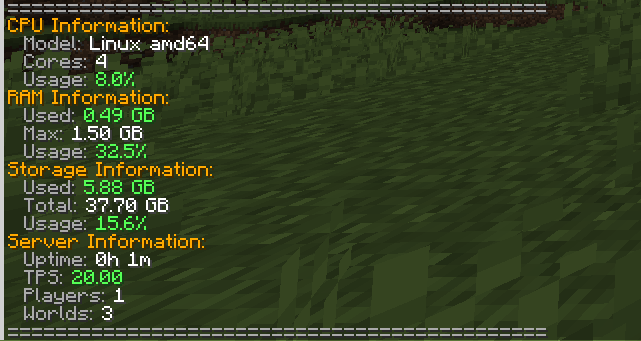
Before ServerOptimiser:
- TPS: 20.00 (standard)
- CPU Usage: 8.0%
- RAM Usage: 0.49GB
After ServerOptimiser (TPS limited to 15):
- TPS: 15.14 (controlled)
- CPU Usage: 2.5%
- RAM Usage: 0.38GB
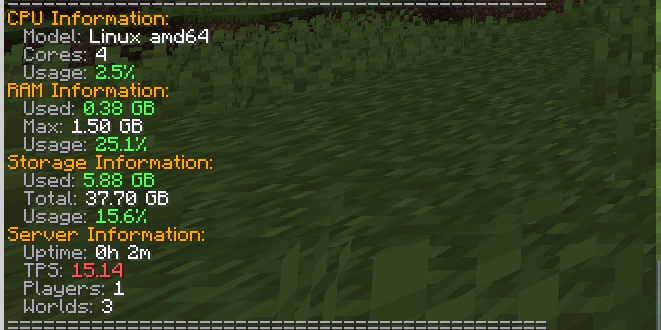
🎯 Result: 25% reduction in RAM & 50%> CPU usage with controlled TPS!
⚠️ TPS Limiting is ENTIRELY OPTIONAL
TPS limiting is only recommended for:
- Survival servers where precision timing isn't critical
- Skyblock servers focused on building and economy
- Peaceful/Non-PvP servers where combat timing doesn't matter
- Economy/RP servers where smooth performance > precise timing
NOT recommended for:
- PvP servers - Combat requires precise timing
- Minigame servers - Fast-paced games need full TPS
- Redstone-heavy servers - Complex contraptions need 20 TPS
💡 Why Lower TPS Actually Improves Performance
The Science Behind Smart TPS Limiting:
Most players can't tell the difference between 20 TPS and 15 TPS in survival gameplay, but your server definitely can! Here's why:
✅ Reduced CPU Cycles - 25% fewer game ticks means 25% less CPU processing
✅ Lower RAM Usage - Fewer entity updates and chunk processing saves memory
✅ Decreased Disk I/O - Less frequent world saves and chunk loading
✅ Improved Stability - Prevents lag spikes during high activity periods
✅ Better Resource Distribution - More CPU available for plugins and player actions
🎮 Core Features
Smart TPS Management (Optional)
- Intelligent TPS Limiting: Set target TPS (15-20) with
/ob tps 15 - Automatic Performance Scaling: Dynamically adjusts based on server load
- Manual Override: Instant reset to 20 TPS when needed
- Completely Optional: Use only if it benefits your server type
Entity Optimization
- Smart Entity Limiting: Reduces mob density in high-traffic areas
- AI Optimization: Improves mob AI performance without breaking behavior
- Automatic Cleanup: Removes lag-causing entities intelligently
Chunk Management
- Smart Unloading: Automatically unloads unused chunks
- Preloading System: Keeps frequently accessed areas ready
- Memory Optimization: Reduces RAM usage from chunk overhead
System Monitoring
- Real-time Stats:
/obstatsshows CPU, RAM, and storage usage - Lag Detection: Automatically identifies and resolves performance bottlenecks
- Performance Alerts: Notifies admins of critical performance issues
Admin Tools
- Auto-Permission Management: Streamlined permission assignment
- Comprehensive Commands: Master
/obcommand with full control - Configuration Flexibility: Extensive YAML configuration options
📊 Commands
Main Commands:
/ob- Run full server optimization/ob tps 15- Limit TPS to 15 for better performance (optional)/ob tps reset- Restore normal 20 TPS/obstats- View detailed system statistics
Specific Optimizations:
/ob entities- Optimize entities only/ob chunks- Optimize chunks only/ob lag- Run lag detection
Additional Commands:
/ob stats- Show performance statistics/ob reload- Reload configuration/ob help- Show all available commands
⚙️ Technical Details
- Platform: PaperMC 1.21.8+ (Java 21)
- Performance Impact: Minimal overhead, major benefits
- Thread Safety: Properly handles async operations
- Analytics: Optional bStats integration for usage insights
🎯 Perfect For
✅ Survival Servers - Improved performance without gameplay impact
✅ Economy Servers - Better stability for shop plugins and transactions
✅ Skyblock Servers - Smooth building and progression experience
✅ RPG Servers - Better performance with custom content
✅ Community Servers - Handle more players with same hardware
✅ Budget Hosting - Maximize performance on limited resources
🚨 Not Recommended For TPS Limiting
❌ PvP Servers - Where precise combat timing is crucial
❌ Redstone-Heavy Servers - Complex contraptions need full TPS
❌ Minigame Servers - Fast-paced games require 20 TPS
❌ Competitive Servers - Where every tick matters
📈 Installation & Setup
- Download and place in your
plugins/folder - Restart your server
- Optional: Run
/ob tps 15if you have a survival/skyblock server - Use
/obstatsto monitor your performance improvements!
Remember: TPS limiting is completely optional and should only be used on appropriate server types!
Experience the difference - your server (and your hosting bill) will thank you!
the tests of the plugin were done on the "hosting" plan on server.pro
- Edition: Minecraft Java
- File type: .jar
- Minecraft versions listed: 1.21, 1.21.1, 1.21.2
- How to install: Install the matching mod loader (Forge, Fabric or NeoForge) for your Minecraft version. → Download the .jar. → Put it in the .minecraft/mods folder and launch that loader profile.
- Where to get it: Opens on Modrinth — not every file is mirrored on our own servers.
Install steps are the general flow for this file type — How to install Minecraft Java mods & modpacks walks through it step by step.
- Ships as ServerOptimiserV2.jar — drop this file into the mods folder
- Download size: 114 KB
- Download link checked 29 Aug 2026 — working
These come from our own check of the pack file, not from the source page.