
EssentialsX GUI
I don't know my version or loader


👑 EGUI (EssentialsGui) v2.1.1
EGUI is a powerful, highly customizable GUI for EssentialsX Homes and Warps. One JAR works on all Paper versions — from Minecraft 1.21.1 through the latest 26.x releases.
Note: EGUI will still start without EssentialsX installed, but home and warp features will be unavailable. OPs are notified in chat.
⚠️ Version Compatibility Notice
| Minecraft Version | Java Version | EGUI Support |
|---|---|---|
| 1.21.1 – 1.21.6 | Java 21 | ✅ AnvilGUI text input |
| 1.21.7 – 1.21.11 | Java 21 | ✅ Paper Dialog API text input |
| 26 and newer | Java 25 | ✅ Paper Dialog API text input |
One JAR for all servers. EGUI automatically detects your Paper version and loads the correct input module. No more choosing between "legacy" and "modern" downloads.
🚧 Development & Support
EGUI is currently in active development! Many more features, flexible layouts, and extended customization options are planned for future updates.
If you need support, want to report an issue, or have a great idea for a new feature you'd like to see added, please join our Discord Server! We would love to hear your feedback and suggestions.
🛑 Prerequisites (Mandatory)
EGUI is a companion plugin for EssentialsX.
- EssentialsX: Download Here — Required for full functionality (homes & warps). EGUI starts without it but warns admins.
- Paper 1.21.1+: PaperMC is required. Spigot/CraftBukkit are NOT supported.
- Java 21+: Compiles to Java 21 bytecode — runs on both Java 21 and Java 25 JVMs.
🚀 Features
- 🛡️ EssentialsX Integration: Seamlessly reads and manages homes and warps directly from EssentialsX data.
- 🛏️ Adaptive Home GUI: Automatically displays the correct number of set and empty home slots based on the player's max home permissions.
- 📐 Customizable Layouts: Choose between a full
THREE_ROWS(with borders) or a compactONE_ROWstyle. - 🎯 Optional Centered Items: Enable
center-homesand/orcenter-warpsto center each menu type independently when fewer than 5 items are shown. - 🎨 Full Customization: Every item, message, and layout is fully configurable in
config.yml. - 🏠 Custom Home Icons: Players can personalize their homes by setting custom material icons.
- ⌨️ Smart Text Input: Automatically uses Paper's native Dialog API on modern servers (1.21.7+) and AnvilGUI on older servers (1.21.1–1.21.6). Zero configuration needed.
- 🛡️ Admin Panel: Search and manage offline players' homes with the
/adminhomescommand. - 🎛️ Extensive Toggles: Toggle the core
/homesor/warpscommands, the set home GUI, deletion confirmations, and the no-homes prompt easily in exactly one config! - 📡 Custom Warp Icons: Assign unique items, names, and lore to specific warps in
warps.yml. - 🗑️ Safe Deletion: Integrated confirmation GUI for home deletions to prevent accidents (toggleable!).
- 🏠 No-Homes GUI: When a player with no homes runs
/homes, a GUI asks if they want to create one at their current location instead of just sending a chat message. - 🔄 Live Reload: Update
config.yml,warps.yml, icon data, Essentials config data, folder paths, and input module selection on the fly with/egui reload. - 📡 Status Dashboard: Check Essentials connectivity and version status via
/egui status. - 🔔 Update Checker: Automatically notifies admins of new releases.
- 📉 Lightweight: ~400 KB including both shaded providers.
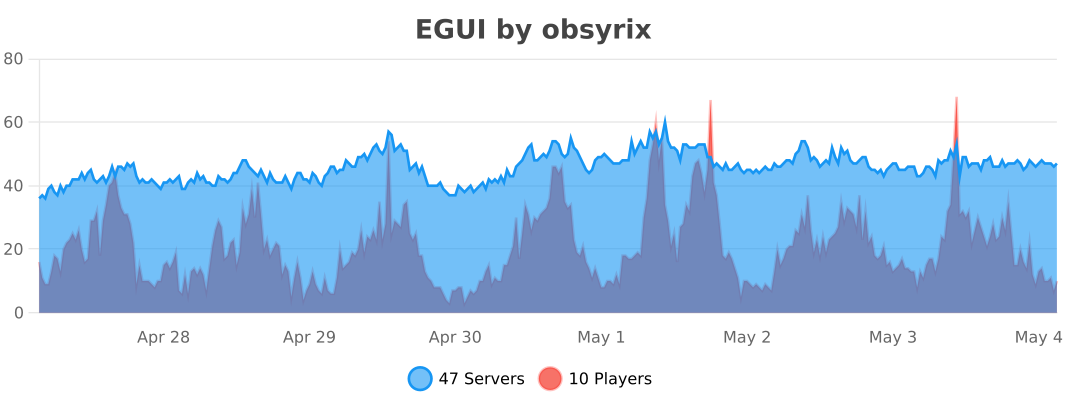
- 📊 bStats Metrics: Anonymous server usage tracking via bStats, including custom charts for active module, GUI style, player count, and server version.
📋 Commands & Permissions
Commands & Permissions| Command | Description | Permission | Default |
|---|---|---|---|
/homes |
Opens the Homes GUI | egui.homes |
Everyone |
/sethomeicon <home> <material> |
Sets a custom item icon for your home | egui.sethomeicon |
Everyone |
/adminhomes |
Opens the Admin Panel to manage player homes | egui.admin |
OP |
/warps |
Opens the Warps GUI | egui.warps |
Everyone |
/egui reload |
Reloads config files, folder paths, icons, Essentials data, and input module selection | egui.reload |
OP |
/egui status |
Displays plugin status and version info | egui.status |
OP |
⚙️ Configuration (config.yml)
config.yml# ==============================================================================
# EGUI Configuration
# ==============================================================================
# ------------------------------------------------------------------------------
# Module Selection (Advanced)
# ------------------------------------------------------------------------------
# EGUI automatically detects your server version and loads the correct module:
# - Paper 1.21.1 to 1.21.6 → loads AnvilGUI (legacy)
# - Paper 1.21.7+ and 26.x → loads Paper Dialog API (dialog)
#
# You can override this behavior:
# auto = Let EGUI decide (recommended)
# legacy = Force AnvilGUI on all versions
# dialog = Force Dialog API on all versions (will crash on old servers!)
module-selection: auto
# Print detailed module loading info to console on startup
module-log-verbose: true
# Path to the Essentials userdata and warps folders.
essentials-userdata-folder: "plugins/Essentials/userdata"
warps-folder: "plugins/Essentials/warps"
# ==============================================================================
# GUI Appearance
# ==============================================================================
# Options:
# THREE_ROWS: A 9x3 GUI with top/bottom glass borders (as in screenshot).
# ONE_ROW: A compact 9x1 GUI containing only the functional row.
gui-style: ONE_ROW
# Centers home items in the functional row when fewer than 5 are shown.
# Example with 2 items: slots 3 and 5 are used, leaving the middle empty.
center-homes: false
# Centers warp items in the functional row when fewer than 5 are shown.
center-warps: false
# Background filler item used for all GUIs
background-item:
material: BLACK_STAINED_GLASS_PANE
name: ""
# Navigation buttons
item-for-previous-page:
material: ARROW
name: "&ePrevious Page"
lore:
- "&aLeft-Click to go to the Previous Page"
item-for-next-page:
material: ARROW
name: "&eNext Page"
lore:
- "&aLeft-Click to go to the next page"
# ==============================================================================
# Homes GUI Settings
# ==============================================================================
gui-titles:
homes: "&8Your homes"
warps: "&8Server Warps"
sethome: "&fEnter Home Name"
admin-search-online-player: "&fSearch Online Player"
admin-search-offline-player: "&fSearch Offline Player"
# Item representing a set home
item-for-home:
material: RED_BED
name: "&e%home%"
lore:
- "&7World: &f%world%"
- "&7X: &f%x% &7Y: &f%y% &7Z: &f%z%"
- ""
- "&aLeft-Click to Teleport"
- "&cRight-Click to Delete"
# Item representing an available but unset home slot
item-for-empty-home:
material: GRAY_BED
name: "&8Empty Home Slot"
lore:
- "&7Click here to securely"
- "&7type and set a new home!"
# ==============================================================================
# Warps GUI Settings
# ==============================================================================
# Default template for warps (if not customized in warps.yml)
default-item-for-warp:
material: ENDER_PEARL
name: "&e%warp%"
lore:
- "&7Click to teleport to %warp%."
# ==============================================================================
# Confirm Deletion GUI
# ==============================================================================
confirm-gui:
# Filling empty slots in the 9-slot confirmation menu
fill-background: true
background-material: BLACK_STAINED_GLASS_PANE
background-name: " "
# The "Yes" button
confirm-item:
material: LIME_WOOL
name: "&aConfirm Deletion"
lore:
- "&7Click to permanently delete"
# The "No" button
cancel-item:
material: RED_WOOL
name: "&cCancel"
lore:
- "&7Go back to your homes list."
# ==============================================================================
# Features
# ==============================================================================
features:
allow-custom-home-icons: true
enable-homes-command: true
enable-warps-command: true
enable-set-home-gui: true
delete-home-confirmation: true
admin-search-exact-match: false
ask-create-home-if-empty: true
# ==============================================================================
# No Homes GUI
# ==============================================================================
# Shown when a player uses /homes but has no homes set
# (only if features.ask-create-home-if-empty is true)
no-homes-gui:
title: "&8No Homes Set"
fill-background: true
background-material: BLACK_STAINED_GLASS_PANE
background-name: " "
# The "Create Home" button
create-item:
material: LIME_WOOL
name: "&aCreate Home"
lore:
- "&7Click to create a home"
- "&7at your current location."
# The "Close" button
close-item:
material: RED_WOOL
name: "&cClose"
lore:
- "&7Close this menu."
# ==============================================================================
# Messages
# ==============================================================================
messages:
no-homes: "&cYou do not have any homes set."
no-warps: "&cThere are no warps set."
deleted: "&cDeleted home &e%home%&c."
confirm-delete-title: "&4Delete %home%?"
no-permission: "&cYou do not have permission to use this command."
only-players: "&cOnly players can use this command."
reload-success: "&aEGUI configuration reloaded!"
usage: "&eUsage: /egui reload"
invalid-home: "&cThat home does not exist."
invalid-material: "&cInvalid item name."
icon-set-success: "&aSuccessfully set the icon for &e%home%&a to &e%material%&a."
icons-disabled: "&cCustom home icons are disabled."
feature-disabled: "&cThis feature is currently disabled."
sethome-success: "&aYour new home &e%home%&a was added!"
sethome-invalid-name: "Enter a valid name"
sethome-no-spaces: "No spaces allowed"
player-not-found: "&cPlayer not found."
admin-teleport-home: "&aTeleported to &e%player%&a's home: &e%home%&a."
admin-delete-home: "&cDeleted &e%player%&c's home: &e%home%&c."
admin-confirm-delete-title: "&4Delete &e%player%'s &4%home%?"
admin-player-head-lore: "&7Click to view homes"
# ==============================================================================
# Admin Panel Items
# ==============================================================================
admin-panel-items:
background-item:
material: BLACK_STAINED_GLASS_PANE
name: " "
lore: []
search-online-button:
material: NAME_TAG
name: "&aSearch Online Player"
lore:
- "&7Click here to filter"
- "&7all online players."
search-offline-button:
material: COMPASS
name: "&cSearch Offline Player"
lore:
- "&7Click here to find"
- "&7a specific offline player."
back-button:
material: BARRIER
name: "&cBack to Admin Panel"
lore: []
⚙️ Configuration Example: Customizing a Warp
To give the warp "spawn" a unique icon, add this to warps.yml:
warps:
  spawn:
    material: NETHER_STAR
    name: "&b&lSpawn"
    lore:
      - "&7Return to the main spawn."
🛠️ Installation
- Download the
EGUI-2.1.1.jarfile. - Ensure you have EssentialsX already installed and running on your server.
- Place the
EGUI-2.1.1.jarinto your server'spluginsfolder. - Restart your server (or use a plugin loader) to generate the configuration files.
- Configure the
plugins/EGUI/config.ymlto match your server's aesthetic. - Optional: Add custom warp icons in
plugins/EGUI/warps.yml. - Type
/egui reloadin-game to apply any changes!
🧩 How the Module System Works
EGUI 2.1.1 ships with two embedded modules inside a single JAR:
| Module | Paper Versions | Input Method |
|---|---|---|
| Legacy | 1.21.1 – 1.21.6 | AnvilGUI by WesJD |
| Dialog | 1.21.7+ and 26.x | Paper's native Dialog API |
On startup, EGUI detects your server's Minecraft version and instantiates the correct provider. Both implementations are shaded directly into the plugin JAR and compile to Java 21 bytecode, so the same JAR runs on both Java 21 and Java 25.
You can override the auto-detection in config.yml:
module-selection: auto # auto, legacy, or dialog
Changing module-selection can be applied with /egui reload. If the newly selected module cannot load, EGUI keeps using the currently loaded input module and logs a warning.
📊 bStats Metrics
EGUI uses bStats to anonymously track server information:
- Default metrics: player count, Minecraft version, Java version, server software, operating system
- Custom charts: active input module, GUI style, player count range, and server version
Privacy Note: bStats aggregates all data anonymously. No server IP addresses, domain names, or player identities are ever transmitted.
📜 Credits
- AnvilGUI — Text input library for legacy Paper versions by WesJD
- bStats — Plugin metrics platform
- EssentialsX — The essential plugin suite for Minecraft servers
- Edition: Minecraft Java
- File type: .jar
- Minecraft versions listed: 1.21.1, 1.21.2, 1.21.3
- How to install: Install the matching mod loader (Forge, Fabric or NeoForge) for your Minecraft version. → Download the .jar. → Put it in the .minecraft/mods folder and launch that loader profile.
- Where to get it: Opens on Modrinth — not every file is mirrored on our own servers.
Install steps are the general flow for this file type — How to install Minecraft Java mods & modpacks walks through it step by step.
- Ships as EGUI-2.1.1.jar — drop this file into the mods folder
- Download size: 401 KB
- Download link checked 29 Aug 2026 — working
These come from our own check of the pack file, not from the source page.