
ModsJava
PixelMOTD
Java mod listed for Minecraft 1.8–1.19. Downloads from the MC Java Mods app on Android.
Customize your minecraft server motd, change your max and online players, hover, protocol, including Gradient Support
⬇ Download on Modrinth
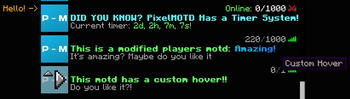


- Support for: Spigot, Paper, Velocity, Bukkit, Sponge, Waterfall, BungeeCord
- Multi color format support: Legacy, classic, MineDown, IridiumColorAPI, MiniMessage
- Customizable Max players
- Hex Colors Support (1.16+) (Gradient and Normal Hex)
- Per Motd Icons!
- Per Server & World Whitelist
- UUID System & Player Name System for Whitelist
- Different Motd for 1.16+ and 1.8-1.15 in the same motd-config.
- Center Text System
- Countdown System
- Customizable Motd Lines
- Customizable Protocol Version
- MultiMOTD Support
- Whitelist Permission Bypass
- Customizable Motd Hover
- Customizable Commands
- Custom Protocol Message
- Custom Server-Icon
- Performance Boost

Quick facts
- Edition: Minecraft Java
- File type: .jar
- Minecraft versions listed: 1.8.5, 1.8.6, 1.8.7
- How to install: Install the matching mod loader (Forge, Fabric or NeoForge) for your Minecraft version. → Download the .jar. → Put it in the .minecraft/mods folder and launch that loader profile.
- Where to get it: Opens on Modrinth — not every file is mirrored on our own servers.
Install steps are the general flow for this file type — How to install Minecraft Java mods & modpacks walks through it step by step.
File checked by MCModsHub
- Ships as PixelMOTD-9.3.9-SNAPSHOT.jar — drop this file into the mods folder
- Download size: 564 KB
- Download link checked 30 Oct 2026 — working
These come from our own check of the pack file, not from the source page.