
ModsJava
SimpleChat
Java mod listed for Minecraft 1.21–26.x. Downloads from the MC Java Mods app on Android.
I don't know my version or loader
Open the Minecraft launcher and look at the profile you play on — it names both, like fabric-loader-1.21.4. The version also shows in the bottom-right corner of the game's main menu.
No loader in the profile name? Then it's plain Minecraft, and these mods won't run — you need Fabric or NeoForge installed first.

SimpleChat
1.21 native simple chat formatting solution. Depends on LuckPerms & supports PlaceholderAPI. Group based, fast, and easy. No bloat, no lag, no fuss.
- Requires LuckPerms
- Supports PlaceholderAPI
- MiniMessage/Adventure Colors, Gradients, and Formatting
- Requires Paper or a fork. Spigot will not work!
- Configurable Event Priority (Allows you to override other plugins)
- Unlimited Group Formats
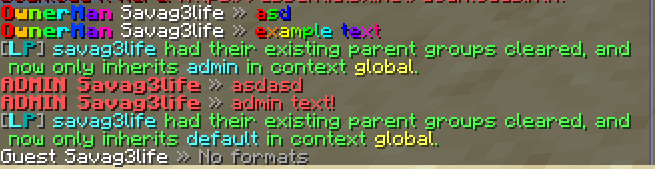
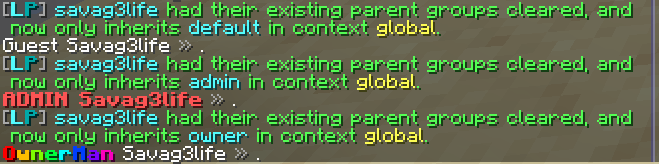
Config
formats:
  default: "%prefix% <white>%name%<reset> <gray>» %message%"
  admin: "%prefix% <bold>%name%<reset> <gray>»</gray> <red>%message%"
  owner: "%prefix%<reset> %name%<reset>%suffix%<reset> <gray>»</gray> <rainbow>%message%"

priority: HIGHEST
support_legacy_ampersand: true
debug: false

messages:
  no_permission: "<white>Unknown command."
  reloaded: "<green>Simple Chat Reloaded."
Quick facts
- Edition: Minecraft Java
- File type: .jar
- Minecraft versions listed: 1.21, 1.21.1, 1.21.2
- How to install: Install the matching mod loader (Forge, Fabric or NeoForge) for your Minecraft version. → Download the .jar. → Put it in the .minecraft/mods folder and launch that loader profile.
- Where to get it: Opens on Modrinth — not every file is mirrored on our own servers.
Install steps are the general flow for this file type — How to install Minecraft Java mods & modpacks walks through it step by step.
File checked by MCModsHub
- Ships as SimpleChat.jar — drop this file into the mods folder
- Download size: 17 KB
- Download link checked 9 Oct 2026 — working
These come from our own check of the pack file, not from the source page.