
DiscordBans
Punishment plugin with discord link and flexible config
Configuration
After starting the server, config.yml will be in plugins/DiscordBansN.
To start working with the plugin you must fill the fields:discord-bot-id (not webhook)discord-channel-id (chanell where will publish punishments)
You can edit every string in plugin config
Type of punishments
Ban/ban player reason
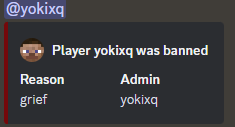
Example:
/ban yokixq grief
/tempban player time reason
Example:
/tempban yokixq 1d grief
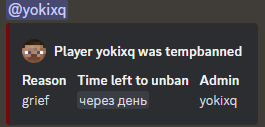
/warn type player time(optional) reason
In the plugin there is 3 types of warns
Red, Orange, Yellow
Red - This warn can only be removed by a moderator, no time to remove
/warn red yokixq grief
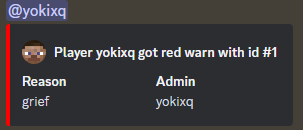
Yellow - This warn can be removed by the moderator and can be removed over time, when the yellow warning ends the player will be given a red warn, and the yellow warn will start again while moderator don't remove it
/warn yellow yokixq 1d grief
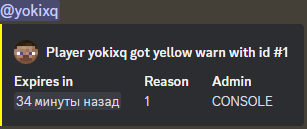
Orange - This warning can be removed by a moderator and can be removed over time. If a player has 3 orange warnings, they will receive a red warning and the orange warnings will be removed.
/warn orange yokixq 1d grief
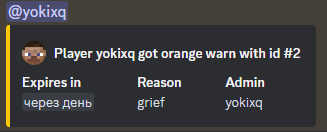
/mute player time reason
Example:
/mute yokixq 1d toxic
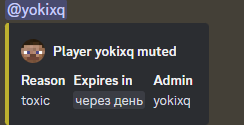
Commands
| Command | Permission | Information | DiscordSRV Hook | Slash Command |
|---|---|---|---|---|
| /ban | discordbansn.ban | Ban a player | ✅ | ✅ |
| /unban | discordbansn.unban | Unban a player | ✅ | ✅ |
| /tempban | discordbansn.tempban | Ban a player for time | ✅ | ✅ |
| /discordbans | discordbansn.reload | Reload config / Show version | ❌ | |
| /warn | discordbansn.warn | Warn a player | ✅ | ✅ |
| /unwarn | discordbansn.unwarn | Unwarn a player | ✅ | ✅ |
| /warns | discordbansn.warns | See your warns (or another player) | ❌ | |
| /mute | discordbansn.mute | Mute a player | ✅ | ✅ |
| /unmute | discordbansn.unmute | Unmute a player | ✅ | ✅ |
| /banlist | discordbansn.banlist | Shows a list of bans | ❌ |
DiscordSRV Hook
If you have DiscordSRV on your server, the plugin will ping players in message with punishment (if linking turn on)
Find bug or need help?
Do you want to know about future updates or report a problem => Discord
- Edition: Minecraft Java
- File type: .jar
- Minecraft versions listed: 1.20, 1.20.1, 1.20.2
- How to install: Install the matching mod loader (Forge, Fabric or NeoForge) for your Minecraft version. → Download the .jar. → Put it in the .minecraft/mods folder and launch that loader profile.
- Where to get it: Opens on Modrinth — not every file is mirrored on our own servers.
Install steps are the general flow for this file type — How to install Minecraft Java mods & modpacks walks through it step by step.
- Ships as DiscordBansN-2.36.jar — drop this file into the mods folder
- Download size: 31.1 MB
- Download link checked 29 Aug 2026 — working
These come from our own check of the pack file, not from the source page.