ModsJava
Velocity Discord
Java mod listed for Minecraft 1.7–1.21. Downloads from the MC Java Mods app on Android.
⬇ Download on Modrinth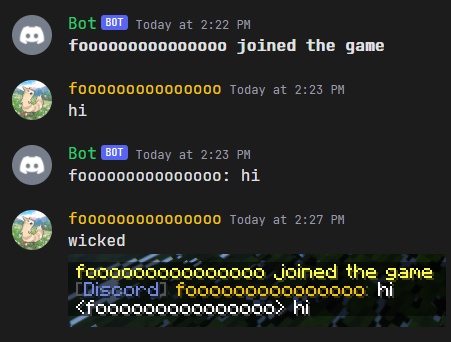
Velocity Discord
Chat from all servers gets bridged with a discord channel
Features
- Configurable
- Webhooks or embeds or normal text for messages
- Player count in bot status
- List command
- Templating syntax for all messages
- Death and Advancement messages shown
- Server start/stop messages
- Server status in channel topic
- Reload command for config changes while the server is running
Note This requires a companion Velocity plugin and companion backend mod/plugin for advancement/death messages
Installation
- Create a bot application here
- Go to the
Bottab and clickAdd bot
- Go to the
- Enable the
SERVER MEMBERS INTENTandMESSAGE CONTENT INTENTunderPrivileged Gateway Intents - Copy the bot's token, you might have to click
Reset Tokenfirst - Install the plugin on your server, start the server once, then stop the server again
- Open the plugin config file at
plugins/discord/config.toml - Under
[discord], paste your token in place ofTOKEN - Under
[discord], paste the channel id you want to use- To get a channel id, you have to enable developer mode in Discord
- Open Discord settings, go to
Advanced, then turn onDeveloper Mode - Now right-click the channel you want to use and click
Copy ID
- Set any additional config options you want
- Start the server and check if it works
For Webhooks
- Create a webhook in the channel you want to use
- Right-click the channel, click
Edit Channel, go toIntegrations, clickCreate Webhook - Copy the webhook URL
- Right-click the channel, click
- Paste the webhook URL under
[discord.webhook]in the config file
For advancements/deaths
- Install the YepLib velocity plugin alongside this plugin
- Install the YepTwo backend mod/plugin on each of your backend servers that you want to receive advancements/deaths from
Configuration
The config file is generated at plugins/discord/config.toml. See here for the default config
Quick facts
- Edition: Minecraft Java
- File type: .jar
- Minecraft versions listed: 1.7.2, 1.7.3, 1.7.4
- How to install: Install the matching mod loader (Forge, Fabric or NeoForge) for your Minecraft version. → Download the .jar. → Put it in the .minecraft/mods folder and launch that loader profile.
- Where to get it: Opens on Modrinth — not every file is mirrored on our own servers.
Install steps are the general flow for this file type — How to install Minecraft Java mods & modpacks walks through it step by step.
File checked by MCModsHub
- Ships as VelocityDiscord-2.0.0.jar — drop this file into the mods folder
- Download size: 7.4 MB
- Download link checked 19 Sept 2026 — working
These come from our own check of the pack file, not from the source page.