
Server Hider
Hides your server essentially making you invisible for server-scanners like: ServerSeeker, Copenheimer, Shodan, etc.. simply be hiding all of your server…
⬇ Download on Modrinth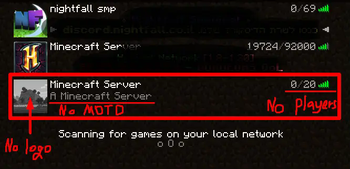
ServerHider
Hides your server and players info from server-scanners like: ServerSeeker, Copenheimer, Shodan, (etc..) by displaying the server info as default new created server for everyone except for players who already logged into the server once.
- PLEASE use Whitelist with this plugin! *
- Should be compatible with any MOTD plugin.
- Super light weight.
- Doesnt uses packets or complicated network overloads.
- As part of the logo hiding mechanism, the server icon need to be named
server-icon2.png.
How server scanners do it?
Most server scanners knows & searches for common hosting servers in the world, they find their IP's (or IP range),
and then checks every IP and pings it, when they ping an IP that respondes they try to find if that machine is used to host minecraft servers,
they doing it by pinging that IP with different ports and checks if a respond of a minecarft server MOTD comes, if it does, they save that IP/PORT to a list.
That list gets ping every X time to see wich players are currently playing (as that info is available in MOTD's player list), AND.. that the way they kmow how to track player's server history and exposes the origin IP of those servers!
How to fix it?
Simple! hide the data as much as you can!
- Hiding the player-list (to show 0/20) scanners just cant know who are the players in the server.
- Default MOTD, logo and player count helps with:
- Hiding any info of the origin of the server, it's name, it's commuinty and so.. making it less likely to be found by users who searches for it on the scanner.
- Making the scanner THINK its new empty server and by so making it less prioritize and in some scanners even completly removing it from the server list as it sees that this server is unused and just takes resources to the scanner.
How users sees it?
- At first any users who didnt logged to the server atleast once will see the server just like the scanner sees it.
- After a first login, the IP of the player gets saved in the config and every time that this IP trys to ping the server, it will send the correct server info.
Default(hidden) view:
Server will be shown like that:
- Defaulted MOTD.
- Defaulted player count (20) (note: only dispaly change, no actual change for this settings).
- Hides currently logged-in users (will show empty allways)!
Server will look like that for every player (or thing really) that didnt connected to the server atleast once!
*: some scanners try and log into a server if the playerlist is hidden to get who is currently on! PLEASE use whitelist to prevent them from doing so.
- Edition: Minecraft Java
- File type: .jar
- Minecraft versions listed: 1.16, 1.16.1, 1.16.2
- How to install: Install the matching mod loader (Forge, Fabric or NeoForge) for your Minecraft version. → Download the .jar. → Put it in the .minecraft/mods folder and launch that loader profile.
- Where to get it: Opens on Modrinth — not every file is mirrored on our own servers.
Install steps are the general flow for this file type — How to install Minecraft Java mods & modpacks walks through it step by step.
- Ships as ServerHider-1.2.1.jar — drop this file into the mods folder
- Download size: 6 KB
- Download link checked 29 Aug 2026 — working
These come from our own check of the pack file, not from the source page.