
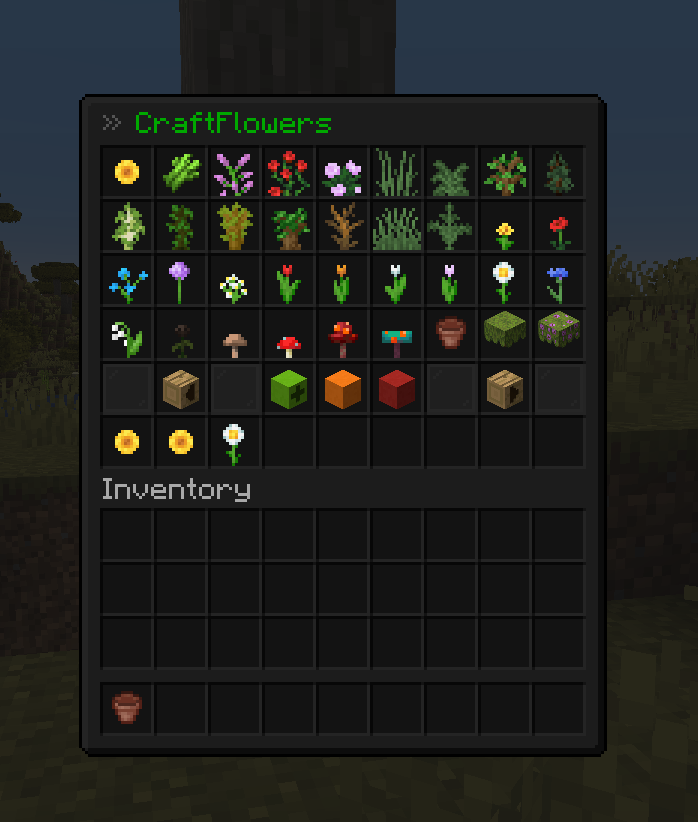

CraftFlowers 🌺
craftFlowers is a plugin whose goal is to create custom flowers easier and more efficiently.
Using an easy-to-use GUI you'll be able to create amazing variants of flowers!
Use /craftflowers help to get a list of all commands.
You can also use the alias /cf for all available commands.
Since my Plugin utilizes the WorldEdit-API you can also use //undo!
Make sure you have a recent version of FastAsyncWorldEdit installed!
SpigotMC: https://www.spigotmc.org/resources/craftflowers-1-16-1-17-port.82407/
Hangar: https://hangar.papermc.io/MenschenToaster/CraftFlowers
Permissions 🛡️
craftflowers.use - allows to open the GUIcraftflowers.place - allows to place the potcraftflowers.edit - allows to edit the potcraftflowers.save - allows save flowercraftflowers.load - allows load flowercraftflowers.delete - allow remove flowercraftflowers.admin - currently for notifications about new versions of the plugin
Commands
/cf - Open GUI/cf help - Shows all commands/cf save <name> - Saves the currently held flower/cf load <name> - Loads a saved flower/cf delete <name> - Removes the saved flower/cf info - Shows info about the plugin//undo - Undo the flower (command from WorldEdit)
Plugin Reviews
Version 1.0.0 in Dutch
- Edition: Minecraft Java
- File type: .jar
- Minecraft versions listed: 1.16, 1.16.1, 1.16.2
- How to install: Install the matching mod loader (Forge, Fabric or NeoForge) for your Minecraft version. → Download the .jar. → Put it in the .minecraft/mods folder and launch that loader profile.
- Where to get it: Opens on Modrinth — not every file is mirrored on our own servers.
Install steps are the general flow for this file type — How to install Minecraft Java mods & modpacks walks through it step by step.
- Ships as CraftFlowers-1.2.5-all.jar — drop this file into the mods folder
- Download size: 128 KB
- Download link checked 29 Aug 2026 — working
These come from our own check of the pack file, not from the source page.