
EzAuction
I don't know my version or loader
EzAuction is a complete, GUI-driven auction house plugin for Paper, Spigot, Purpur, and Bukkit Minecraft servers. Players list items for timed sale, create reserve-balance buy orders, and compete in real-time live broadcast auctions – all through smooth, paginated menus backed by Vault economy, MySQL or YAML persistence, PlaceholderAPI support, and optional Discord webhook notifications.
Whether you run survival, skyblock, SMP, or factions, EzAuction handles your server economy: timed listings, offline-safe item returns, enchantment-aware search, live auction sessions with one-click bidding, and team-scoped auctions via TeamsAPI.
| Platforms | Paper, Spigot, Purpur, Bukkit 1.13 – 26.1.* |
| Java | 21+ |
| Storage | YAML (built-in) · MySQL |
| Languages | English · Dutch · Spanish · Chinese |
| Dependencies | Vault + any economy plugin |
Requires Vault and a compatible economy plugin such as EzEconomy to process currency.
What's New – v2.3.0
Live Auction Overhaul
- Live auction seller management – Players with
ezauction.auction.live.sellcan now queue items directly from the Live Auction browser (sell button in the GUI) or via/liveauction sell. On enqueue, a chat message confirms the queue position./liveauction cancelremoves the entry and refunds the deposit; a cancel button also appears in the GUI while the player has a queued entry. Admins withezauction.auction.live.admincan force-cancel any active auction with/liveauction cancel <id>. /bidcommand (alias/livebid) – Dedicated command for live auction interactions: place bids (/bid <amount>), view session status, and manage per-player countdown preferences. Bids can also be placed by clicking the suggestion in the live auction chat message.- Per-player notification preferences – Toggle countdowns with
/bid notify [on|off]and select display type with/bid notify display <types…>. Preferences persist across restarts inlive-preferences.yml(or a MySQL table). - EzCountdown integration (optional soft-dependency) – Display live auction countdowns via
ACTION_BAR,BOSS_BAR,TITLE,SCOREBOARD, orCHAT. - Clickable bid messages & item hover previews – The bid announcement in chat links directly to
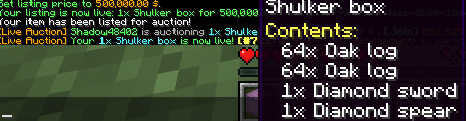
/bid <next-minimum>; hovering the item name shows enchantments, potion effects, and shulker box contents on hover. - Five new Bukkit events –
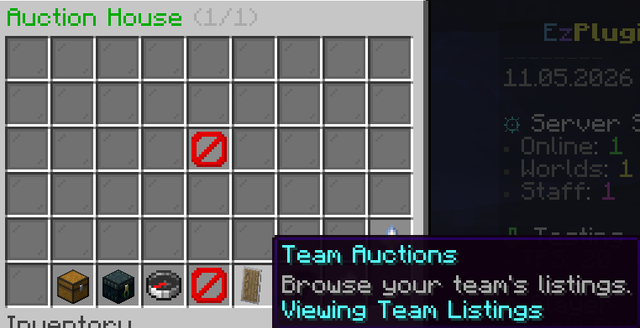
LiveAuctionStartedEvent(cancellable),LiveAuctionBidPlacedEvent(cancellable),LiveAuctionEndedEvent,LiveAuctionPlayerJoinedEvent,LiveAuctionPlayerLeftEvent. - Live Auctions shortcut in Auction House – A quick-access beacon button (slot 47) in the main
/auctionbrowser opens the Live Auction picker directly, without having to type/liveauction.


Fixes & Other Additions
- Claim GUI –
/auction claimand the Claims button in the browser now open a 54-slot GUI showing each pending return item with its expiry date displayed in the item lore. A single Claim All button collects everything at once; a Back button returns to the auction browser. - Configurable claim expiry – Set
claim.expiry-daysinauction.yml(default7) to control how many days pending return items are held before expiry is shown in the Claim GUI. - First-bid minimum fix – The opening bid on a live auction now only requires the starting price; the increment is applied to subsequent bids only. Sending an empty
/bidresponse automatically places the minimum bid.
Why Use EzAuction?

- Menu-first trading – Paginated browsers, sell/order editors, and confirmation popups keep every transaction guided and click-friendly.
- Listings + buy orders – Run timed sales, reserve balance for buy requests, and fulfill either side straight from the GUI or command flow.


- Team auctions – TeamsAPI integration lets team members co-list and co-claim auctions, perfect for faction and skyblock economies.
- Async persistence & fallbacks – Listings and history write through dedicated executors, automatically falling back to YAML storage if MySQL is unreachable.
- Offline-safe returns – Expired or undeliverable items go to a claimable stash with login reminders and
/auction claimrecovery. - Rank-aware limits – Plug in a custom
AuctionListingLimitResolverservice to scale slot caps with ranks, islands, or progression data. - Smart value overlays – Surface configured price hints or pipe in EzShops buy/sell estimates directly into menu lore.

Feature Highlights
- Configurable menus & translations – Override browser/confirm layouts, filler glass, and button text across the bundled English, Dutch, Spanish, and Chinese menu files.
- Flexible storage – Start on lightweight YAML or flip to production-ready MySQL with connection pooling, SSL flags, and table prefixes.
- Asynchronous history – Background save queues batch player history writes to keep gameplay responsive, even during heavy auction traffic.
- Player protections – Deposit refunds, balance checks, expiry sweeps, and inventory-aware delivery prevent dupes and lost currency.
- PlaceholderAPI support – Drop
%ezauction_*%placeholders into scoreboards, holograms, or chat to surface active listings, orders, limits, and pending returns. - Integration-ready API – Register Bukkit services to override listing caps or provide custom value providers without forking the plugin.
- Enchant-aware search – Search
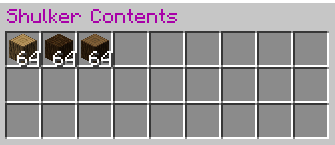
sharpness v,fortune 3, orminecraft:lootingto find listings and buy orders carrying exact enchantment stacks - supports roman numerals, numeric levels, namespaced keys, and underscore/space variants. - Shulker box previews – Buyers can inspect shulker contents directly from the auction browser before purchasing.
Discord Integration
- Standalone webhook – Post colour-coded embed notifications to any Discord channel by pasting a webhook URL into
discord.yml. No DiscordSRV or bot setup required. - DiscordSRV support – Optionally route notifications through an existing DiscordSRV installation with optional account-linking and role-gating per event.
- Four event types – Receive a message whenever an auction is listed, sold, bid on, or cancelled, each styled with its own accent colour (green / blue / yellow / red).
- Live admin commands – Configure, enable, disable, and test the webhook in-game with
/auctiondiscord webhook- changes take effect instantly without a restart. - Async & non-blocking – All HTTP calls run on a background thread; a failed delivery is logged at WARNING level and never interrupts gameplay.
- Open the target Discord channel → Edit Channel → Integrations → Webhooks → New Webhook → Copy Webhook URL.
- In-game or via console, run:
/auctiondiscord webhook set url https://discord.com/api/webhooks/YOUR_ID/YOUR_TOKEN - Verify with
/auctiondiscord webhook test- a test embed will appear in your channel immediately.
# discord.yml - webhook section
webhook:
  enabled: true
  url: "https://discord.com/api/webhooks/123456789/YOURTOKEN"
  username: "EzAuction"
  use-embeds: true
  events:
    auction_start: true
    auction_end: true
    auction_bid: true
    auction_cancel: true
For the full DiscordSRV integration guide and all options, see the Discord integration docs.
Hologram Features
- Auction holograms – Place interactive holograms in the world to display live auction stats, top listings, or buy order summaries. Supports click/touch interaction for quick info and future actions.
- Performance optimized – Configurable max hologram count and batch update options ensure smooth gameplay even with many holograms active.
- Permission and proximity controls – Optionally restrict hologram visibility and interaction by permission node or player proximity (distance).
- Configurable types – Choose which auction stats or listings to display via hologram type selection.
holograms:
  enabled: true
  update-interval-ticks: 100
  search-radius: 2.5
  height-offset: 1.75
  max-holograms: 100
  batch-update: true
  require-permission: false # Set true to require a permission node
  view-permission: ezauction.hologram.view # Permission node for viewing/interacting
  proximity-limit: false # Set true to restrict by distance
  proximity-distance: 32.0 # Max distance for interaction
Quick Start
- Upload
EzAuction.jar, restart your Paper or Purpur server, and confirm Vault plus an economy plugin are active. - Edit
plugins/EzAuction/auction.ymlfor pricing rules, durations, and GUI slots, adjustauction-storage.ymlfor YAML/MySQL persistence, and updateauction-values.ymlormessages/menu-interactions_*.ymlas needed. - Choose between YAML or MySQL storage, then grant players
ezauction.auction(and optional sell/order/history nodes) so they can browse and trade. - Encourage
/auction historyso buyers and sellers can audit their latest activity right from chat.
Live Auctions
- Queue the spotlight listings – Flip
live-auctions.enabledon (andqueue-enabledif you want a rolling lineup) so fresh sales are staged for broadcast and visible through/liveauction. - Sell from the GUI – The Live Auction browser shows a sell button for players with
ezauction.auction.live.sell. One click opens the sell menu pre-configured for the live queue – no command needed. - Queue position feedback – After queuing an item, the seller receives a chat confirmation with their position number. If the queue is disabled, the auction starts immediately and a different confirmation is shown.
- Cancel anytime – A cancel button appears in the GUI while the player has a queued entry; clicking it (or running
/liveauction cancel) dequeues the item and refunds the deposit. - Admin force-cancel – OPs and players with
ezauction.auction.live.admincan stop an active auction immediately via/liveauction cancel <auction-id>. All bids are refunded and the item is returned to the seller. /bidcommand – Bidders place bids with/bid <amount>or by clicking the clickable suggestion in chat./bid notifyand/bid notify displaymanage per-player countdown preferences.- Hype them in chat – Keep
display-in-chatenabled to broadcast live listings everyannouncement-interval-ticksticks with clickable bid links and hover previews on the item name.
- Curate from the live menu – The Live Auctions GUI shows queue position, seller names, price summaries, and highlights your own entry with a badge and enchant glow.
Commands & Permissions
| Command | Description | Permission |
|---|---|---|
/auction |
Open the auction browser, claim items, and cancel listings. | ezauction.auction |
/auction sell <price> [duration] |
List the held item instantly or open the sell GUI. | ezauction.auction.sell |
/auction order <price> <amount> [duration] |
Create a buy order with reserved funds. | ezauction.auction.order |
/auction cancel [id] |
Review and cancel active listings or buy orders. | ezauction.auction |
/auction history [buy/sell] |
Show the latest transactions for each category. | ezauction.auction.history |
/auction live |
Preview upcoming live auction broadcasts and refresh the queue. | ezauction.auction.live |
/liveauction |
Open the live auction viewer. | ezauction.live |
/liveauction sell |
Queue the held item for the live auction. | ezauction.auction.live.sell |
/liveauction cancel |
Cancel your own queued live auction entry and receive a deposit refund. | ezauction.auction.live.sell |
/liveauction cancel <id> |
Force-cancel an active live auction by ID. Refunds all bidders and returns the item. (Admin) | ezauction.auction.live.admin |
/bid [amount] |
Place a bid or view session status in an active live auction. | ezauction.bid |
/auction claim |
Withdraw stored return items. | ezauction.auction |
/auction search <query> |
Open the auction browser filtered by item name, enchantment, or keyword. | ezauction.auction.search |
/auctionhologram <create/remove/list> [args] |
Manage auction holograms: create, remove, or list in-world auction displays. | ezauction.hologram.manage |
Setup Guide
Installation & ConfigurationNeed more details? See the full documentation for all YAML, MySQL, menu, and advanced settings options.
Requirements
| Requirement | Notes |
|---|---|
| Java 21+ | Matches the Paper 1.21+ API target used by EzAuction. |
| Paper / Spigot / Purpur 1.21+ | The plugin relies on Paper-compatible server APIs. |
| Vault | Provides the economy bridge for deposits, buy orders, and payouts. |
| Economy plugin (recommended: EzEconomy) | A Vault-compatible provider is required. EzEconomy is recommended for best compatibility and modern features. |
| Optional: EzShops | Unlock live value overlays via values.mode = ezshops-buy or ezshops-sell. |
| Optional: Custom limit resolver | Expose AuctionListingLimitResolver as a Bukkit service to scale listing caps. |
| Optional: Menu localisation overrides | Duplicate the bundled _nl, _es, or _zh menu files to keep translations in sync with your branding. |
Configuration Overview
- Storage selection – Toggle
storage.typebetweenyamlandmysql; MySQL connections support SSL flags and pool tuning. - Menus –
menu.browserandmenu.confirmcontrol inventory sizes, filler panes, and navigation slots across all language variants. - Sell & order editors – Configure default price suggestions and click adjustments for both listing and buy-order editors.
- Listing rules – Clamp durations, enforce minimum pricing, schedule custom duration options, and reserve refundable deposits, with automatic executor-based expiry sweeps.
- Menu interactions – Tweak click increments, confirmation buttons, and chat prompts through
messages/menu-interactions_*.ymlper locale. - Live auctions – Manage
live-auctions.enabled,queue-enabled,display-in-chat, andannouncement-interval-ticksto stage listings for announcements or GUI previews. - Value display – Display configured material prices or EzShops-sourced estimates, templated through
values.format.
Optional Integrations
- Expose a custom
AuctionListingLimitResolverservice to scale listing caps with ranks, islands, or other progression data. - Install EzShops so the auction browser can display buy or sell prices directly in listing lore when configured.
- Install PlaceholderAPI to unlock
%ezauction_*%placeholders for leaderboards, scoreboards, or Discord relays.
Network Setup (Bungee/Velocity)
- Switch
storage.typetomysqland point each Paper/Purpur backend to the same credentials so listings, buy orders, and returns are stored centrally. The bundled MySQL driver implementsDistributedAuctionListingStorageso inserts and claims remain atomic across servers. - Drop the same
EzAuction.jaron every gameplay server behind your proxy, then copy a single set of tuned configs (auction.yml,auction-storage.yml,messages/*.yml) to keep menus, limits, and language consistent network-wide. - Restart each backend (avoid /reload) after editing the configs so every instance warms its cache from MySQL before players join. The manager only serves listings once storage is marked ready.
- If a lobby should not show auctions, leave EzAuction off that node or point it at a different
table-prefixso it maintains a separate pool. - Confirm every server shares the same Vault economy provider or synchronised balance backend. Currency withdrawals happen locally, so mismatched economy data across nodes can desync deposits and reserved funds.
- EzAuction ships with
menu-layout_*.ymlandmenu-interactions_*.ymlbundles for English, Dutch, Spanish, and Chinese (_en,_nl,_es,_zh). - Copy any bundle to another locale tag (for example
_de) to introduce custom language support without touching code. - Keep button text consistent across languages so navigation slots and confirmation buttons remain aligned with the GUI configuration.
package com.example.auctionlimits;

import com.skyblockexp.ezauction.api.AuctionListingLimitResolver;
import org.bukkit.Bukkit;
import org.bukkit.plugin.ServicePriority;
import org.bukkit.plugin.java.JavaPlugin;

public final class AuctionLimitPlugin extends JavaPlugin {

    @Override
    public void onEnable() {
        saveDefaultConfig();

        AuctionListingLimitResolver resolver = (sellerId, baseLimit) -> {
            int bonus = getConfig().getInt("extra-slots." + sellerId.toString(), 0);
            return Math.max(0, baseLimit + bonus);
        };

        Bukkit.getServicesManager().register(
                AuctionListingLimitResolver.class,
                resolver,
                this,
                ServicePriority.Normal
        );
    }

    @Override
    public void onDisable() {
        Bukkit.getServicesManager().unregisterAll(this);
    }
}
name: AuctionLimitPlugin
version: 1.0.0
main: com.example.auctionlimits.AuctionLimitPlugin
loadbefore: [EzAuction]
# plugins/AuctionLimitPlugin/config.yml
extra-slots:
  123e4567-e89b-12d3-a456-426614174000: 2
  2a2f4982-0c7a-4f13-86a1-4f85c4a94cf7: 4
This companion plugin registers before EzAuction enables and adds any configured bonus slots per player UUID on top of EzAuction's base limit. Update the UUID keys or compute the bonus however you like to reflect your network's progression rules.
Configuration at a Glanceauction.yml
storage:
  type: yaml # or mysql
  mysql:
    host: localhost
    port: 3306
    database: skyblock
    username: root
    password: secret
    use-ssl: true
    table-prefix: ezauction_
    pool:
      maximum-pool-size: 10
      minimum-idle: 2
      connection-timeout-millis: 10000
      idle-timeout-millis: 600000
      max-lifetime-millis: 1800000
menu:
  browser:
    title: "&2Auction House &7({page}/{total_pages})"
    size: 54
    filler:
      material: GRAY_STAINED_GLASS_PANE
      display-name: "&8 "
    navigation:
      previous-slot: 45
      close-slot: 49
      next-slot: 53
    empty-listing-slot: 22
  confirm:
    title: "&2Confirm Purchase"
    size: 27
    filler:
      material: GRAY_STAINED_GLASS_PANE
      display-name: "&8 "
    confirm-slot: 11
    listing-slot: 13
    cancel-slot: 15
listings:
  default-duration-hours: 24
  max-duration-hours: 72
  minimum-price: 10.0
  listing-deposit-percent: 5.0
  max-listings-per-player: 3
live-auctions:
  enabled: false
  queue-enabled: true
  display-in-chat: true
  announcement-interval-ticks: 200
values:
  enabled: false
  format: "&7Value: &6{value}"
  materials:
    diamond: 2500.0
auction-storage.yml
type: yaml # or mysql
mysql:
  host: localhost
  port: 3306
  database: skyblock
  username: root
  password: secret
  use-ssl: true
  table-prefix: ezauction_
  pool:
    maximum-pool-size: 10
    minimum-idle: 2
    connection-timeout-millis: 10000
    idle-timeout-millis: 600000
    max-lifetime-millis: 1800000
auction-values.yml
enabled: false
mode: configured # or ezshops-buy / ezshops-sell
format: "&7Value: &6{value}"
materials:
  diamond: 2500.0
Support & Links
- Discord: Join the EzPlugins server for help, bug reports, and release announcements.
- Documentation: ez-plugins.github.io/ezauction
- EzEconomy - Modern Vault economy plugin, recommended for best compatibility.
- EzShops - Dynamic player shops and GUI, integrates with EzAuction value overlays.
Ready to add an auction house to your Minecraft server?
Deploy EzAuction today - a polished, GUI-driven auction house plugin for Paper, Spigot, Purpur, and Bukkit. Download, drop in the jar, configure Vault, and your players are trading in minutes.
- Edition: Minecraft Java
- File type: .jar
- Minecraft versions listed: 1.21, 1.21.1, 1.21.2
- How to install: Install the matching mod loader (Forge, Fabric or NeoForge) for your Minecraft version. → Download the .jar. → Put it in the .minecraft/mods folder and launch that loader profile.
- Where to get it: Opens on Modrinth — not every file is mirrored on our own servers.
Install steps are the general flow for this file type — How to install Minecraft Java mods & modpacks walks through it step by step.
- Ships as EzAuction-2.3.1.jar — drop this file into the mods folder
- Download size: 5.5 MB
- Download link checked 29 Aug 2026 — working
These come from our own check of the pack file, not from the source page.