
rpchat
I don't know my version or loader


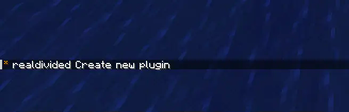
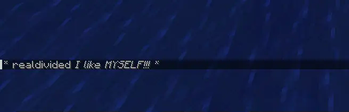

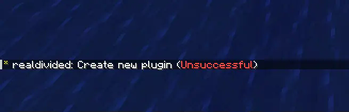
rpchat — Advanced Roleplay Chat Plugin
rpchat is a lightweight, modern, and highly customizable roleplay chat plugin for Minecraft servers. It enhances roleplay experience with powerful emote-style commands, local/global messaging, full Adventure (MiniMessage) support for beautiful formatting, HEX colors, gradients, hover/click events, and full PlaceholderAPI integration.
Perfect for RP servers, survival servers with roleplay elements, or any server that wants immersive chat actions!
Features
Local & Global Emotes:
/me– Local third-person action (visible only to nearby players)/gme– Global third-person action (visible to everyone)/do– Local action description/try– Try something with random success/failure result/dice– Toss a 6-sided die/coin– Toss a coin (heads/tails)/whisper– Whisper to nearby players
Modern Formatting with Adventure & MiniMessage:
- HEX colors:
<#FF0000>red text</color> - Gradients:
<gradient:#FFAA00:#FFFF00>rainbow</gradient> - Styles:
<bold>,<italic>,<underline>,<strikethrough> - Hover & Click:
<hover:show_text="Click me!"><click:run_command:/say hi>clickable</click></hover>
- HEX colors:
Full PlaceholderAPI Support:
- Use any placeholders in formats:
%player_name%,%vault_eco_balance%,%luckperms_prefix%,%player_ping%, etc. - Placeholders are personalized — each player sees their own values!
- Use any placeholders in formats:
Fully Configurable:
- Customize every command format, radius, usage messages, results, etc.
- One global permission:
rpchat.commands(default: true) - Custom no-permission message
Performance & Compatibility:
- Works perfectly on Paper, Folia, and Purpur
- Supports Minecraft 1.15 – 1.21+
- No external dependencies required (PlaceholderAPI is optional)
Supported Versions
| Minecraft Version | Tested | Supported | Notes |
|---|---|---|---|
| 1.15 – 1.18 | ✅ | ✅ | |
| 1.19 – 1.20 | ✅ | ✅ | Full Folia support |
| 1.21 – 1.21.11 | ✅ | ✅ | Latest Adventure & MiniMessage |
Installation
- Download the latest version from Releases
- Place
rpchat-x.x.x.jarinto yourplugins/folder - (Optional) Install PlaceholderAPI for extra placeholders
- Restart the server
- Edit
plugins/rpchat/config.ymlto your liking - Done!
Permissions
rpchat.commands– Allows using all rpchat commands
Default: true (everyone can use them)
Commands
| Command | Description | Radius (configurable) |
|---|---|---|
/me |
Local third-person action | Yes |
/gme |
Global third-person action | No |
/do |
Local action description | Yes |
/try |
Try something (random success/failure) | Yes |
/dice |
Toss a 6-sided die | Yes |
/coin |
Toss a coin (heads/tails) | Yes |
/whisper |
Whisper to nearby players | Yes |
- Edition: Minecraft Java
- File type: .jar
- Minecraft versions listed: 1.21, 1.21.1, 1.21.2
- How to install: Install the matching mod loader (Forge, Fabric or NeoForge) for your Minecraft version. → Download the .jar. → Put it in the .minecraft/mods folder and launch that loader profile.
- Where to get it: Opens on Modrinth — not every file is mirrored on our own servers.
Install steps are the general flow for this file type — How to install Minecraft Java mods & modpacks walks through it step by step.
- Ships as rpchat-1.5.0.jar — drop this file into the mods folder
- Download size: 19 KB
- Download link checked 29 Aug 2026 — working
These come from our own check of the pack file, not from the source page.