
AutoShutdown
Automatically stop/shutdown your server after no players have been online for a specific amount of time. Free Minecraft Java mod for 1.8, 1.8.1, 1.8.2.
I don't know my version or loader
AutoShutdown
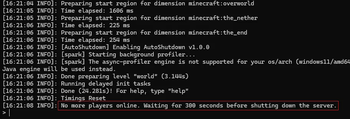
Automatically stop/shutdown your server after no players have been online for a specific amount of time. Nothing more, nothing less.
Why? This frees up resources on your system and can minimize the risk of unwanted attention to your server while no one is there to monitor it.
Installation
- Put the .jar file in your plugins or mods folder (depending on server loader you are using).
- Run the server once to generate the config file and stop it again
- Change any config values if wanted
- Run the server again
- The plugin/mod should now be working
Config
| value | loader * | explanation |
|---|---|---|
| initial_delay | bukkit, fabric | Specifies the delay before the first check for 'online players'. |
| polling_delay | fabric | The amount of time between each check for 'online players' |
| shutdown_delay | bukkit, fabric | Timeframe after the last person has left the server (or after the initial delay has ended), until the server is actually shut down. If a new player joins the server within this timeframe, the shutdown process will be cancelled. |
| enable_logging | bukkit, fabric | Whether or not basic information should be logged to the console. When disabled, warnings and errors will still be logged but no basic information. |
* Depending on the version of the plugin/mod you are using (e.g. bukkit or fabric) some values might or might not be relevant to you and thus not exist within your config file. The plugin/mod itself however will still work perfectly fine :). For the values that do exist, you can find their explanation here.
Help! Which version do I use?
- For any minecraft servers based on fabric (e.g. fabric, quilt, etc.) use the version annotated with [fabric].
- For servers based on bukkit (e.g. craftbukkit, spigot, paper, etc.) use the [bukkit] annotated version.
Newer minecraft version needed?
Just try the newest version of the plugin for your loader (see "Help! Which version do I use?" above), it will likely work anyway.
I don't update the supported versions section often enough to keep up with the rate at which new minecraft versions drop, srry!
Questions, bugs or feature requests?
Please use the github issues page for this as I will probably not read this modrinth page that often.
- Ships as AutoShutdown-bukkit-1.0.0.jar — drop this file into the mods folder
- Download size: 3 KB
- Download link checked 29 Aug 2026 — working
These come from our own check of the pack file, not from the source page.