Format
A plugin (and now MOD) that will help you with data pack creation. It can generate NBT and JSON advancement areas with a world edit-like tool.
I don't know my version or loader
New project link -> https://modrinth.com/mod/format2.0
Format tool
With this tool, you can generate an NBT area or JSON advancement area. Have you ever thought it annoying to sit and count to make NBT select areas, now you can automatically generate them with this tool!
Commands
- /formattool - This will give you the tool to select the area. (Will only work in creative)
- /format nbt or json - It will give you a formatted NBT selector or JSON.
For example "[x=0,y=0,z=0,dx=0,dy=0,dz=0]". If you left click the message in the chat you will copy it to your clipboard
Tool
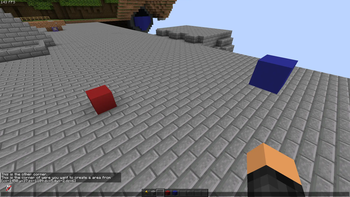
With the tool you can left and right click to get the area. Exactly like world edit
Looking for a server?
Get BisectHosting and save 25% off for new customers using code Lukas at checkout. Thanks for your support - it helps me develop this and other mods I make! #ad

- Edition: Minecraft Java
- File type: .jar
- Minecraft versions listed: 1.20, 1.20.1, 1.20.2
- How to install: Install the matching mod loader (Forge, Fabric or NeoForge) for your Minecraft version. → Download the .jar. → Put it in the .minecraft/mods folder and launch that loader profile.
- Where to get it: Opens on Modrinth — not every file is mirrored on our own servers.
Install steps are the general flow for this file type — How to install Minecraft Java mods & modpacks walks through it step by step.
- Ships as Format-1.5.jar — drop this file into the mods folder
- Download size: 10 KB
- Download link checked 29 Aug 2026 — working
These come from our own check of the pack file, not from the source page.