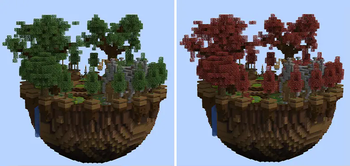
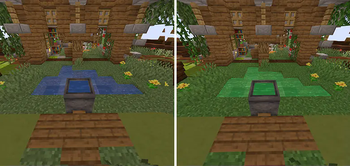
Building tool to change the color of grass, leaves, water or the sky in a region using custom biomes.
Requires FAWE or FAWE for folia.
Supported version: 1.20.5 - 1.21.11

❗ You must reconnect in order to see some of the changes
❗ Due to the way biomes work in minecraft, selections, especially small ones, might not be precise.
Commands
//getbiomecolors - get the colors of the biome you're in
//setgrasscolor #hexcode [namespace:biomename] - change the color of grass, ferns and sugarcane
//setfoliagecolor #hexcode [namespace:biomename] - change the color of leaves and vines
//setdryfoliagecolor #hexcode [namespace:biomename] - change the color of dry foliage
//setwatercolor #hexcode [namespace:biomename] - change the color of water
//setwaterfogcolor #hexcode [namespace:biomename] - change the color of the fog while in water
//setskycolor #hexcode [namespace:biomename] - change the color of the sky
//setfogcolor #hexcode [namespace:biomename] - change the color of the fog
//setsunrisesunsetcolor #hexcode [namespace:biomename] - change the color of the sun rise and sun set
//setcloudcolor #hexcode [namespace:biomename] - change the color of the cloud
//setskylightcolor #hexcode [namespace:biomename] - change the color of the sky light
#hexcode - the hex color code
namespace:biomename - (Optional) the biome name that shows up when you press F3
Permissions
custombiomecolors.all
custombiomecolors.get
custombiomecolors.grass
custombiomecolors.foliage
custombiomecolors.dryfoliage
custombiomecolors.water
custombiomecolors.waterfog
custombiomecolors.sky
custombiomecolors.fog
custombiomecolors.sunrisesunset
custombiomecolors.cloud
custombiomecolors.skylight
- Edition: Minecraft Java
- File type: .jar
- Minecraft versions listed: 1.20.5, 1.20.6, 1.21
- How to install: Install the matching mod loader (Forge, Fabric or NeoForge) for your Minecraft version. → Download the .jar. → Put it in the .minecraft/mods folder and launch that loader profile.
- Where to get it: Opens on Modrinth — not every file is mirrored on our own servers.
Install steps are the general flow for this file type — How to install Minecraft Java mods & modpacks walks through it step by step.
- Ships as CustomBiomeColors-2.6.0+1.20.5-26.2.jar — drop this file into the mods folder
- Download size: 225 KB
- Download link checked 29 Aug 2026 — working
These come from our own check of the pack file, not from the source page.