
Journey
I don't know my version or loader
Journey
Journey will help you and your players navigate your server by quickly calculating a path to get there, whether it be walking, swimming, boating, flying, going through portals, or even teleporting with commands.
If you die, use /jt death to navigate to where you died. If you need help getting out of a cave, use /jt surface. If you want to go to the nether, try /jt the_nether.
You can also set custom locations called waypoints. For example, try /journey setwaypoint home, then type /jt home anywhere on the server to find your way back.
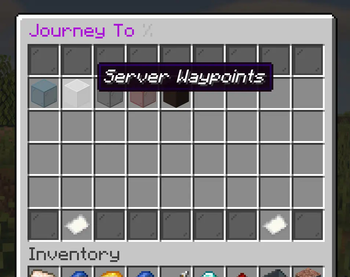
If you would prefer a GUI, you can simply type /jt and click on the place you want to go.
Check out the wiki to learn how to use Journey!
Use Journey with your Server's Plugins
Journey also can work with other plugins. We recommend you use the corresponding "integration plugin" on your server if you use any of these popular plugins:
- EssentialsX by mdcfe -- download JourneyEssentials
- When traveling from place to place, users may be prompted to teleport using Essentials teleport commands
- For a more vanilla experience, disallow teleportation. Users may still travel to existing warp or home locations using Journey.
- NotQuests by Alessio -- download JourneyNotQuests
- Enable Journey on your quest objectives to automatically help your players navigate to the objective location as soon as they activate it!
Learn more on the wiki.
Found a bug?
Or have any other requests? Use the issue tracker
Are you a developer?
Do you want to help with Journey? Journey is open source. Are you developing your own plugin? You can leverage Journey's helpful and growing API to give your plugin powerful navigation features!
- Edition: Minecraft Java
- File type: .jar
- Minecraft versions listed: 1.20.6, 1.21, 1.21.1
- How to install: Install the matching mod loader (Forge, Fabric or NeoForge) for your Minecraft version. → Download the .jar. → Put it in the .minecraft/mods folder and launch that loader profile.
- Where to get it: Opens on Modrinth — not every file is mirrored on our own servers.
Install steps are the general flow for this file type — How to install Minecraft Java mods & modpacks walks through it step by step.
- Ships as Journey-Bukkit-1.3.1.jar — drop this file into the mods folder
- Download size: 2.9 MB
- Download link checked 29 Aug 2026 — working
These come from our own check of the pack file, not from the source page.