
Reset Anvil Cost
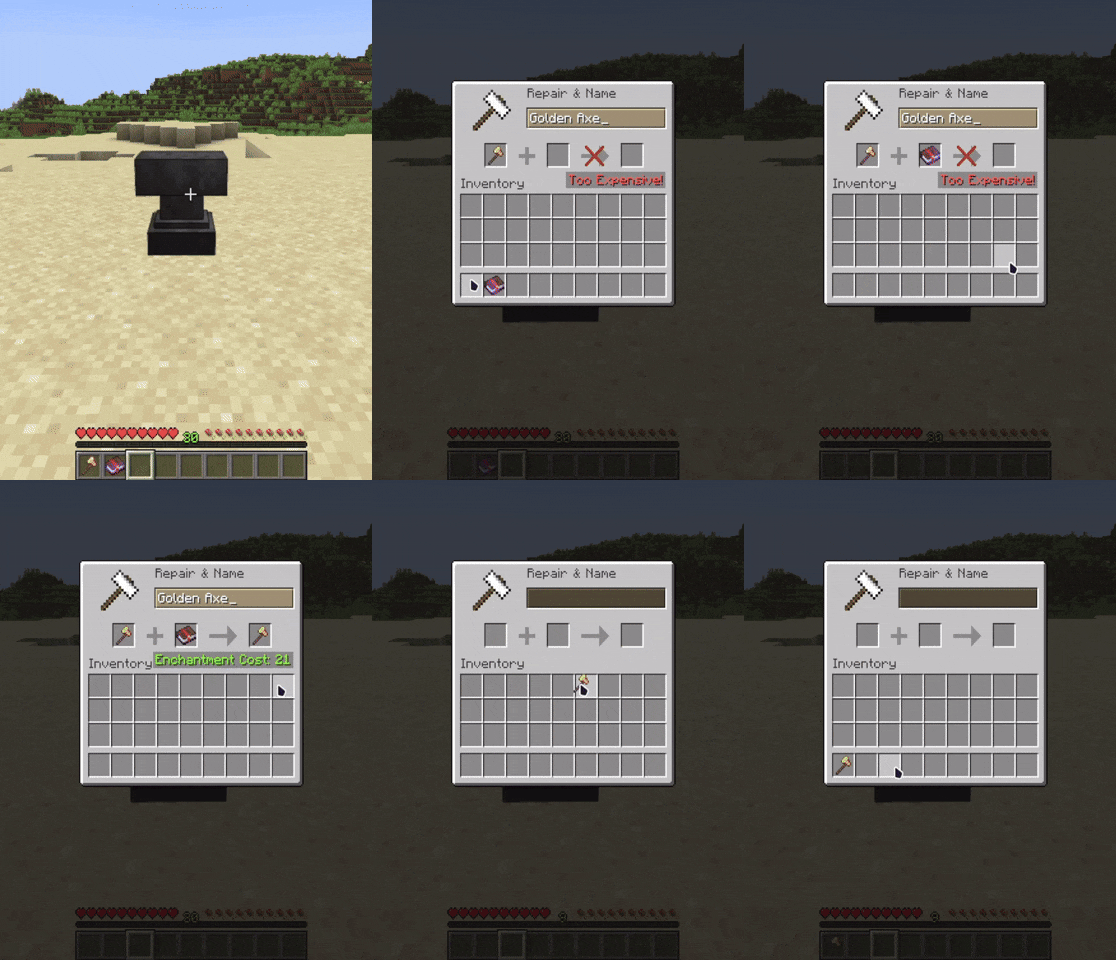
A simple plugin to reset the repair cost of an item to a lower level to avoid the "Too Expensive!" text from Minecraft
I don't know my version or loader
Reset Anvil Repair Cost
Avoid the annoying Too Expensive! text
Supported Versions: 1.20 and above
This simple plugin ensures that the Repair Cost of any item remains within the allowed limit set in the configuration file.
Since that limit is enforced client-side, the current solution is to cap the repair cost of items at 40 levels
Commands:
Command to reload the configuration file
/anvilresetcost reload
Permissions:
Permission for Players to be able to use the plugin
resetrepaircost.userPermission to reload the configuration file
resetrepaircost.admin
If an item has already surpassed the Repair Cost limit and/or is already showing the "Too Expensive!" text, you can revert it to the Adjusted Cost by simply clicking on the item while it is in the Anvil Slot.
- Edition: Minecraft Java
- File type: .jar
- Minecraft versions listed: 1.20, 1.20.1, 1.20.2
- How to install: Install the matching mod loader (Forge, Fabric or NeoForge) for your Minecraft version. → Download the .jar. → Put it in the .minecraft/mods folder and launch that loader profile.
- Where to get it: Opens on Modrinth — not every file is mirrored on our own servers.
Install steps are the general flow for this file type — How to install Minecraft Java mods & modpacks walks through it step by step.
- Ships as AnvilCost-0.0.5.jar — drop this file into the mods folder
- Download size: 6 KB
- Download link checked 29 Aug 2026 — working
These come from our own check of the pack file, not from the source page.