
VirtualStorages | Backpacks
Java mod listed for Minecraft 1.20–1.21. Downloads from the MC Java Mods app on Android.
I don't know my version or loader
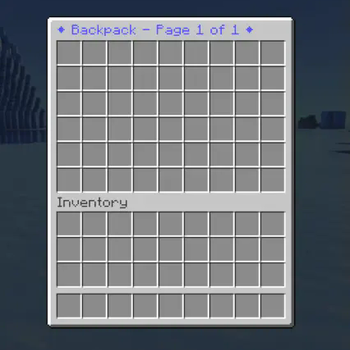
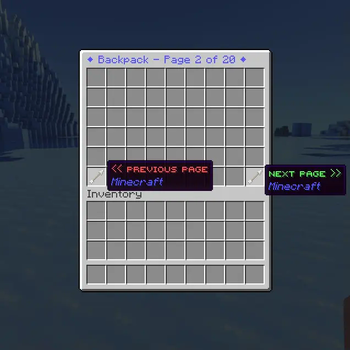

VirtualStorages is a Bukkit/Spigot plugin that enhances player storage capabilities by introducing virtual backpacks — accessible from anywhere in the world, allowing players to store items beyond their regular inventory limits.
🧰 Features
Virtual Backpacks: Players can access extra inventory space inside a personal virtual backpack. Backpacks are available anywhere — no need for chests!
Customizable: Configure titles, messages, and permissions. Allow specific backpack counts using permission nodes.
Admin Tools:
- Inspect and manage other players’ backpacks using
/backpackview <player> - Reload messages dynamically with
/vsreload - All data stored in editable YAML files for easy manual adjustments
- Inspect and manage other players’ backpacks using
⚙️ Installation
- Download the VirtualStorages plugin JAR.
- Place it into your server’s
pluginsfolder. - Restart (or start) your server to enable the plugin.
💬 Commands
| Command | Description | Alias | Permission |
|---|---|---|---|
/backpack |
Opens your virtual backpack | /bp |
virtualstorages.use.# |
/backpackview <player> |
Allows admins to view another player’s backpack | /bpview <player> |
virtualstorages.admin |
/vsreload |
Reloads messages from the config | — | virtualstorages.admin |
Replace
#with the backpack number (1–999). Example:virtualstorages.use.3lets a player access up to 3 backpack pages.
🗃️ Data Storage
All player backpack data is stored inside the plugin’s data folder. Each file is named after a player’s UUID, and can be edited manually. Changes are applied instantly, without requiring a server restart.
(Database storage support planned for future updates.)
🖼️ Screenshots
Single page backpack:
Multiple page backpack:
🧩 Permissions Overview
virtualstorages.use.#→ Access backpack number#(1–999)virtualstorages.admin→ Use/vsreloadvirtualstorages.admin→ Use/backpackview <player>
A permissions plugin (like LuckPerms) is required to manage these effectively.
🧱 Feedback & Support
Found a bug or have a feature request? Report it on the GitHub Issues page.
✅ TODO
- Allow viewing other players’ backpacks
- Make
/vsreloadunnecessary for updating player backpack pages - Add database storage option
- Edition: Minecraft Java
- File type: .jar
- Minecraft versions listed: 1.20, 1.20.1, 1.20.2
- How to install: Install the matching mod loader (Forge, Fabric or NeoForge) for your Minecraft version. → Download the .jar. → Put it in the .minecraft/mods folder and launch that loader profile.
- Where to get it: Opens on Modrinth — not every file is mirrored on our own servers.
Install steps are the general flow for this file type — How to install Minecraft Java mods & modpacks walks through it step by step.
- Ships as VirtualStorages-1.4.0.0.jar — drop this file into the mods folder
- Download size: 31 KB
- Download link checked 9 Oct 2026 — working
These come from our own check of the pack file, not from the source page.