
Trusted Travels
I don't know my version or loader
What is it?
This is a mod/plugin made for jumping between your servers. It uses Mojangs new transfer packets. You can make pre-made destinations for your other servers. The mod is originally made for a survival/creative combo. Use this if you don't want to set up a proxy server.
This mod is not meant to replace proxy servers Big multiplayer servers use proxy servers for multiple reasons. This is intended for having a small network of servers. For example an SMP with a creative server.
Config
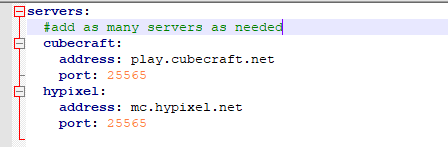 Ex. photo
Config structure
servers:
  #add as many servers as needed
  <name of server>:
    address: <ip for server>
    port: <port for server, Minecraft default port is 25565>
Server.properties
You need to ensure that the server you are going to has
accepts-transfers=true in the server.properties. It's not going to work otherwise!
Commands
/server <name> - The name is the one you put in the config
/tt reload - Reloads to the current config
Looking for a server?
Get BisectHosting and save 25% off for new customers using code Lukas at checkout. Thanks for your support - it helps me develop this and other mods I make! #ad

- Edition: Minecraft Java
- File type: .jar
- Minecraft versions listed: 1.20.6, 1.21, 1.21.1
- How to install: Install the matching mod loader (Forge, Fabric or NeoForge) for your Minecraft version. → Download the .jar. → Put it in the .minecraft/mods folder and launch that loader profile.
- Where to get it: Opens on Modrinth — not every file is mirrored on our own servers.
Install steps are the general flow for this file type — How to install Minecraft Java mods & modpacks walks through it step by step.
- Ships as TrustedTravelPlugin-1.1.jar — drop this file into the mods folder
- Download size: 9 KB
- Download link checked 29 Aug 2026 — working
These come from our own check of the pack file, not from the source page.