
Set up cameras to notify you on discord if someone goes near your base. 0 Config in config.yml for debugging
1 Link to DiscordSrv
1.1 you should use the resource pack https://modrinth.com/resourcepack/cameras to see your camera
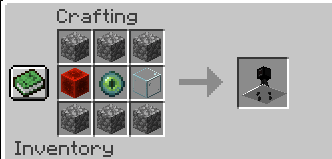
2 Craft a camera using
ccc
reg
ccc
c = cobblestone
r = redstone_block
g = glass
e = eye of ender\
3 Place it in open areas within 10 blocks of any important entrances\
4 Wait for someone to come and it will notify you
Quick facts
- Edition: Minecraft Java
- File type: .jar
- Minecraft versions listed: 1.19, 1.19.1, 1.19.2
- How to install: Install the matching mod loader (Forge, Fabric or NeoForge) for your Minecraft version. → Download the .jar. → Put it in the .minecraft/mods folder and launch that loader profile.
- Where to get it: Opens on Modrinth — not every file is mirrored on our own servers.
Install steps are the general flow for this file type — How to install Minecraft Java mods & modpacks walks through it step by step.
Verified by MCModsHub
- Ships as Security-0.1.jar — drop this file into the mods folder
- Download size: 2.2 MB
- Download link checked 29 Aug 2026 — working
These come from our own check of the pack file, not from the source page.