
Visualmodder
⚡ Learn coding! ⚡ Add a simple coding webpage to your server. Use it to code with blocks or Python and run your programs directly in Minecraft. Quick…
⬇ Download on Modrinth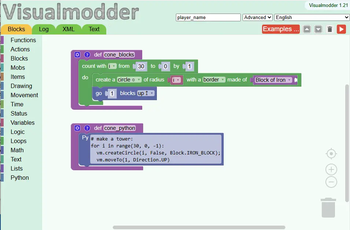


🚀 Learn Coding by Playing in Minecraft
Learn coding! This plugin adds a simple coding webpage to your server and then you can build with blocks or Python and watch your creations come alive in Minecraft. Quick setup, lots of fun.
🧩 How it works
Getting started is simple:
- Install the plugin
- Open the coding webpage by typing http://:10273
- Start building with blocks
- Click run → see it happen in Minecraft
That’s it. No complicated setup, no prior experience. Examples and documentation here: Visualmodder.org
🧠 Learn step by step
- Start with block coding (easy and visual)
- Understand how your code works by seeing it instantly
- Switch to Python when you're ready
You’re not just placing blocks—you’re learning real programming logic.
🎓 Great for beginner coders
- Perfect for kids starting out
- Useful for parents and teachers
- No coding experience needed
Start small. Have fun. Build your way to Python.
Built as a powerful alternative to Minecraft Education Edition and Tynker, VisualModder works on any standard Spigot Java server—no special Minecraft edition needed.
(Note: VisualModder requires an extra port besides the default Minecraft port. The default port for the editor is 10273 and can be changed with the "vmport" command)
Here you can find setup information or you can find the latest version of the plugin: Plugin configuration
Free, ad-free, and no registration required! For support and community help, join our Discord: https://discord.gg/A58Sr6WVq4
- Edition: Minecraft Java
- File type: .jar
- Minecraft versions listed: 1.21.9, 1.21.10, 1.21.11
- How to install: Install the matching mod loader (Forge, Fabric or NeoForge) for your Minecraft version. → Download the .jar. → Put it in the .minecraft/mods folder and launch that loader profile.
- Where to get it: Opens on Modrinth — not every file is mirrored on our own servers.
Install steps are the general flow for this file type — How to install Minecraft Java mods & modpacks walks through it step by step.
- Ships as VisualmodderLoader-1.21-20260324_1153.jar — drop this file into the mods folder
- Download size: 11 KB
- Download link checked 29 Aug 2026 — working
These come from our own check of the pack file, not from the source page.