Addon adda for chestshop
this is a plugin which act as a addon to add itemdisplay above chest for the plugin named chestshop by phoenix616
I don't know my version or loader
Addon Description: Holographic Item Display for ChestShop
This addon enhances the shopping experience in Minecraft by adding a holographic display(itemdisplay) above each shop created with the ChestShop plugin by Phoenix616. This addon is compatible with Minecraft version 1.20+ and utilizes the new itemdisplay feature introduced in 1.19.4 version. (example can be seen in gallery.)
Features
- Chestshop item logo
- Per shop total transaction limit
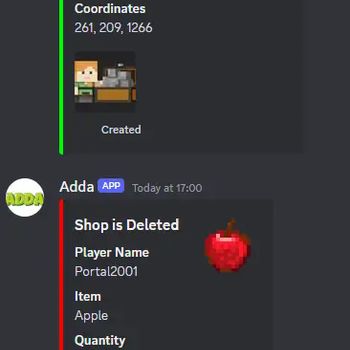
- Discord alerts
- Per rank shop creation limit
Installation
- Download from Modrith
- Put in plugins folder
- Restart. Thats all
Dependency
- ChestShop plugin by Phoenix616
Command
- /adda reload
Todos
- Gui shop search
- Item click shop creation
Disclaimer
If need any help join discord, the Chestshop plugin is not mine so any bug related to it will not be fixed by me, this plugin is only a addon for it which will be maintained by me only if there is enough attention.
Default config
itemdisplay:
  enable: true
#Distance to view the logox y and z size of the item above chest
  size: [0.5f,0.5f,0.5f]
#Distance to view the logo
  view: 10
#hight of the item from ground
  hight: 1.5
#item name
  name: '&b%item% x%size%'


moneylimit:
  enable: true
#reset the players limit after 24h or server restart
  reset_every: 24
#admin shop name
  admin_name: 'Admin Shop'
#per admin shop total transaction limit
  buy_admin_shop: 100
  sell_admin_shop: 100
#per player shop total transaction limit
  buy_player_shop: 999999999999
  sell_player_shop: 999999999999
  message:
    cancel: '&cYou can only shop %amount% more from this shop'

limit:
  enable: true
  default: 5
  vip: 10
  message:
    reached: '&cShop creation Limit Reached!! for %rank%'

discord:
  enable: false
  url: 'https://discord.com/api/webhooks/blaablaablaa'
- Edition: Minecraft Java
- File type: .jar
- Minecraft versions listed: 1.20, 1.20.1, 1.20.2
- How to install: Install the matching mod loader (Forge, Fabric or NeoForge) for your Minecraft version. → Download the .jar. → Put it in the .minecraft/mods folder and launch that loader profile.
- Where to get it: Opens on Modrinth — not every file is mirrored on our own servers.
Install steps are the general flow for this file type — How to install Minecraft Java mods & modpacks walks through it step by step.
- Ships as chestshopaddon-0.16.jar — drop this file into the mods folder
- Download size: 32 KB
- Download link checked 29 Aug 2026 — working
These come from our own check of the pack file, not from the source page.