
MC×Discord
I don't know my version or loader
MC×Discord is a lightweight alternative to traditional discord bot plugins — built specifically for server hosts that don’t allow self-hosted bots, like FMCS. if your host allows discord bots, this probably isn’t for you, would still apprechiate if you used it!
HOW TO SET UP PLUGIN
- Download and upload to your /plugins folder
- Restart the server
- Fill out the config
You will have to fill out the config. The plugin will not boot if the plugin is not properly set up
After finishing the plugin config setup:
- Restart the server again
- Add the Discord Bot to your server.
- Use the /link command
Boom! You have successfully linked your Discord server with your Minecraft server.
Features & Plugin DescriptionFeatures:
optimized message handling for extremely high performance
relay system that sends messages through our servers — no bot token needed
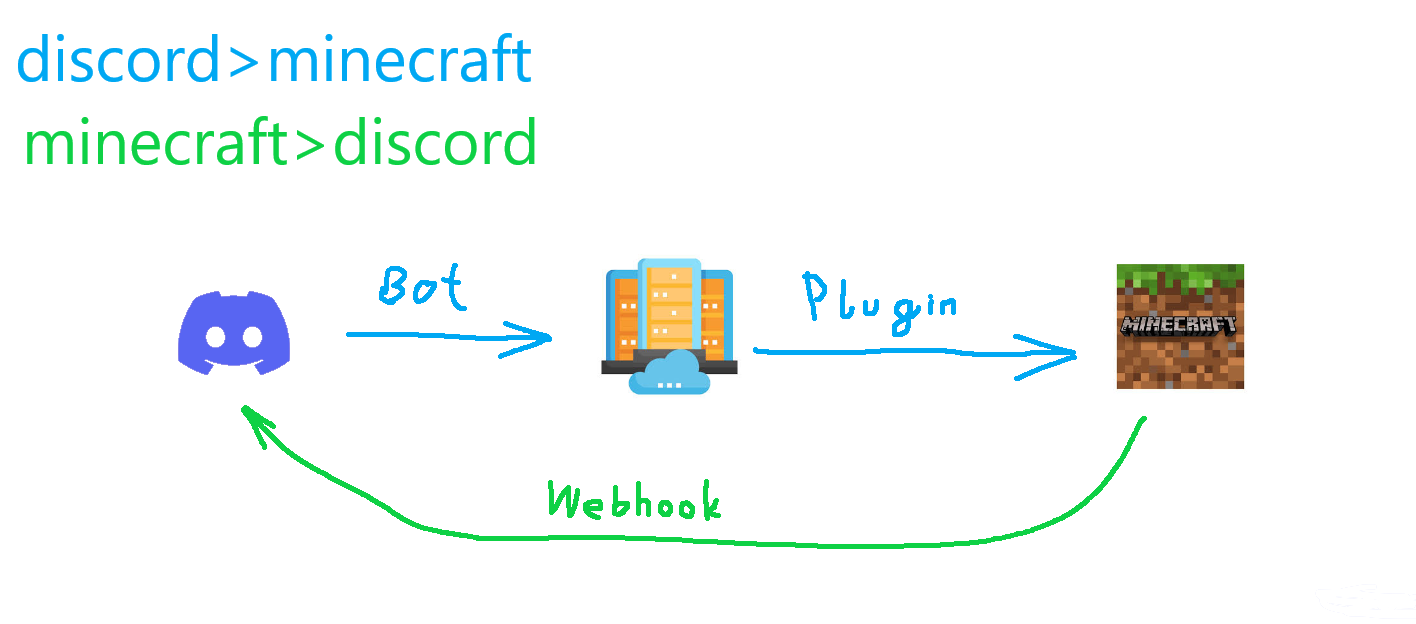 2.1. The delay between Discord and Minecraft is around 1-2 seconds. Messages are sent in order, if that is not the case please create an issue report.
active dev team that listens — your suggestions won’t get buried or ignored
- Edition: Minecraft Java
- File type: .jar
- Minecraft versions listed: 1.21, 1.21.1, 1.21.2
- How to install: Install the matching mod loader (Forge, Fabric or NeoForge) for your Minecraft version. → Download the .jar. → Put it in the .minecraft/mods folder and launch that loader profile.
- Where to get it: Opens on Modrinth — not every file is mirrored on our own servers.
Install steps are the general flow for this file type — How to install Minecraft Java mods & modpacks walks through it step by step.
- Ships as MCxDiscord-V17.jar — drop this file into the mods folder
- Download size: 33 KB
- Download link checked 29 Aug 2026 — working
These come from our own check of the pack file, not from the source page.