
ArenaRegenerator
Java mod listed for Minecraft 1.21–26.x. Downloads from the MC Java Mods app on Android.
⬇ Download on Modrinth

ArenaRegenerator




ArenaRegenerator Plugin
ArenaRegenerator is a plugin for Minecraft servers that handles arena saving, resetting, and full minigame logic using WorldEdit or FAWE.
This plugin manages and regenerates WorldEdit or FAWE-defined arenas. Includes full minigame support (e.g., lobby, countdown, game state, win detection) and interactive signs for easy use.
Table of Contents
- Features
- Dependencies
- Installation
- Usage
- Example Configuration
- Data Storage
- Building from Source
- Support & Contribution
Features
Arena Management:
Save WorldEdit selections as arenas.
Instantly clear or regenerate arenas.
List, delete, and view detailed information for saved arenas.
Minigame System:
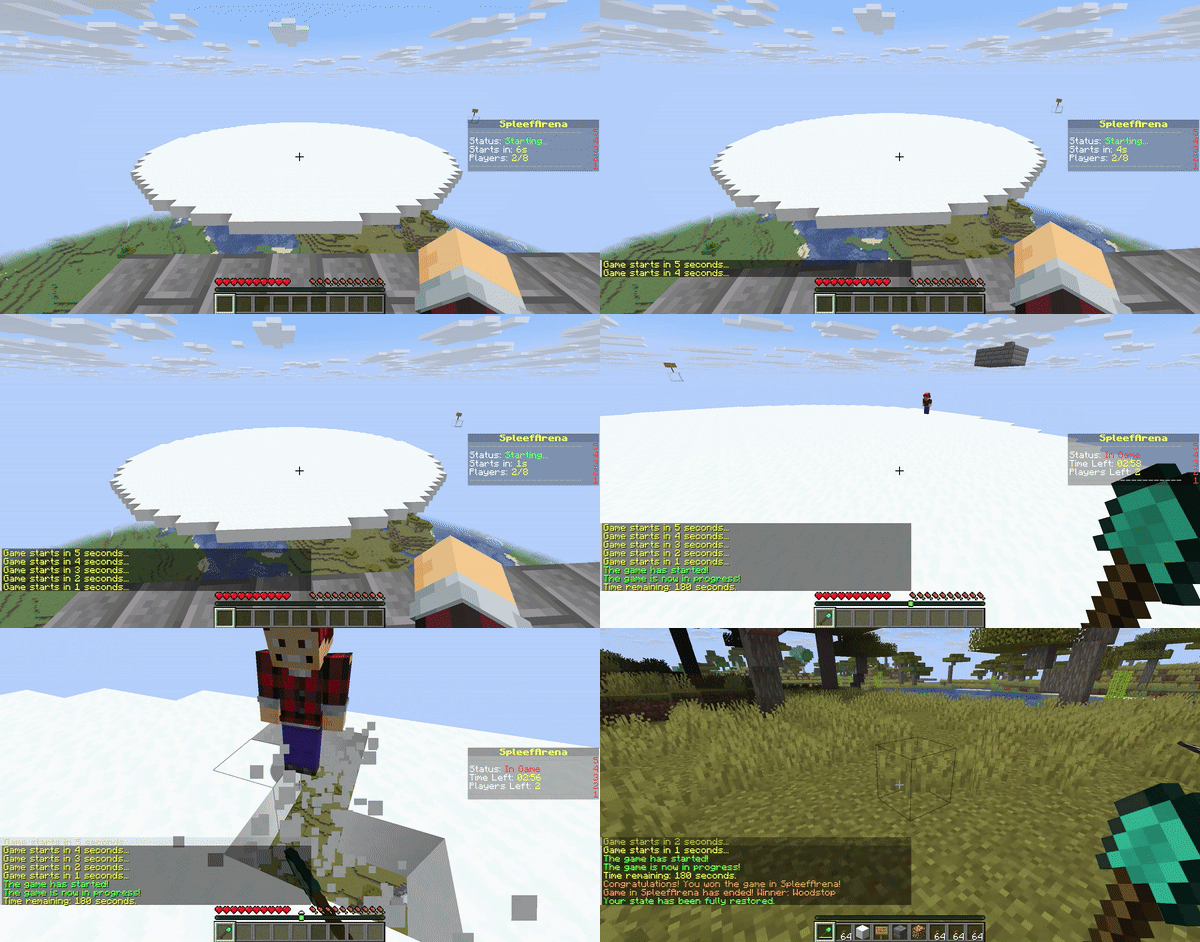
Lobby System: Players can join an arena's lobby and wait for enough players.
Countdown: A configurable countdown begins when the minimum player count is met.
Game Start: Players are moved from the lobby to game spawn points, inventories are cleared (configurable), and game mode is set.
Game End: Game ends after a set duration or when a win condition (e.g., last player standing) is met. Players are teleported out, their state is restored (configurable), and the arena is reset.
Spectator Mode: Players leaving the arena boundaries during a game can be moved to spectator mode.
Configurable Rules: Set minimum/maximum players, game duration, lobby countdown, items and game mode on join, what blocks can be broken or placed, and damage prevention per arena.
Interactive Signs:
- Regenerate arenas on click with
[RegenArena]signs - Join minigame arenas with
[JoinArena]signs - Leave minigame arenas with
[LeaveArena]signs
- Regenerate arenas on click with
/arena save and /arena info

/arena clear and /arena regen

Arena Regen Signs

Join Arena Signs
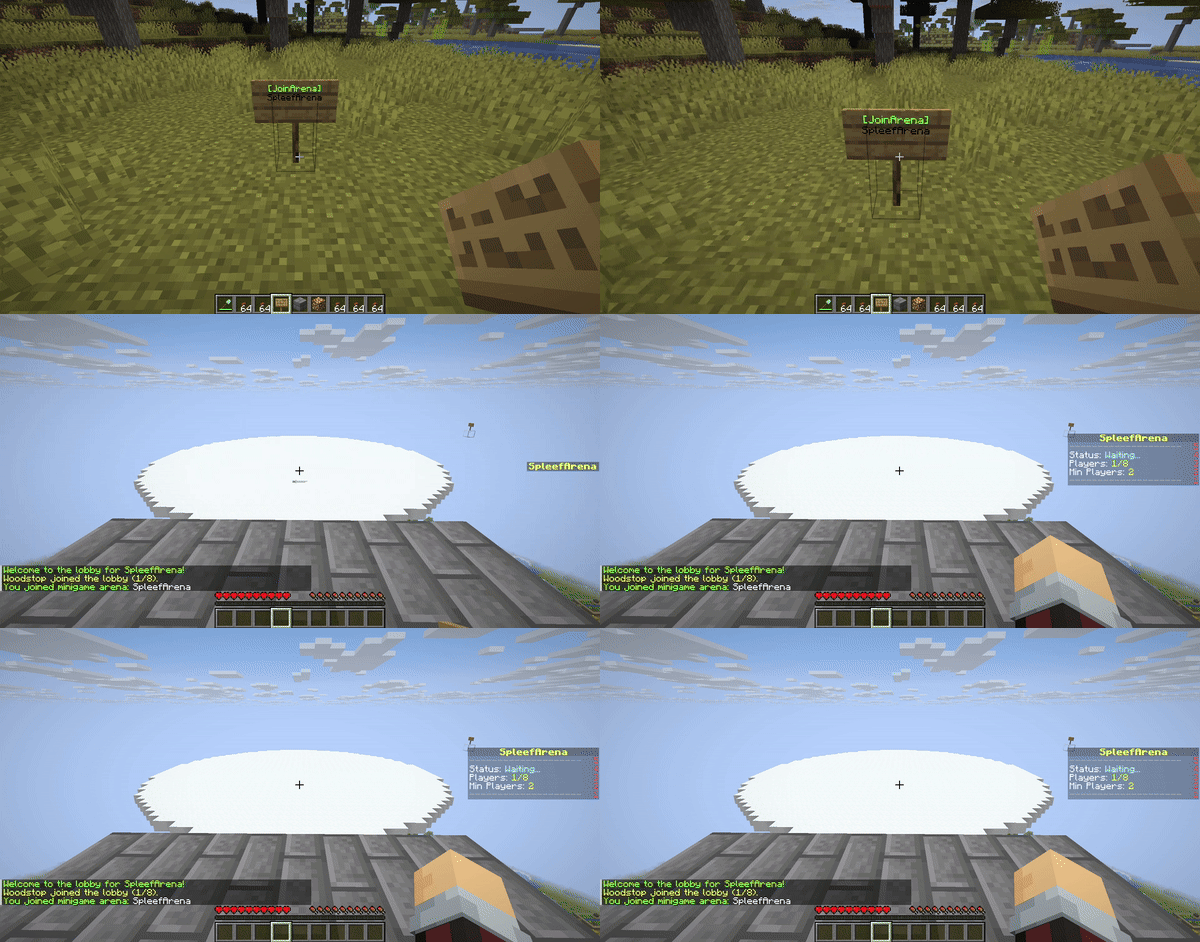
Minigame Logic
Dependencies
This plugin requires either WorldEdit or FastAsyncWorldEdit (FAWE) to be installed on your server.
Important: Only install ONE of these plugins (WorldEdit or FAWE) on your server. Having both can cause conflicts.
Installation
- Download the latest
ArenaRegenerator-X.X.X.jarfrom the releases page (or compile it yourself). - Download either WorldEdit or FastAsyncWorldEdit (FAWE) that is compatible with your server version.
- Place both
ArenaRegenerator-X.X.X.jarand your chosen WorldEdit/FAWE JAR into your server's plugins/ folder. - Restart server.
Usage
Interactive Signs
Create signs to automatically regenerate arenas, join minigames, or leave minigames.
- Place sign.
- Line 1:
[RegenArena]or[JoinArena]or[LeaveArena]. - Line 2: Your exact arena name.
- Players with appropriate permissions can click to use.
- Default 10-second cooldown;
arenaregenerator.sign.bypassoverrides.
Commands and Permissions
Commands use the /arena prefix. An alias /ar is also available. Replace <arenaName> with your desired name for the arena.
<arenaType> can be either lobby, exit, spectator, or game.
| Permission Node | Description | Command |
|---|---|---|
arenaregenerator.regen |
Allows use of the regen function | /arena regen <arenaName> |
arenaregenerator.save |
Allows saving an arena | /arena save <arenaName> |
arenaregenerator.list |
Allows listing saved arenas | /arena list |
arenaregenerator.delete |
Allows deleting an arena | /arena delete <arenaName> |
arenaregenerator.clear |
Allows clearing an arena without deleting the schematic | /arena clear <arenaName> |
arenaregenerator.info |
Allows viewing info about the current arena | /arena info <arenaName> |
arenaregenerator.select |
Allows selecting a region for an arena | /arena select <arenaName> |
arenaregenerator.setspawn |
Allows setting lobby, exit, spectator, and game spawns for minigames | /arena setspawn <arenaType> <arenaName> [spawnName] |
arenaregenerator.delspawn |
Allows deleting spawn points for minigames | /arena delspawn <arenaType> <arenaName> [spawnName] |
arenaregenerator.join |
Allows joining minigame arenas | /arena join <arenaName> |
arenaregenerator.leave |
Allows leaving minigame arenas | /arena leave |
arenaregenerator.reload |
Allows reloading the plugin configuration | /arena reload |
arenaregenerator.sign.create.regen |
Allows players to create [RegenArena] signs |
Create sign with tags |
arenaregenerator.sign.create.join |
Allows players to create [JoinArena] signs |
Create sign with tags |
arenaregenerator.sign.create.use |
Allows players to create [LeaveArena] signs |
Create sign with tags |
arenaregenerator.sign.use.regen |
Allows players to use [RegenArena] signs |
Click [RegenArena] sign |
arenaregenerator.sign.use.join |
Allows players to use [JoinArena] signs |
Click [JoinArena] sign |
arenaregenerator.sign.use.leave |
Allows players to use [LeaveArena] signs |
Click [LeaveArena] sign |
arenaregenerator.sign.bypass |
Allows players to bypass sign cooldowns | Click signs repeatedly |
arenaregenerator.sign.break |
Allows players to break interactive signs | Break sign block |
Example Configuration
# ArenaRegenerator Plugin Configuration

# Cooldown in seconds for using ArenaRegenerator signs (e.g., [JoinArena], [RegenArena]).
# Set to -1 to disable the cooldown entirely.
sign-use-cooldown-seconds: -1

# Minigame Arena Configurations
# Define settings for each arena that will function as a minigame.
minigames:
  # Example Arena Configuration
  arena_1:
    enabled: false # Whether this arena can be used as a minigame
    min-players: 2 # Minimum players required to start the game
    max-players: 8 # Maximum players allowed in the arena
    game-duration-seconds: 180 # How long the game lasts (e.g., 3 minutes)
    lobby-countdown-seconds: 10 # Countdown before game starts when min players met

    # Player State Restoration
    # If true, players' inventory, health, food, game mode, and exact location
    # will be saved before joining and restored upon leaving/game end.
    # If an exit spawn is defined, this will override the player's last location.
    restore-player-state-on-exit: true

    # Whether players' inventories are cleared when joining the game
    clear-inventory-on-join: true

    # Specify items to give on join as a list of "MATERIAL_NAME" or "MATERIAL_NAME:AMOUNT"
    give-item-on-join:
      - DIAMOND_SHOVEL
      - STONE_AXE:1 # Example: a stone axe with quantity 1
      - LEATHER_HELMET
      - LEATHER_CHESTPLATE
      - LEATHER_LEGGINGS
      - LEATHER_BOOTS
      - COOKED_BEEF:16 # Example: 16 cooked beef

    game-mode-on-join: SURVIVAL # SURVIVAL, ADVENTURE, CREATIVE, SPECTATOR

    # List of materials that players are allowed to break in this arena
    breakable-blocks:
      - SNOW_BLOCK
      - ICE
      - GLASS

    # List of materials that players are allowed to place in this arena
    placeable-blocks:
      - COBBLESTONE
      - DIRT
      - SAND

    prevent-damage: true # Prevent any damage to the players
    item-drops: true # Allow item drops from blocks
    prevent-item-durability-loss: true # Prevent items from losing durability

    winner-rewards: # Gives players rewards for winning the game. Use %player% to specify the winning player.
      commands:
        - "give %player% diamond 3"
        - "eco give %player% 100"
Data Storage
The plugin stores:
Arena Metadata and Spawn Points: Located in
plugins/ArenaRegenerator/arenas.json. This file contains the origin, world, and all configured lobby, exit, spectator, and named game spawn points for each arena.Schematic Files: Located in
plugins/ArenaRegenerator/schematics/. These are the WorldEdit schematic files (.schem) for each saved arena.Minigame Configurations: Located in
plugins/ArenaRegenerator/config.yml. This file defines the rules and settings for which saved arenas function as minigames (e.g., min/max players, game duration, specific game rules).
Building from Source
To build from source:
- Clone repository.
- Ensure Java 25 and JAVA_HOME are set.
- Build with Maven (
mvn clean package).
The compiled JAR will be in thetarget/directory.
Support & Contribution
If you encounter issues, have suggestions, or wish to contribute, visit the GitHub repository.
- Edition: Minecraft Java
- File type: .jar
- Minecraft versions listed: 1.21, 1.21.1, 1.21.2
- How to install: Install the matching mod loader (Forge, Fabric or NeoForge) for your Minecraft version. → Download the .jar. → Put it in the .minecraft/mods folder and launch that loader profile.
- Where to get it: Opens on Modrinth — not every file is mirrored on our own servers.
Install steps are the general flow for this file type — How to install Minecraft Java mods & modpacks walks through it step by step.
- Ships as ArenaRegenerator-1.2.8.jar — drop this file into the mods folder
- Download size: 81 KB
- Download link checked 10 Oct 2026 — working
These come from our own check of the pack file, not from the source page.