ModsJava
Simple Welcome Message
Java mod listed for Minecraft 26.x. Downloads from the MC Java Mods app on Android.
A simple welcome message plugin/mod. Customise a message, with colour codes or the players name, that will be displayed to your players every time they…
⬇ Download on Modrinth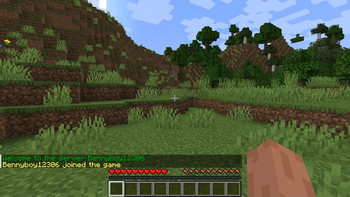
Welcome Message Plugin
This is a simple welcome message plugin/mod for paper or fabric servers. Customise a message, with colour codes or the players name, that will be displayed to your players every time they join
Usage:
- Simply drag and drop the jar into your servers plugins/mods folder depending on which version you are using. If you are using the fabric version you also need to install fabric api.
- Modify config.yml (Paper) or config/welcome-message/config.json to customise your message.
- Use %player% as a placeholder for the players name.
- Use & to specify a color.
- If you are using the paper version run /welcome-message-reload or restart your server to apply changes, If you are using the fabric version you must restart the server to apply the changes.
Commands (Only on Paper Version):
- Get - Gets the current welcome message:
/welcome-message-get
- Set - Sets the welcome message:
/welcome-message-set <value>
- Reload - Reloads the config (use after editing the config.yml):
/welcome-message-reload
Quick facts
- Edition: Minecraft Java
- File type: .jar
- Minecraft version listed: 26.1.2
- How to install: Install the matching mod loader (Forge, Fabric or NeoForge) for your Minecraft version. → Download the .jar. → Put it in the .minecraft/mods folder and launch that loader profile.
- Where to get it: Opens on Modrinth — not every file is mirrored on our own servers.
Install steps are the general flow for this file type — How to install Minecraft Java mods & modpacks walks through it step by step.
File checked by MCModsHub
- Ships as WelcomeMessage-1.0-all.jar — drop this file into the mods folder
- Download size: 32 KB
- Download link checked 20 Sept 2026 — working
These come from our own check of the pack file, not from the source page.