
AdvancedLinks
I don't know my version or loader
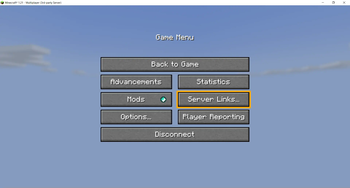
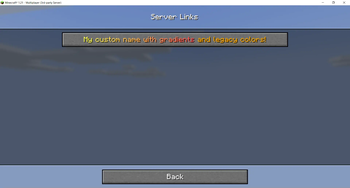
 AdvancedLinks is a plugin that allows servers to have server links (a button added in 1.21 in the escape menu in servers). When pressed, they allow users to open links in their browsers. The plugin includes these features:
- 1.21.x - 26.x support.
- Multiplatform support for both backend servers (Spigot, Paper, Purpur, Folia), proxies (BungeeCord, Velocity) and modded servers (Fabric, NeoForge).
- Only in Paper-based servers: Custom ServerLinks dialog title and pause menu button text.
- Simple and easy-to-configure config file.
- Links with a specific type or a custom display name.
- Minimessage and legacy support for links with custom display names.
- Per-player links
- Placeholders in URLs:
- PlaceholderAPI for plugin backend servers.
- Text Placeholder API for Fabric servers.
- Proxies and NeoForge servers don't support placeholders other than
%player_name%

/al reload - al.reload - Reloads the plugin.
/al help - none - Shows information about the commands that THE USER has access to.
/al add [name] [url] [type / display name] - al.add - Adds a new server link.
/al remove [name] - al.remove - Removes an existing server link
 Server links button:
Server links screen:

- Wiki: https://lucaaa.gitbook.io/advancedlinks
- Source code on GitHub: https://github.com/Luncaaa/AdvancedLinks
- Dev build: https://github.com/Luncaaa/AdvancedLinks/releases/tag/dev
If you need help, found a bug or want to suggest something, please do it in any of these places:
- Issues on GitHub: https://github.com/Luncaaa/AdvancedLinks/issues
- Contact me on Discord: Lucaaa#6268 / luncaaa
- Edition: Minecraft Java
- File type: .jar
- Minecraft versions listed: 1.21, 1.21.1, 1.21.2
- How to install: Install the matching mod loader (Forge, Fabric or NeoForge) for your Minecraft version. → Download the .jar. → Put it in the .minecraft/mods folder and launch that loader profile.
- Where to get it: Opens on Modrinth — not every file is mirrored on our own servers.
Install steps are the general flow for this file type — How to install Minecraft Java mods & modpacks walks through it step by step.
- Ships as AdvancedLinks-plugin-2.2.jar — drop this file into the mods folder
- Download size: 874 KB
- Download link checked 29 Aug 2026 — working
These come from our own check of the pack file, not from the source page.