
ModsJava
EZ Hologram
A powerful and user friendly Minecraft plugin for creating, managing, and customizing holograms in your server.
⬇ Download on Modrinth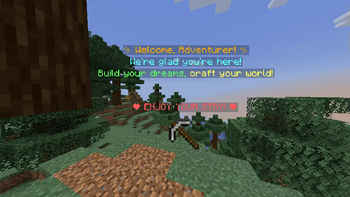
EZ Holograms Plugin
A powerful and user friendly Minecraft plugin for creating, managing, customizing, and animating holograms in your server.
Features
- Easy to use graphical interface for hologram creation and management
- Support for multiple text lines and advanced formatting
- Item display functionality (including in animations)
- Animated hologram lines: cycle through text and/or items with configurable speed
- Word level and line level text editing
- Hologram movement and copying
- Animation management: rename/change animations via UI, with YAML sync
- Persistent storage of holograms and animations
Installation
- Download the plugin JAR file
- Place it in your server's
pluginsfolder - Restart your server
- The plugin will automatically create configuration files
Configuration
- Hologram settings are stored in
holograms.yml - Animation settings are stored in
animations.yml
Commands
Main Commands
/ezhologram(aliases:/ezh,/hologram)- Opens the main hologram management interface
- Requires permission:
ezholograms.use
/ezhologram reload(alias:/ezh reload)- Reloads the holograms configuration
- Requires permission:
ezholograms.reload - Usage:
/ezhologram reloador/ezh reload
/ezhologram debug <name>- Shows debug info for a hologram
/ezhologram recreate <name>- Recreates a hologram at its current location
Creating Holograms
- Use
/ezhologramcommand to open the UI - Click "Create Hologram" button
- In the creation menu:
- Add text lines using "Add Text"
- Create new lines with "Add New Line"
- Change text color with "Add Color"
- Display items with "Add Item"
- Add animated lines with "Add Animation"
- After completing your hologram:
- Click "Create Hologram"
- Enter a unique name for your hologram
- The hologram will appear at the center of the block you are standing on
Special Formatting Codes
Use these special codes in your hologram text or animation frames:
Text Formatting
!boldor|bold- Makes text bold!italicsor|italics- Makes text italic!underlinedor|underlined- Adds underline!glowor|glow- Adds glowing effect
Line Breaks
!nlor|nl- Creates a new line
Colors
!color.colornameor|color.colornameAvailable colors:- black, darkblue, darkgreen, darkaqua
- darkred, darkpurple, gold, gray
- darkgray, blue, green, aqua
- red, lightpurple, yellow, white
Items
!item.itemnameor|item.itemnameExample:!item.diamond_sword
Animations
!animation.animationnameor|animation.animationname- Animation frames can be any text or item line (including formatting, color, and
!item.) - Frames are cycled at the configured interval (in ticks)
- Example animation frame list:
!item.diamond
!item.emerald
!color.red Animated Text!
!item.stick
- Animation frames can be any text or item line (including formatting, color, and
Editing Holograms
- Open the main UI with
/ezhologram - Click "Edit Hologram"
- Select the hologram to edit
- Edit options:
- Edit entire hologram text
- Word-level and line-level editing:
- Left-click to edit individual words
- Right-click to edit entire line
- Apply formatting to specific words
- Add or edit animation lines and frames
- Rename/change animations (updates YAML and all references)
- Additional options:
- Move hologram to new coordinates
- Copy hologram with new name
- Cancel editing at any time with the Cancel button
Removing Holograms
- Use
/ezhologramcommand - Click "Remove Hologram"
- Select the hologram to remove
- The hologram will be permanently deleted
Examples
Simple Welcome Hologram
Welcome to the server!
Multi-line Colored Hologram
!color.blue Welcome
!color.gold to our awesome server
!color.aqua Enjoy your stay!
Hologram with Items
!color.yellow Available Items:
!item.diamond_sword
!item.diamond_pickaxe
Animated Hologram (Text and Items)
!animation.example
Where example is an animation defined with frames like:
!item.diamond
!item.emerald
!color.red Animated Text!
!item.stick
Styled Hologram
Welcome
!bold This text is bold
!italics This text is italic
!underlined This text is underlined
!glow This text glows
Complex Hologram
!color.blue Welcome !nl
!color.green to the server !nl
you can create anything you want !item.iron_pickaxe !nl
ENJOY!
Troubleshooting
- If holograms or animations aren't showing up, check your permissions
- Make sure you have the latest version of the plugin
- If editing isn't working, try reloading the plugin
- If items in animations show as text, check your animation frame syntax
- If spacing looks wrong, make sure you are using the latest version
License
All Rights Reserved
Quick facts
- Edition: Minecraft Java
- File type: .jar
- Minecraft versions listed: 1.21, 1.21.1, 1.21.2
- How to install: Install the matching mod loader (Forge, Fabric or NeoForge) for your Minecraft version. → Download the .jar. → Put it in the .minecraft/mods folder and launch that loader profile.
- Where to get it: Opens on Modrinth — not every file is mirrored on our own servers.
Install steps are the general flow for this file type — How to install Minecraft Java mods & modpacks walks through it step by step.
Verified by MCModsHub
- Ships as EZ-Hologram 1.1.0-1.21.x.jar — drop this file into the mods folder
- Download size: 51 KB
- Download link checked 20 Sept 2026 — working
These come from our own check of the pack file, not from the source page.