
SignWarp




A Bukkit plugin for teleportation using signs. (Minecraft Version 1.20 - 1.21.8)
SignWarp allows players to place signs to teleport between them with a simple right-click.
By default, teleportation costs one ender pearl, which must be in the player's hand when interacting with the sign, but this can also be disabled in the configuration.
Permissions
signwarp.create- Allow creation and destruction of warp signs (default: op)signwarp.use- Allow usage of warp signs (default: everyone)signwarp.reload- Allow access to reload (default: op)signwarp.admin- Allows access to the warp management GUI (default: op)signwarp.*- Allow access to all features (default: op)signwarp.limit.unlimited- Allows unlimited warp creation
Commands:
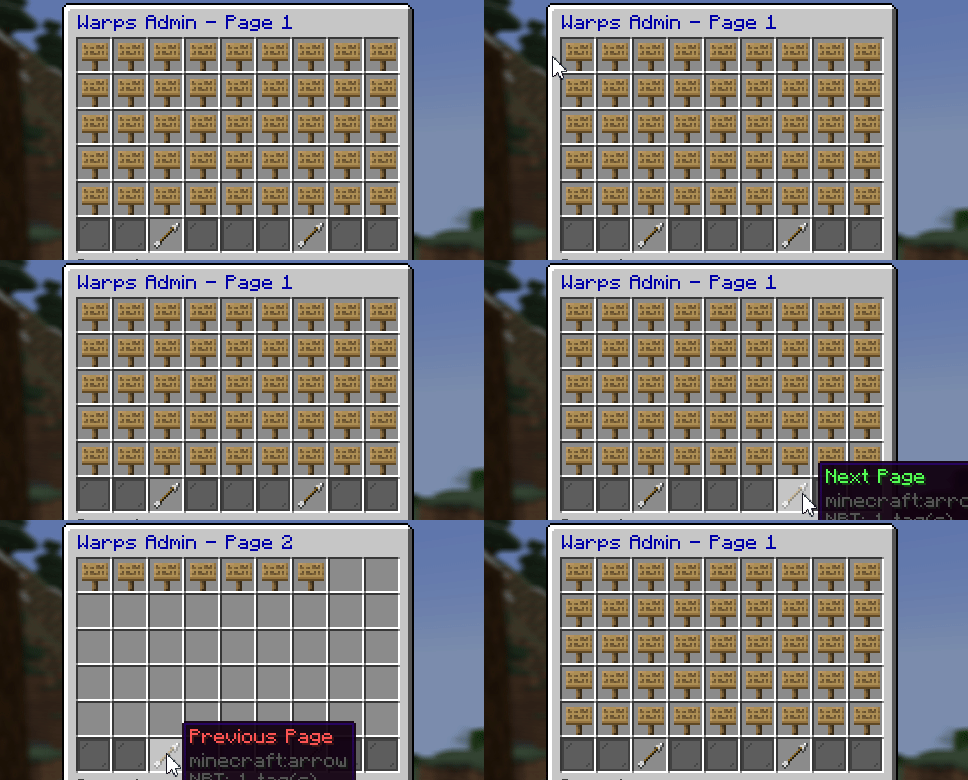
/signwarp reload- Reloads the configuration./signwarp gui- Open the warp management GUI.
How to Use
First, place a sign where you want to teleport with the following content:
- First line: [WarpTarget] or [WPT]
- Second line: The name you want to use
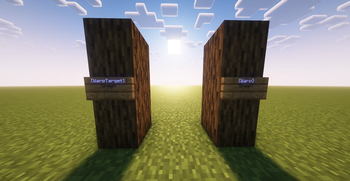
This will create a warp sign that sets the location to which a player teleports.
After creating the warp sign, create one or more warp signs from which you want to teleport to the target sign.
This is done by placing a sign with the following content:
- First line: [Warp] or [WP]
- Second line: The name you want to use
Note: The target sign (WarpTarget) must exist before creating the warp sign!
Bi-Directional Teleportation (New in v1.2.0!)
SignWarp now supports bi-directional teleportation! This enhancement allows players to travel back and forth between paired warp signs seamlessly.
How It Works
- Forward Travel: Right-clicking a [Warp] sign teleports you to the corresponding [WarpTarget] (existing behavior)
- Return Travel: Right-clicking a [WarpTarget] sign now teleports you back to the corresponding [Warp] sign (new feature!)
This creates a true two-way teleportation system between paired signs, perfect for:
- Creating transportation networks between bases
- Setting up quick travel points in adventure maps
- Establishing merchant shop connections
- Building dungeon entrance/exit systems
Technical Details
- Both directions respect the same permissions, cooldowns, and costs
- The plugin tracks sign locations in a database for reliable bi-directional links
- If either sign is broken, the link is automatically cleaned up
- Works with all existing warp configurations (economy costs, item costs, effects, etc.)
Once you have created both signs, you can right-click with the use-item in your hand (by default, it's an ender pearl).
Each teleportation will cost the number of items configured in use-cost (default: 1).
You can remove the use-item option in the config.yml or set it to "none" to allow any item to be used (i.e., each warp is free per use).
Alternatively, you can enable teleport-cost in the config.yml to charge players a set amount of in-game currency for each teleportation. Ensure Vault is installed on your server to use this feature.
Warp Limit System
Control the maximum number of warps players can create using permissions.
Example with LuckPerms:
/lp group default permission set signwarp.limit.3
This allows players in the default group to create up to 3 warps.
Without a limit permission, players can create an unlimited number of warps by default.
Admin GUI

Message Customization
In the config.yml configuration file, you have the option to customize the messages used by the plugin. These messages are defined under the key messages and can be modified according to your preferences.
Preview :
messages:
  create_permission: "&cYou do not have the required permissions to create warp signs!"
  no_warp_name: "&cNo warp name set!\nPlease specify the warp name on the second line."
  warp_created: "&aWarp sign successfully placed."
  warp_name_taken: "&cA warp target with the same name already exists!"
  warp_destroyed: "&aWarp destroyed."
  target_sign_created: "&aTarget sign for warp successfully placed."
  destroy_permission: "&cYou do not have the required permissions to destroy warp signs!"
  invalid_item: "&cYou must use {use-item} for this warp!"
  not_enough_item: "&cYou need {use-cost} {use-item} for this warp!"
  warp_not_found: "&cSpecified warp does not exist!"
  use_permission: "&cYou do not have the required permissions to use the warp sign!"
  teleport: "&eTeleporting to {warp-name} in {time} seconds..."
  teleport-success: "&aSuccessfully teleported to {warp-name}."
  teleport-cancelled: "&cTeleport cancelled."
  notify-cost: "&aYou have been charged {cost} currency for the teleportation."
  not_permission: "&cYou do not have permission!"
  limit_reached: "&cYou have reached your warp creation limit ({limit})."
  warp_sign_removed: "&aWarp sign removed successfully!"
  no_bidirectional_link: "&cNo return point found for this warp!"
{warp-name}: This placeholder is replaced by the name of the warp specified on the sign.{use-item}: Used to represent the name of the item required to use the warp. For example, if the required item is an ender pearl, this placeholder will be replaced by "ENDER_PEARL".{use-cost}: This placeholder is replaced by the number of items needed to use the warp. For example, if the cost to use the warp is 1 ender pearl, this placeholder will be replaced by "1".{cost}: This placeholder is replaced by the amount of currency charged for teleportation.{time}: This placeholder is replaced by the time in seconds before the teleportation is completed.
You have the option to stylize your texts with Minecraft color codes. These codes start with the & character, followed by a letter or number representing a specific color. More informations
Sound and Effect Customization
You can customize the sound and effect played during teleportation in the config.yml configuration file:
List Sound and List Effect
Note : The sound and effect must be in uppercase and replace "." by "_" for the sound.
Preview :
teleport-sound: ENTITY_ENDERMAN_TELEPORT
teleport-effect: ENDER_SIGNAL
Screenshot

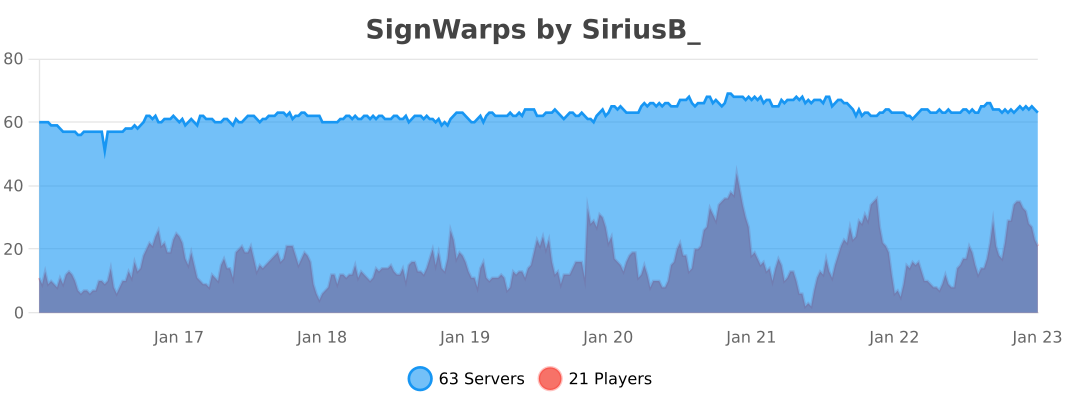
Statistics (bstats.org)
- Edition: Minecraft Java
- File type: .jar
- Minecraft versions listed: 1.20, 1.20.1, 1.20.2
- How to install: Install the matching mod loader (Forge, Fabric or NeoForge) for your Minecraft version. → Download the .jar. → Put it in the .minecraft/mods folder and launch that loader profile.
- Where to get it: Opens on Modrinth — not every file is mirrored on our own servers.
Install steps are the general flow for this file type — How to install Minecraft Java mods & modpacks walks through it step by step.
- Ships as SignWarp-1.2.1.jar — drop this file into the mods folder
- Download size: 12.3 MB
- Download link checked 29 Aug 2026 — working
These come from our own check of the pack file, not from the source page.