
Combat Log Detector Plugin
Java mod listed for Minecraft 1.16–1.21. Downloads from the MC Java Mods app on Android.
The Combat Log Detector is a Minecraft plugin that tracks players engaging in PvP and detects combat logging (players leaving during combat). It…
I don't know my version or loader
Combat Log Detector Plugin
 Version: 1.0.0
Minecraft Version: 1.16.5
Platform: Spigot
Developed with Java 8
Overview:
The Combat Log Detector plugin helps server administrators detect players who combat log (leave the server during PvP). It provides essential features like combat detection, monitoring combat logs, and integration with Discord for notifications. This plugin doesn't punish or kill players for combat logging, but it provides valuable information to admins.
Key Features:
Combat Detection:
Tracks player interactions during PvP. Players are tagged as "in combat" for 10 seconds after hitting or being hit.Combat Log Detection:
Monitors player activity and detects when players quit during combat. It will not punish or kill the player but will log the event for admin review.Discord Integration:
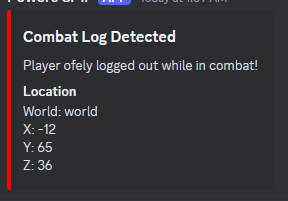
Sends real-time notifications to Discord using webhooks when a player combat logs. The message includes:- Player name
- World name
- Coordinates (X, Y, Z)
Configuration:
- The plugin's Discord webhook URL can be configured in the
config.ymlfile. - When the plugin is first installed, the
config.ymlfile will be generated, where you can add your Discord webhook URL.
Installation:
- Place the JAR file in the
pluginsfolder of your Spigot server. - Start the server to generate the
config.ymlfile. - Open the
config.ymlfile and add your Discord webhook URL. - Restart the server to apply the settings.
Compatibility:
- Minecraft Version: 1.16.5
- API: Spigot 1.16.5 (Compatible with most Minecraft servers)
- Java Version: Java 8
License:
This plugin is open-source and free to use. Contributions are welcome!
- Edition: Minecraft Java
- File type: .jar
- Minecraft versions listed: 1.16, 1.16.1, 1.16.2
- How to install: Install the matching mod loader (Forge, Fabric or NeoForge) for your Minecraft version. → Download the .jar. → Put it in the .minecraft/mods folder and launch that loader profile.
- Where to get it: Opens on Modrinth — not every file is mirrored on our own servers.
Install steps are the general flow for this file type — How to install Minecraft Java mods & modpacks walks through it step by step.
- Ships as CombatLogPlugin-1.0-SNAPSHOT.jar — drop this file into the mods folder
- Download size: 5 KB
- Download link checked 10 Oct 2026 — working
These come from our own check of the pack file, not from the source page.