
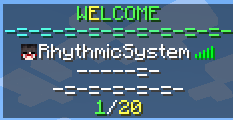
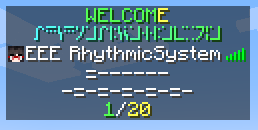
Simple Custom Tab
Customize the tablist with PAPI and minimessage
- Takes server placeholders (Placeholders without a player provided) in the header and footer, and placeholders that require a player, on the player list
- Placeholder must be put into the config such that if you have a placeholder called
%place_holder%it would go into the config like<papi:place_holder> - Uses MiniMessage Formatting
- Accepts additional fonts using the
<font:name>tag - Header and Footer can be animated and multi-line
Simple Custom Tab
Customize the tablist with PAPI and minimessage
Commands and permissions:
/sctreload- Reloads the configuration
sct.reloadpermission
Custom permissions can be used for sorting players and using custom formats, this is available in the config:
Config
# included placeholders are <displayname> and <username> for the user's display name and username
header: "<red>Header"
footer: "<gradient:red:blue>-=-=-=-=-=-=-=-=-=-</gradient>"
player: "<papi:luckperms_prefix> <papi:player_displayname>"
update-ticks: 20
sort-users:
  enabled: false
  # This list can be expanded, the permissions are customizable.
  # The highest numbers will be on the top, lowest will be bottom.
  sort-order:
    5: "tablist.order.admin"
    4: "tablist.order.mod"
    3: "tablist.order.donators"
    2: "tablist.order.voters"
    1: "tablist.order.members"
# Note, this will override the normal display.
# The topmost listed will be the highest priority.
# Permissions are customizable.
permission-formatting:
  enabled: false
  formats:
    admin:
      permission: "tablist.formatting.admin"
      format: "<bold>[</bold>ADMIN<bold>]</bold> <displayname>"
      priority: 5
    mod:
      permission: "tablist.formatting.mod"
      format: "<bold>[</bold>MOD<bold>]</bold> <displayname>"
      priority: 4
animated:
  enabled: false
  delay-ticks: 5
  header:
    - "EEEEeEEE"
    - "EEEeEEEE"
    - "EEeEEEEE"
    - "EeEEEEEE"
    - "eEEEEEEE"
    - "EEEEEEEe"
    - "EEEEEEeE"
    - "EEEEEeEE"
  footer:
    - "AAAAAAa"
    - "AAAAAaA"
    - "AAAAaAA"
    - "AAAaAAA"
    - "AAaAAAA"
    - "AaAAAAA"
    - "aAAAAAA"
Quick facts
- Edition: Minecraft Java
- File type: .jar
- Minecraft versions listed: 1.21, 1.21.1, 1.21.2
- How to install: Install the matching mod loader (Forge, Fabric or NeoForge) for your Minecraft version. → Download the .jar. → Put it in the .minecraft/mods folder and launch that loader profile.
- Where to get it: Opens on Modrinth — not every file is mirrored on our own servers.
Install steps are the general flow for this file type — How to install Minecraft Java mods & modpacks walks through it step by step.
Verified by MCModsHub
- Ships as SimpleCustomTab-1.1.1.jar — drop this file into the mods folder
- Download size: 19 KB
- Download link checked 29 Aug 2026 — working
These come from our own check of the pack file, not from the source page.