
CoreMechanics
Java mod listed for Minecraft 1.20–1.21. Downloads from the MC Java Mods app on Android.
⬇ Download on Modrinth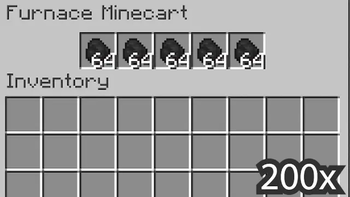

CoreMechanics
CoreMechanics is a plugin designed to introduce modular enhancements and refine existing features in Minecraft, giving players and server administrators greater control over the gameplay experience. Each addition is entirely optional, allowing users to enable or disable specific features as needed, creating a customized environment tailored to any server’s unique style.
Key Features:
Minecart Module Enhancements: Improve minecart interactions and functionality with unique additions.
- Powered Rails Speed: Adjust minecart speed based on redstone power level for more efficient travel.
- Hopper Minecart Push: Enable hopper minecarts to push items into adjacent containers, even with rails between.
- Chest Placement on Hopper Minecart: Place chests directly above hopper minecarts using SHIFT + right-click for easier item management.
- Furnace Minecart Rework: Add fuel storage functionality to furnace minecarts for simplified management.
- Rails Above Containers: Place rails over storage containers like chests for flexible track layouts.
Enchantments Module Improvements: Expand on existing enchantment mechanics for creative gameplay possibilities.
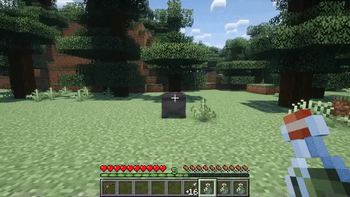
- Cauldron for Tipped Arrows: Craft tipped arrows by right-clicking potions into cauldrons, similar to Bedrock mechanics.
- Frost Walker Running: Trigger Frost Walker effects while running and jumping on water.
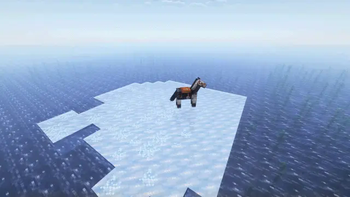
- Frost Walker for Horses: Horses equipped with Frost Walker-enchanted armor can walk on water.
Inventory Module: Improve inventory management for players and storage containers.
- Sort Inventories: Sort items in inventory or chests with SHIFT + left-click on an empty slot.
Miscellaneous Module: Additional mechanics for an immersive experience.
- Dispenser to Cauldron Interaction: Allow dispensers to place and remove liquids from cauldrons.
- Anvil Repair Cost Cap: Set a maximum repair cost of 6 levels for items on an anvil.
- Dyeable Terracotta: Dye already-colored terracotta for flexible decoration.
- Cobbled Deepslate Crafting: Use cobbled deepslate in recipes traditionally reserved for cobblestone, like droppers and dispensers.
- Horse Swimming: Allow horses to swim, aiding in crossing rivers without risking player dismount.
Modular Customization:
Every feature in CoreMechanics is modular, providing complete control over which mechanics are active. Administrators can enable or disable modules based on preference or server theme, ensuring a tailored experience for all players.
How to Install:
- Download the latest version of CoreMechanics.
- Place the
.jarfile in your server’spluginsdirectory. - Restart the server to generate default configuration files.
Need Help?
For detailed instructions, check out the Documentation. If you need assistance or want to offer feedback, join our Discord. We're always ready to help!
Note: This post may receive updates based on community input.
- Edition: Minecraft Java
- File type: .jar
- Minecraft versions listed: 1.20, 1.20.1, 1.20.2
- How to install: Install the matching mod loader (Forge, Fabric or NeoForge) for your Minecraft version. → Download the .jar. → Put it in the .minecraft/mods folder and launch that loader profile.
- Where to get it: Opens on Modrinth — not every file is mirrored on our own servers.
Install steps are the general flow for this file type — How to install Minecraft Java mods & modpacks walks through it step by step.
- Ships as CoreMechanics-1.0.7.jar — drop this file into the mods folder
- Download size: 3.2 MB
- Download link checked 10 Oct 2026 — working
These come from our own check of the pack file, not from the source page.