


English

BanMace is a powerful administrative tool for Minecraft servers, disguised as a mystical weapon. It provides server staff with a range of intuitive player management functions, from teleportation to punishment, all accessible through a single, versatile item. The plugin features two convenient ways to switch between modes: a quick right-click cycle and an immersive radial menu.
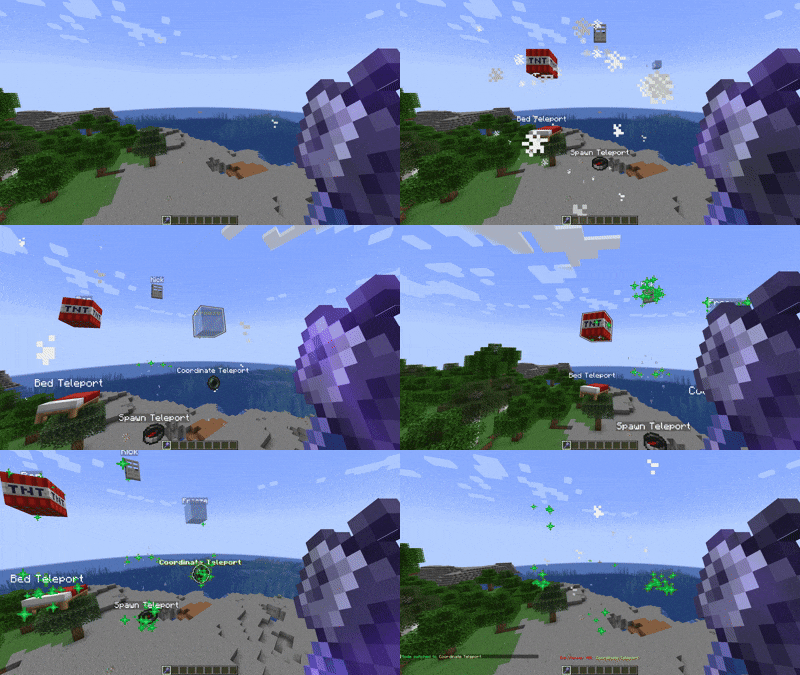

BanMace offers several modes, each with a unique function:
- SPAWN: Teleports the target player to the world's spawn point.
- BED: Teleports the target to their personal bed. If no bed is set, they are sent to the world spawn.
- COORDINATE TELEPORT: Teleports the target to specific coordinates stored within the mace. Use
/bm-tpcoordinatesto set them. - FREEZE: Immobilizes a player, encasing them in ice for a short duration.
- KICK: Instantly kicks the player from the server.
- BAN: Temporarily bans the player from the server.
- BALLOON: Launches the player into the air with colorful balloon effects for a fun and playful moderation approach.
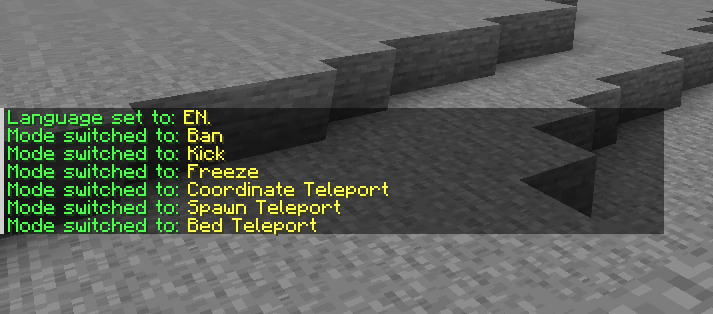
Mode Switching
You can switch between modes in two ways:
- Right-Click: Quickly cycle through the available modes.
- Radial Menu (Press F): Hold the BanMace and press your "Swap-Hand" key (default: F) to open an immersive radial menu for easy mode selection.
Customization and Settings
A comprehensive in-game GUI allows you to customize almost every aspect of the plugin.
/bm-settings: Opens the main settings menu.- Customize the BanMace's item type.
- Configure particles, sounds, and message display styles (chat, actionbar, or title).
- Manage Discord integration, language settings, and more.

| Command | Description | Permission |
|---|---|---|
/bm-give |
Gives the user a Ban Mace. | banmace.give |
/bm-settings |
Opens the settings GUI. | banmace.settings |
/bm-tpcoordinates <x> <y> <z> |
Sets the target coordinates for the mace. | banmace.tpcoordinates |
/bm-setlanguage <lang> |
Changes the plugin's language. | banmace.setlanguage |
/bm-changeview <mode> |
Changes the message display mode. | banmace.changeview |
Installation
- Download the latest version of the BanMace plugin.
- Place the
.jarfile into thepluginsfolder of your Spigot/Paper server. - Restart or reload the server.
Notes
- The plugin is designed for Paper and its forks for best performance and compatibility.
- Ensure the main world is available for teleportation functions to work correctly.
- Default configuration and language files (
message_en.yml,message_ru.yml) are generated on the first run.
Contact
If you have any questions, suggestions, or issues, please open an issue on the GitHub Issues page.

Russian | Русский

BanMace — это мощный административный инструмент для серверов Minecraft, замаскированный под мистическое оружие. Он предоставляет персоналу сервера ряд интуитивно понятных функций для управления игроками, от телепортации до наказаний, доступных через один универсальный предмет. Плагин предлагает два удобных способа переключения режимов: быстрое переключение по правому клику и иммерсивное радиальное меню.

BanMace предлагает несколько режимов, каждый с уникальной функцией:
- СПАВН: Телепортирует игрока на точку спавна мира.
- КРОВАТЬ: Телепортирует игрока к его личной кровати. Если кровать не установлена, игрок отправляется на спавн мира.
- ТЕЛЕПОРТ ПО КООРДИНАТАМ: Телепортирует игрока на определённые координаты, сохранённые в булаве. Используйте
/bm-tpcoordinatesдля их установки. - ЗАМОРОЗКА: Обездвиживает игрока, заключая его в ледяную глыбу на короткое время.
- КИК: Моментально кикает игрока с сервера.
- БАН: Временно банит игрока на сервере.
- ШАРЫ: Запускает игрока в воздух с красочными эффектами шаров для веселого и игривого подхода к модерации.
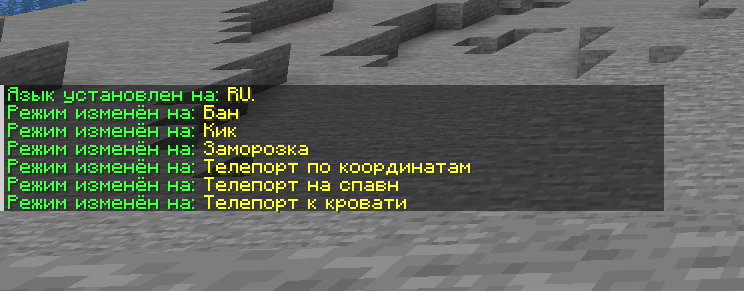
Переключение Режимов
Вы можете переключаться между режимами двумя способами:
- Правый клик: Быстрое циклическое переключение между доступными режимами.
- Радиальное меню (нажмите F): Удерживая BanMace, нажмите клавишу смены предмета в руках (по умолчанию F), чтобы открыть удобное радиальное меню для выбора режима.
Кастомизация и Настройки
Комплексный внутриигровой интерфейс позволяет настроить практически каждый аспект плагина.
/bm-settings: Открывает главное меню настроек.- Настраивайте тип предмета булавы.
- Настраивайте частицы, звуки и стиль отображения сообщений (чат, actionbar или title).
- Управляйте интеграцией с Discord, настройками языка и многим другим.

| Команда | Описание | Право |
|---|---|---|
/bm-give |
Выдаёт игроку Булаву Бана. | banmace.give |
/bm-settings |
Открывает GUI с настройками. | banmace.settings |
/bm-tpcoordinates <x> <y> <z> |
Устанавливает целевые координаты в булаве. | banmace.tpcoordinates |
/bm-setlanguage <язык> |
Изменяет язык плагина. | banmace.setlanguage |
/bm-changeview <режим> |
Изменяет режим отображения сообщений. | banmace.changeview |
Установка
- Скачайте последнюю версию плагина BanMace.
- Поместите
.jarфайл в папкуpluginsвашего сервера Spigot/Paper. - Перезагрузите сервер.
Примечания
- Плагин разработан для Paper и его форков для наилучшей производительности и совместимости.
- Убедитесь, что основной мир доступен на сервере для корректной работы функций телепортации.
- Файлы конфигурации и языковые файлы по умолчанию (
message_en.yml,message_ru.yml) создаются при первом запуске.
Контакты
Если у вас есть вопросы, предложения или вы нашли ошибку, пожалуйста, создайте обращение на странице GitHub Issues.

- Edition: Minecraft Java
- File type: .jar
- Minecraft version listed: 1.21.8
- How to install: Install the matching mod loader (Forge, Fabric or NeoForge) for your Minecraft version. → Download the .jar. → Put it in the .minecraft/mods folder and launch that loader profile.
- Where to get it: Opens on Modrinth — not every file is mirrored on our own servers.
Install steps are the general flow for this file type — How to install Minecraft Java mods & modpacks walks through it step by step.
- Ships as BanMace-1.13.0.jar — drop this file into the mods folder
- Download size: 101 KB
- Download link checked 29 Aug 2026 — working
These come from our own check of the pack file, not from the source page.