
ModsJava
Super Shop
Java mod listed for Minecraft 26.x. Downloads from the MC Java Mods app on Android.
⬇ Download on Modrinth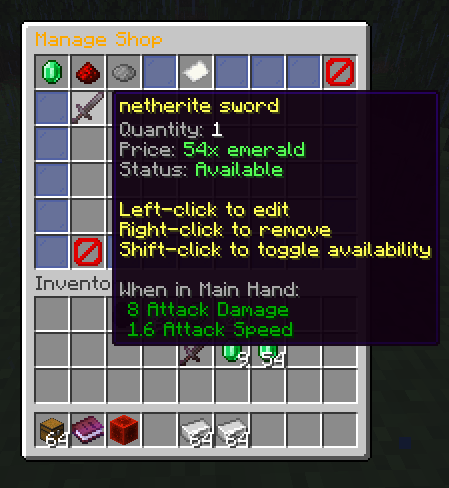
Requires Paper or a Paper-based fork (such as Purpur). This plugin uses Paper-only APIs and will not run on Spigot or Bukkit.
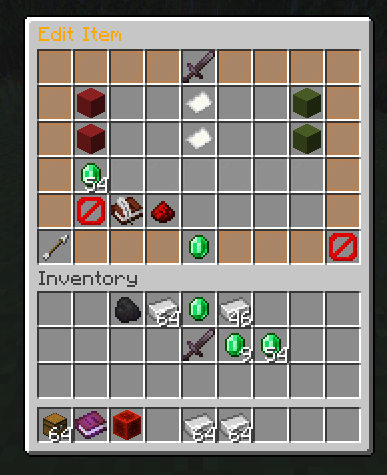
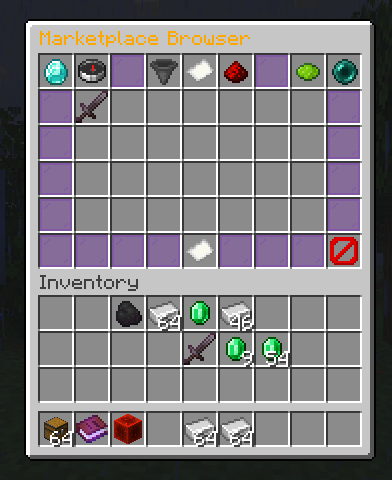
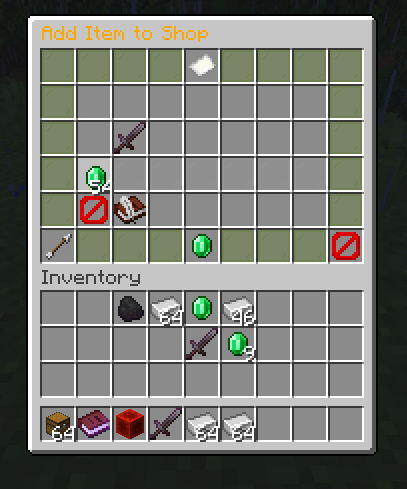
SuperShop is a decentralized player-driven trading system designed for Minecraft servers. It empowers players to establish and manage their own shops, facilitating the buying and selling of items within the game world.
Core Functionality:
- Player-Owned Shops: Players can create and operate individual shops to trade goods with others. This system promotes a dynamic, player-driven economy.
- Item Search Utility: The
/searchbookcommand, also accessible via/searchor/finditem, allows players to locate specific items available for purchase across all active player shops on the server. - Multilingual Support: Users can customize their language preference within the plugin using the
/superlangcommand, or its aliases/slangand/lang.
Command Reference:
/shop <subcommand>: This is the primary command for all shop management operations.create: Establish a new shop.remove: Dismantle an existing shop.list: View a list of available shops.info: Retrieve detailed information about a specific shop.give: Grant a search book to another player (requires appropriate permissions).stats: Access statistics related to shops (requires appropriate permissions).reload: Refresh the plugin's configuration (requires appropriate permissions).help: Display assistance for shop commands.
/searchbook <item name>: Initiates a search for the specified item across all player shops./superlang [locale]: Sets the preferred language for the plugin. If no locale is provided, it may display the current language or available options.
Quick facts
- Edition: Minecraft Java
- File type: .jar
- Minecraft version listed: 26.2
- How to install: Install the matching mod loader (Forge, Fabric or NeoForge) for your Minecraft version. → Download the .jar. → Put it in the .minecraft/mods folder and launch that loader profile.
- Where to get it: Opens on Modrinth — not every file is mirrored on our own servers.
Install steps are the general flow for this file type — How to install Minecraft Java mods & modpacks walks through it step by step.
File checked by MCModsHub
- Ships as supershop-3.2.0.jar — drop this file into the mods folder
- Download size: 245 KB
- Download link checked 10 Oct 2026 — working
These come from our own check of the pack file, not from the source page.