
CodeBots
Java mod listed for Minecraft 1.19–1.21. Downloads from the MC Java Mods app on Android.
CodeBots is a Minecraft plugin that allows you to create and program bots inspired by ComputerCraft's turtles.
I don't know my version or loader
Warning
This plugin is in experimental phase. I am still working on core features before I can polish everything and make it more user friendly. I also can change many things between versions so things can break, bugs can show up, issues can occur.
For all questions and problems that you may encounter, you can contact me on Discord, or create an issue on GitHub.
What is CodeBots?
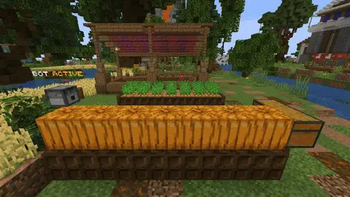
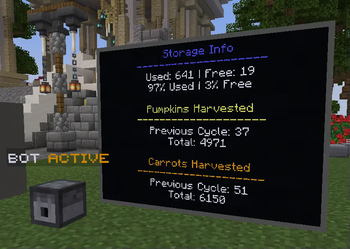
CodeBots is a Minecraft plugin that allows players to create and program their own bots. These bots can be used to automate farms, create redstone contraptions, make fun minigames, and more! CodeBots uses a custom programming language, so the possibilities are endless.
Getting Started
To create a bot, use /codebots give bot command. You will receive an item which spawns the bot upon placing it. Right-clicking the bot opens up a GUI which allows you to interact with it.
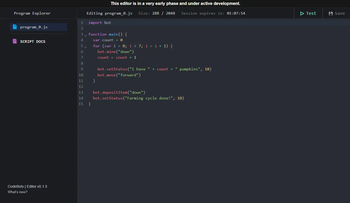
When you create a new file, it will come with a default program which prints "Hello World" when the bot is started. To edit programs, right-click on a bot to open its GUI, go to programs and in the bottom left there's a button to create a code editor session. This will give you a link to an editor which allows you to code your own bots.
Commands & Permissions
To see all commands and permissions please check this link: Commands & Permissions
Future plans
- Add bot networks and routers
- Custom models for bots (by using block displays or custom models with resource packs provided by other plugins)
- Fuel mechanic
Scripting Language
Please check the Scripting Language Wiki for details about the scripting language.
If you'd like to donate, click here. Thank you ♥!
- Edition: Minecraft Java
- File type: .jar
- Minecraft versions listed: 1.19, 1.19.1, 1.19.2
- How to install: Install the matching mod loader (Forge, Fabric or NeoForge) for your Minecraft version. → Download the .jar. → Put it in the .minecraft/mods folder and launch that loader profile.
- Where to get it: Opens on Modrinth — not every file is mirrored on our own servers.
Install steps are the general flow for this file type — How to install Minecraft Java mods & modpacks walks through it step by step.
- Ships as CodeBots-1.0.0.jar — drop this file into the mods folder
- Download size: 550 KB
- Download link checked 10 Oct 2026 — working
These come from our own check of the pack file, not from the source page.