
Yolo
You only live once... the name says it all. This plugin is meant for hardcore survival servers, that implements, but also expands a bit on the vanilla…
⬇ Download on Modrinth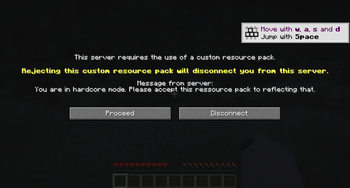

Yolo - A hardcore plugin




Content
- What does this plugin do?
- Configuration
- Permissions
- Commands
- Further considerations
- Planned features
- For developers
1. What does this plugin do?
You only live once... the name says it all.
This plugin is meant for hardcore survival servers, that implements, but also expands on the vanilla hardcore
mechanics for a player's death on a server.
Upon death players usually get banned off of a server, if (and only if) the setting for hardcore was enabled in
server.properties before world generation.
That is not the case if this setting was set to true retroactively.
And here is, where this plugin comes into play, by implementing this behaviour regardless of when hardcore was enabled.
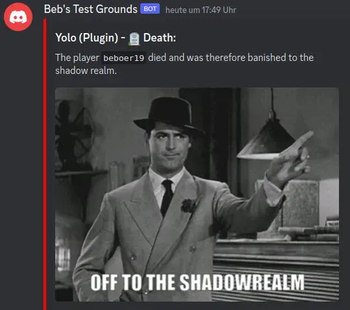
Additionally, you can exempt players from this rule and send a customized message to a Discord-server upon the occurrence of a (non-exempt) player-death.
The plugin can also force a resource-pack of your choice, with the default one replacing the normal health-bar with hardcore-hearts, on any non-exempt player.
(You can check out the resource-pack here.)
2. Configuration
2.1 config.yml
There are currently four configuration sections.
The first one is for managing the resource-pack sent to non-exempt players:
# You can specify a custom resource pack and turn off forcing the pack onto non-exempt players.
resource-pack:
  force: true
  custom:
    use: false
    url: ""
    sha1: ""
- The
forceoption lets you control, whether the player has to accept the pack. (Allowed values:true,false) customlets you define a custom resource-pack, other than the default one.use: Set totrueto use the custom pack, otherwise set it tofalseurl: The download-link to the custom pack.sha1: The sha1-checksum of the file. You can use this tool to obtain it.
The next section is for configuring the Spicord integration:
spicord:
  send: false
  message_channel_id: ""
send: Whether to enable the Spicord-Integration. (Allowed values:true,false)message_channel_id: The id of the channel to send the message to. You can obtain it using this method (you can also obtain the channel-id by itself, by right-clicking the channel on the channel-selection-sidebar).
In the announce section you can individually toggle messages:
announce:
  death:
    discord: false
    chat: true
  totem:
    discord: false
    chat: true
  revive:
    discord: false
    chat: true
This should be pretty self-explanatory.
The listed messages are announcements that would be sent on their respective occasions and targets.
The allowed values are true or false.
The option enable-on-non-hc lets you enable this plugin's functionality even on a non-hardcore server, while the last
option easy-disable lets you disable the death-ban functionality, if it's true (previously dead players can join, if
this is enabled).
It may take a while before banned players can join if this option is true.
Yet again acceptable values (for both) are true and false.
2.2 chat_messages.properties
The messages defined in this file are chat messages that can be customized.
There shouldn't be a need to add more. You can also use the MiniMessage format to make them special.
How you can use this format, you can read here.
2.3 discord/[...].json
In these files, you can customize the embeds, sent by the plugin.
You can use this tool to visualize them and generate the json file.
If, for example, you'd like to customize the discord message, that is getting sent upon a player's death, you'd need to
modify plugins/yolo/discord/death_message.json to something like this:
{
  "embed": {
    "title": "%player_name% has died!",
    "description": "Press \"F\" to pay respect.",
    "color": 16521991,
    "author": {
      "name": "author name",
      "url": "https://discordapp.com",
      "icon_url": "https://cdn.modrinth.com/data/ExWUwvY3/a8ab710896279f5c3ed9c377d408a10587f5509d.png"
    },
    "image": {
      "url": "https://media.tenor.com/bMbIAroA0PkAAAAi/rip-rest.gif"
    }
  }
}
2.4 ban_message.txt
This is where you can customize the ban message that players see when they're dead.
2.5 Text replacements
Every message that gets sent by the Plugin can use the following replacements:
%player_name%- The name of the affected player%totem_uses%- The number of totems the subject player of the message has used.%death_message%- The death message, if the player has died. (only available in messages, sent upon a player's death.)%version%- The current version of the plugin.
3. Permissions
One permission is yolo.exempt, which excludes any players having it from the plugin's effects. There are also two
other permissions that relate to commands. These are described in the section about commands.
For a general guide to permissions on Bukkit and its derivatives, please refer to
this page. (I'd recommend using a permission manager like
LuckPerms though.)
4. Commands
There are currently two commands available:
/yolo-reload: This command is useful for reloading all configuration dependent features of this plugin, without having to restart the whole server. It requires theyolo.reloadpermission./revive [revivable player] <restore inventory> <safe teleport to death location>: This command lets you revive a player who has died, attempting to restore their inventory and teleporting them to their death location (if safe). It requires theyolo.revivepermission. You can also disable restoring their inventory and the teleportation, by setting the arguments tofalse. (If you only want to disable the teleport, you need to explicitly set the inventory restoring totrue.)/checkout_death_locationThis command lets you teleport to a dead player's death location. This is useful for checking for traps and duplicate items. It requires theyolo.revivepermission.
5. Further considerations
- If hardcore is enabled in
server.properties, the resource pack is always forced upon players by default. ( configurable since: 0.4.0) - In order to use Spicord, you have to configure it correctly. In order to register this plugin as an addon for a bot, you have to add it like this:
### ↑ Irrelevant stuff above ↑ ###
[[bots]]
name = "" # Name for the bot here.
enabled = true
token = "" # Your bot's token here
command_support = true # Irrelevant for this plugin's Spicord addon.
command_prefix = "-"
addons = [
    # Potentially other addons.
    "yolo"
]
### ↓ Other irrelevant stuff below ↓ ###
- This plugin was made for PaperMC-1.19.4. Other versions and platforms haven't been tested yet, but this is planned to be completed until the full release. Issues for incompatibility can be submitted, but will not be resolved if this means dropping support for other compatible versions.
- Reviving a player with inventory restoring enabled, can lead to item duplication, as players still drop their items.
You may want to check out the teleport location with
/checkout_death_locationfirst, in order to check for duplicates. - This is a pre-release version, so bugs or glitches may be encountered more often.
6. Planned features
- Commands to undo a player's revive
- GUI for the revive-system (planned for 2.0)
- Full support for PlaceholderAPI (planned for 2.0)
- Death location marker on Dynmap, Bluemap and co. (planned for in 2.0)
- Have a suggestion? Submit it here!
7. For developers
To add this project as a dependency for yours, follow this link and select your desired version (go to branches → master-SNAPSHOT for the most recent version). Then follow the instructions below.
To avoid inflating your jar-file, you can change the scope to compileOnly.
Additionally, you'll need to declare the dependency in your plugin.yml-file like this:
#### ↑ other stuff ↑ ###
depend: [  # Or `softdepend`
  Yolo
]
#### ↓ other stuff ↓ ###
You can find the documentation here.
From Version: 0.7.0
- Ships as Yolo-0.7.2.jar — drop this file into the mods folder
- Download size: 214 KB
- Download link checked 30 Aug 2026 — working
These come from our own check of the pack file, not from the source page.