

BlockStreet: The Ultimate Stock Market Simulation for Minecraft
Bring the excitement of real-world trading to your Minecraft server with BlockStreet, the plugin that transforms gameplay into an immersive economic experience.
Buy. Sell. Profit.
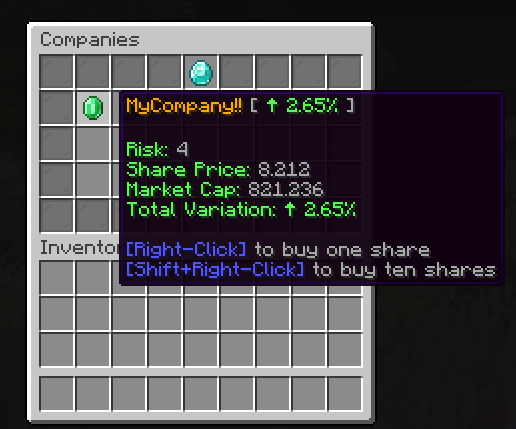
Allow players to invest in virtual companies, watch the stocks rise and fall, and make strategic decisions to grow their in-game wealth. Will they play it safe or take a risk for higher rewards?
Risk & Reward
Every company comes with a risk level—high-risk stocks swing big, while low-risk options offer steady but smaller returns. Choose a strategy and dominate the market.
Custom Companies
Allow players to start their own companies, set stock prices, and convince other players to invest in their companies.


You can check all the available commands in-game using /invest help

- blockstreet.command.main - give the player access to command /invest.
- blockstreet.command.help - give the player access to command /invest help.
- blockstreet.command.portfolio - give the player access to command /invest portfolio.
- blockstreet.command.buy - give the player access to command /invest buy.
- blockstreet.command.sell - give the player access to command /invest sell.
- blockstreet.command.companies - give the player access to command /invest companies.
- blockstreet.command.company - give the player access to command /invest company.
- blockstreet.command.reload - give the player access to command /invest reload.
- blockstreet.command.create - allows players to create their own companies using the command /invest company create.
- blockstreet.command.delete - allows players to delete companies they fully control using the command /invest company delete.
- blockstreet.admin.command.create - allows administrators to create server companies using /invest admin create command
- blockstreet.admin.command.delete - allows administrators to delete server companies using /invest admin delete command
- blockstreet.ui.companies - grant permission to open the Companies GUI.
- blockstreet.ui.portfolio - grants permission to open the Portfolio GUI.
- blockstreet.ui.notifications - grants permission to open the Notifications GUI.

BlockStreet is fully configurable. You can create new companies, change each company's predefined stock value, change its risk, and change the number of stocks that each company has to sell.
Config.yml:
BlockStreet:
  Version: 2.0.0                # Do not change this, it is used for internal purposes
  InterestInterval: 10
  Updates:
    Remainder: true
  StockCrash:
    Enabled: true              # Enable or disable stock crashes.
    Aggressiveness: 0.7        # Value between 0 and 1. A higher value means more frequent crashes.
  Taxes:
    CompanyCreation:           # Tax applied when creating company, applied over the valuation, per risk level
      - 0.1                    # Risk 1 (10% of the total valuation)
      - 0.2                    # Risk 2 (20% of the total valuation)
      - 0.3                    # Risk 3 (30% of the total valuation)
      - 0.4                    # Risk 4 (40% of the total valuation)
      - 0.5                    # Risk 5 (50% of the total valuation)
  Limits:
    MinBalance: 0.1            # Minimum balance a player must have after buying stocks as % of total investment value (defaults to 10 %)
    MaxSharesPerPlayer: 1000   # Maximum number of shares a player can own (set -1 to disable)
Important: There are some translations created by the community available for Czech and Japanese. You can access them here. Beware that these translations may be incomplete!

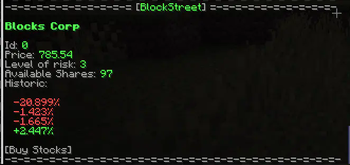
You can add signs to show information about the company's current stock value.
Create a sign To create a company sign, you should do the following:
- 1st line: [BlockStreet]
- 2nd line: Name of the company
And it's done! The sign should show information about the stocks of the selected company.

BlockStreet depends on Vault to provide economy features. Make sure you have it installed in your server before using BlockStreet!

Please feel free to propose new functionalities and report any kind of bug. To report bugs and/or get support please join our Discord server.
If you have any questions regarding the plugin or need support installing/configuring it, you can also join the Discord server and ask your questions there!
- Edition: Minecraft Java
- File type: .jar
- Minecraft versions listed: 1.16, 1.16.1, 1.16.2
- How to install: Install the matching mod loader (Forge, Fabric or NeoForge) for your Minecraft version. → Download the .jar. → Put it in the .minecraft/mods folder and launch that loader profile.
- Where to get it: Opens on Modrinth — not every file is mirrored on our own servers.
Install steps are the general flow for this file type — How to install Minecraft Java mods & modpacks walks through it step by step.
- Ships as blockstreet-2.10.0.jar — drop this file into the mods folder
- Download size: 14.6 MB
- Download link checked 29 Aug 2026 — working
These come from our own check of the pack file, not from the source page.