
EyeOfEnderFix
I reported this as a bug here: but I will explain it here as well Origin This simple bug has been around since 1.9 because of the transition from the eyes…
I don't know my version or loader
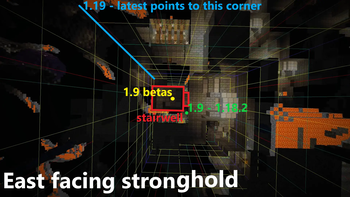
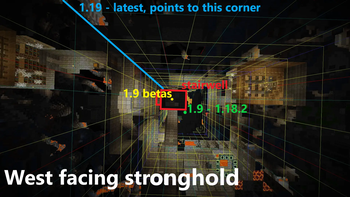
I reported this as a bug here: https://bugs.mojang.com/browse/MC-253394 but I will explain it here as well
Origin
This simple bug has been around since 1.9 because of the transition from the eyes of ender pointing to the end portal to now pointing to the "entrance".
Cause
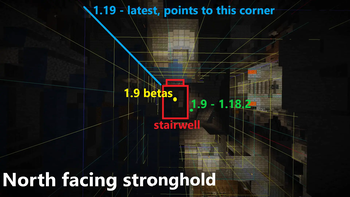
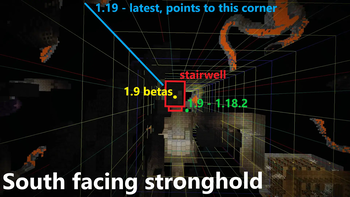
While trying to switch the eyes of ender to point to the stairs in the stronghold instead of the portal there was a bug. It would only point to the stairs instead of the portal on a relog when the stronghold was generated. Later in the betas they fixed that but in the process left the eyes pointing to the middle of the chunk ([8,8] chunk coordinate) instead of the [4,4] chunk coordinate. The stairs are always at the [4,4] chunk coordinate.
what my stuff does
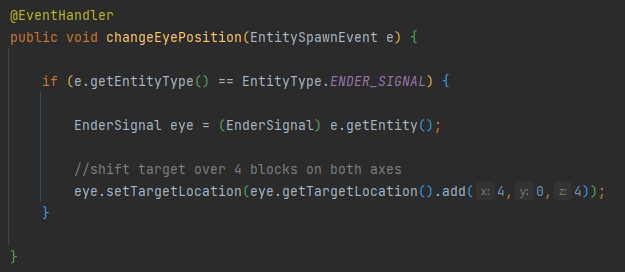
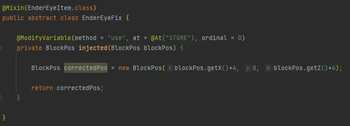
It simply shifts where the eyes point over by 4 blocks on both axes because from 1.19 to 1.20.2 they point to the [0,0] chunk coordinate so by moving them over a few blocks it puts them in the right spot.
Refer to images for examples on why this is an issue
If you have any bugs or requests feel free to put them on the GitHub issues page
- Edition: Minecraft Java
- File type: .jar
- Minecraft versions listed: 1.20, 1.20.1, 1.20.2
- How to install: Install the matching mod loader (Forge, Fabric or NeoForge) for your Minecraft version. → Download the .jar. → Put it in the .minecraft/mods folder and launch that loader profile.
- Where to get it: Opens on Modrinth — not every file is mirrored on our own servers.
Install steps are the general flow for this file type — How to install Minecraft Java mods & modpacks walks through it step by step.
- Ships as EyeOfEnderFixPlugin.jar — drop this file into the mods folder
- Download size: 2 KB
- Download link checked 30 Aug 2026 — working
These come from our own check of the pack file, not from the source page.