
ModsJava
EpicTroll
💬 Need help? Join the Discord: 👉 Discord Support: 🛠️ All messages are fully configurable! 📜 Commands /troll anvil /troll explode /troll fire [duration…
⬇ Download on Modrinth

💬 Need help? Join the Discord:
👉 Discord Support: https://discord.gg/cT5MxqAYTd
🛠️ All messages are fully configurable!
📜 Commands
- /troll anvil
- /troll explode
- /troll fire [duration in seconds]
- /troll freeze
- /troll knocbackstick – gives you a knockback stick
- /troll mob
- /troll reload
- /troll apple [player] [amount]
- /troll diamond (player)
- /troll launch (player)
- /troll cookie (player) (amount) - gives a infinite cookie!
- /troll fakeop [player]
- /troll blockcraft [player]
- /troll reversechat (player)
- /troll fakexp (player) (amount)
- /troll blocktooluse (player)
- /troll dropinv (player)
- /troll gui [player]
🔐 Permissions
- epictroll.anvil
- epictroll.explode
- epictroll.fire
- epictroll.freeze
- epictroll.knockbackstick
- epictroll.mob
- epictroll.apple
- epictroll.diamond
- epictroll.launch
- epictroll.cookie
- epictroll.fakeop
- epictroll.blockcraft
- epictroll.reversechat
- epictroll.dropinv
- epictroll.blocktooluse
- epictroll.fakexp
- epictroll.gui
- epictroll.help
- epictroll.reload
- epictroll.* (for everything)
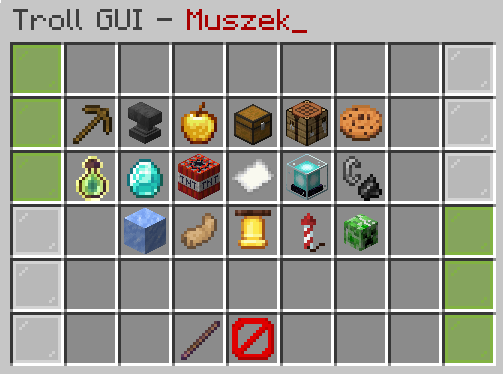
⭐ If you like my plugin, give ❤️
Quick facts
- Edition: Minecraft Java
- File type: .jar
- Minecraft versions listed: 1.18, 1.18.1, 1.18.2
- How to install: Install the matching mod loader (Forge, Fabric or NeoForge) for your Minecraft version. → Download the .jar. → Put it in the .minecraft/mods folder and launch that loader profile.
- Where to get it: Opens on Modrinth — not every file is mirrored on our own servers.
Install steps are the general flow for this file type — How to install Minecraft Java mods & modpacks walks through it step by step.
Verified by MCModsHub
- Ships as EpicTroll-1.2.0.0.jar — drop this file into the mods folder
- Download size: 900 KB
- Download link checked 30 Aug 2026 — working
These come from our own check of the pack file, not from the source page.