
EntityCompass
I don't know my version or loader
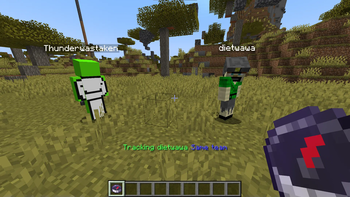
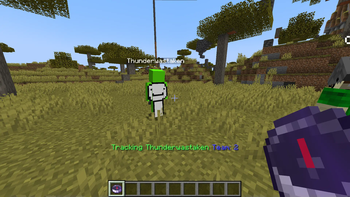
Compass controls:
Right-Click - to cycle between things that are tracked in a group
Shift+ Right-Click - cycle between groups
left-click on the compass for info on verticality of tracking
Terminology
TrackedEntity - instance of an entity (players or items) that is currently on in a group aka "Tracked"
Group - a list of TrackedEntities that has a custom name to organize teams or categories.
Commands:
/EntityCompass
Alias: /e
/EntityCompass create [name] ----- creates a new "group"
/EntityCompass join [group name] ----- joins group of specifed name
/EntityCompass leave ----- remove yourself from the Entitylist you're on
/EntityCompass additem [group name] ----- adds the item in your main hand to the specified group
/EntityCompass add [player] [group] ----- adds player to specified group
/EntityCompass remove [player/item name] ----- remove TrackedEntity by name from its group
/EntityCompass list ----- shows all the groups and the name of each TrackedEntity on them
experimental gamemode where you have to throw an item into the end portal after beating the dragon to win
/EntityCompass relicrush start
/EntityCompass relicrush end
Features
• Item tracking (first plugin to do this afaik)
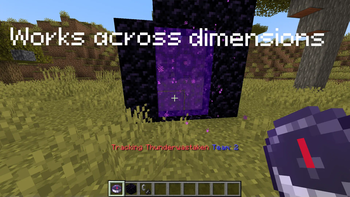
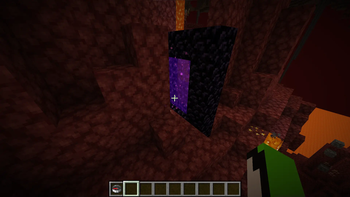
• Compass tracking through dimensions
• Compass works in all dimensions (doesn't just switch to coordinates in the nether)
• Tracked Items are indestructible (until they are removed from a group)
Future goals
• Add a ton of configuration settings for the plugin
• fix a bunch of edge cases that break tracking
• Automatically remove tracking on unreachable items
• Add optional GUI for large amounts of entity lists and entities
Submit issues or requests on the GitHub "issues" page tagged appropriately.
Also tell me if it works properly on older versions and I will add them to the support list (On github issues page).
Old instructions for TeamsCompass plugin if you want to use that for any reason.
WELCOME TO MY FIRST PLUGIN
This plugin is a compass tracking plugin that allows the creation of teams and the compass can toggle which team and player your compass is pointing to.
Yes, you can do manhunts with it.
Compass controls:
Right-Click
Shift+ Right-Click
Commands:
Alias: /t
/team create [name] ----- creates a new team
/team join [team join] ----- joins team of specifed name
/team leave ----- leaves team
/team list ----- lists teams and players on them
/team nbt ---- see your current nbt data (for debugging)
/team compass ------ gives a compass to you
- Edition: Minecraft Java
- File type: .jar
- Minecraft versions listed: 1.21, 1.21.1, 1.21.2
- How to install: Install the matching mod loader (Forge, Fabric or NeoForge) for your Minecraft version. → Download the .jar. → Put it in the .minecraft/mods folder and launch that loader profile.
- Where to get it: Opens on Modrinth — not every file is mirrored on our own servers.
Install steps are the general flow for this file type — How to install Minecraft Java mods & modpacks walks through it step by step.
- Ships as EntityCompass-1.21.4-Spigot.jar — drop this file into the mods folder
- Download size: 60 KB
- Download link checked 30 Aug 2026 — working
These come from our own check of the pack file, not from the source page.