
ModsJava
Enchant Limiter/blocker
This plugin for 1.21 lets you block certain enchants and enchant levels from being applied with a anvil or enchant table.
⬇ Download on Modrinth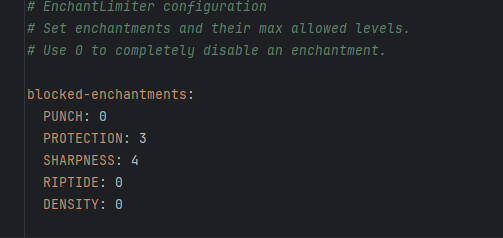
With this plugin you can block certain enchants by setting the value of the enchant in the config to 0 or just limit the level by putting the level of enchant you would like to limit in the config aswell. for example if you would like to set the max level of sharpness in the server to 4 put the config to SHARPNESS:4. if you would like to disable sharpness put SHARPNESS:0
Quick facts
- Edition: Minecraft Java
- File type: .jar
- Minecraft version listed: 1.21
- How to install: Install the matching mod loader (Forge, Fabric or NeoForge) for your Minecraft version. → Download the .jar. → Put it in the .minecraft/mods folder and launch that loader profile.
- Where to get it: Opens on Modrinth — not every file is mirrored on our own servers.
Install steps are the general flow for this file type — How to install Minecraft Java mods & modpacks walks through it step by step.
Verified by MCModsHub
- Ships as Enchantlimiter-1.0-SNAPSHOT.jar — drop this file into the mods folder
- Download size: 6 KB
- Download link checked 30 Aug 2026 — working
These come from our own check of the pack file, not from the source page.