
TeamChatPrefix
A lightweight Spigot plugin that adds team-based prefixes, suffixes, and colors to player chat messages using the scoreboard system.
⬇ Download on Modrinth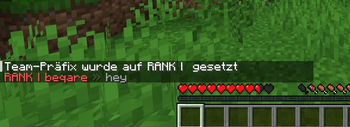
TeamChatPrefix
TeamChatPrefix is a lightweight Spigot plugin that enhances in-game chat by automatically applying team-based prefixes, suffixes, and colors to player messages using Minecraft's scoreboard system.
Features
- Automatic Team Formatting - Applies scoreboard team prefix, suffix, and color to chat messages
- Customizable Chat Format - Fully configurable message format with various placeholders
- Easy Configuration - Simple YAML configuration with comprehensive options
- Runtime Management - Reload configuration without restarting using
/tcp reload - Team Color Support - Uses team colors or configurable fallback colors
- Update Notifications - Built-in update checker to stay current with latest versions
- Lightweight - Performance-friendly with minimal resource usage
- Broad Compatibility - Works with Bukkit, Spigot, Paper, Purpur, and more
Usage
- Install the plugin on your server
- Set up scoreboard teams with prefixes, suffixes, and colors
- Assign players to teams
- Chat messages will automatically use team formatting
The plugin works immediately with default settings, but you can customize the chat format in the config.yml file.
Commands
/tcp reload- Reload the plugin configuration/tcp version- Check plugin version and update information/tcp status- View current plugin status and settings/tcp toggle- Enable or disable the plugin
Configuration
The config.yml file allows you to customize:
- Chat message format with placeholders
- Team color usage preferences
- Default colors for players without teams
- Update checker settings
- Plugin enable/disable state
Placeholders
%playername%- Player's display name%team%- Team name%prefix%- Team prefix%suffix%- Team suffix%teamcolor%- Team color%message%- Chat message
Support
For support, bug reports, or feature requests, visit the GitHub repository.
- Edition: Minecraft Java
- File type: .jar
- Minecraft versions listed: 1.21, 1.21.1, 1.21.2
- How to install: Install the matching mod loader (Forge, Fabric or NeoForge) for your Minecraft version. → Download the .jar. → Put it in the .minecraft/mods folder and launch that loader profile.
- Where to get it: Opens on Modrinth — not every file is mirrored on our own servers.
Install steps are the general flow for this file type — How to install Minecraft Java mods & modpacks walks through it step by step.
- Ships as TeamChatPrefix-1.3.jar — drop this file into the mods folder
- Download size: 11 KB
- Download link checked 30 Aug 2026 — working
These come from our own check of the pack file, not from the source page.