
Locator Bar Configuration
Let players configure their locator bar in a menu. Per-user enable/disable toggle, colour configuration and range configuration from the pause menu.
⬇ Download on ModrinthLocator Bar Configuration
A small paper plugin that allows players to change their locator bar settings without needing to use commands.
Inspired by RedSyven's Datapack Locator Bar Options.
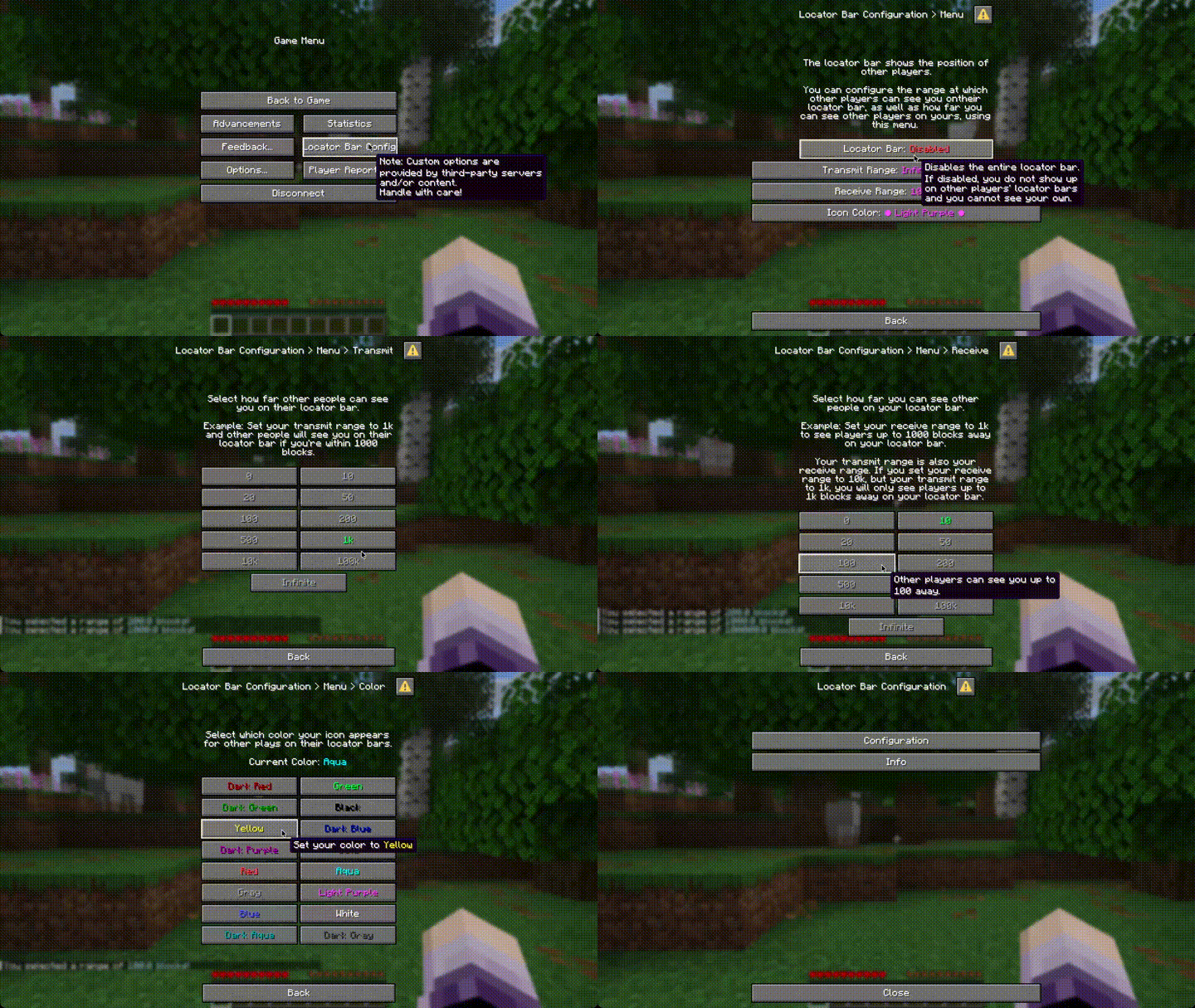
You can access the menu from the pause screen (either through Locator Bar Configuration or Custom Options and then Locator Bar Configuration)
Features
Supported Minecraft Versions: 1.21.8 - 26.2
Each player can
- toggle their locator bar on and off
- customize their transmit and receive range
- customize the colour their waypoint appears to others.
Administrators can
- configure which range values and colors players can choose
- disable player customization of range or color entirely (or both but what's the point of this plugin then)
- seamlessly migrate data from RedSyven's Datapack
Configuration
The default configuration is automatically created inside the LocatorBarConfiguration directory inside your plugin directory (so usually inside plugins/LocatorBarConfiguration).
You can add or remove options for transmit range, receive range and the icon color.
If the receiveRanges option is not set, players will have the same options as for transmitting.
If you set an option to an empty list (iconColors: []) the option will be locked for players.
You can reload the config using
/lbc reload. This requires thelbc.reloadpermission.
Migration from Locator Bar Options
To migrate from Locator Bar Options, simply install the plugin and disable the LocatorBarOptions datapack. User data will automatically be migrated once they (re-)join. They will be notified about this migration so they can ensure the migration worked correctly.
More notes about migration can be found in the wiki.
Folia
Folia doesn't support waypoints yet. Folia forks that implement waypoint support will likely work already, though. CanvasMC is one such fork and officially supported.
Why?
While RedSyven's datapack worked fine for our purposes, some players ran into undiagnosable issues with their options not being updated.
Since the server I used the datapack on might switch to Folia soon and datapacks aren't enabled in Folia, I wanted to see
what Paper's experimental support for the Dialog API can do.
It now offers some features datapacks cannot offer, like configuring available options for player.
- Edition: Minecraft Java
- File type: .jar
- Minecraft versions listed: 1.21.8, 1.21.9, 1.21.10
- How to install: Install the matching mod loader (Forge, Fabric or NeoForge) for your Minecraft version. → Download the .jar. → Put it in the .minecraft/mods folder and launch that loader profile.
- Where to get it: Opens on Modrinth — not every file is mirrored on our own servers.
Install steps are the general flow for this file type — How to install Minecraft Java mods & modpacks walks through it step by step.
- Ships as LocatorBarConfiguration-1.0.6.jar — drop this file into the mods folder
- Download size: 5.5 MB
- Download link checked 20 Sept 2026 — working
These come from our own check of the pack file, not from the source page.