
ModsJava
ArcaneTable
This is a Minecraft Plugin which turns the default Enchantment table into a Magical Arcane Table, The Arcane Table changes the way default enchanting…
I don't know my version or loader
Open the Minecraft launcher and look at the profile you play on — it names both, like fabric-loader-1.21.4. The version also shows in the bottom-right corner of the game's main menu.
No loader in the profile name? Then it's plain Minecraft, and these mods won't run — you need Fabric or NeoForge installed first.
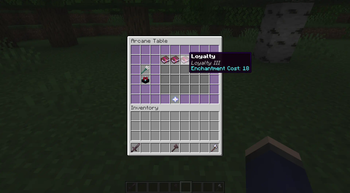
Arcane Table
This Minecraft Plugin is in beta, contact
RealName_123#2570for help or bugs
This is a Minecraft Spigot Plugin which turns the default Enchantment table into a Magical Arcane Table,
The Arcane Table will allow you to enchant your item as many times...
Versions
1.5.2 Metrics & Testing
1.5.1 MC 1.20 Support
1.5-SNAPSHOT MC 1.20 Support
1.4.1-SNAPSHOT Conflict Enchatn Fix
1.4-SNAPSHOT Code Refactoring
1.3-SNAPSHOT Inv Close On Block Break
1.2-SNAPSHOT Config Added
1.1-SNAPSHOT Bug Fixes
1.0-SNAPSHOT Initial Update
v1.5.2 | Metrics & Testing
- Added Metrics
- tested on 1.20.2
v1.5.1 | Version Checking Fix
- Fixed version checking issues
- Clean-up of EnchantmentUtils
v1.5-SNAPSHOT | MC 1.20 support
- MC 1.20 Support
- Recode of core plugin
- Added percentage xp return on disenchant
- BREAKING CHANGE - all config files have been changed to support new features
- Config for xp return on disenchant, percentage of xp returned
v1.4.1-SNAPSHOT | Fixed Display For Conflicting Enchants
- formatting issue related to conflicting enchantments has been resolved
v1.4-SNAPSHOT | More fixes
- Refactoring of Advancement code
- Language File
v1.3-SNAPSHOT | Utils Fixes
- Breaking Arcane Table while in gui will close
- Advancement on enchant
- Backwards compatibility with 1.12.
- Support for Advanced Enchantments
- Language File
v1.2-SNAPSHOT | Config
- Removes Console Spam from previous version
- Xp returned on disenchant option added to config
v1.1-SNAPSHOT | Bugs
- Getting Back Button From Shift-Clicking Back
- Lore of items not showing
Huge thanks to Rodehaas for reporting these bugs.
v1.0-SNAPSHOT | Initial
- Basic Table Setup
Quick facts
- Edition: Minecraft Java
- File type: .jar
- Minecraft versions listed: 1.18, 1.18.1, 1.18.2
- How to install: Install the matching mod loader (Forge, Fabric or NeoForge) for your Minecraft version. → Download the .jar. → Put it in the .minecraft/mods folder and launch that loader profile.
- Where to get it: Opens on Modrinth — not every file is mirrored on our own servers.
Install steps are the general flow for this file type — How to install Minecraft Java mods & modpacks walks through it step by step.
Verified by MCModsHub
- Ships as ArcaneTable-1.5.3.jar — drop this file into the mods folder
- Download size: 73 KB
- Download link checked 30 Aug 2026 — working
These come from our own check of the pack file, not from the source page.